- Kenmore refrigerator water filters
- Whirlpool refrigerator water filters
- Samsung refrigerator water filters
- GE refrigerator water filters
- LG refrigerator water filters
- Frigidaire refrigerator water filters
- KitchenAid refrigerator water filters
- Maytag refrigerator water filters
- Kenmore Elite refrigerator water filters
- Estate refrigerator water filters
- GE Profile refrigerator water filters
- Amana refrigerator water filters
- Bosch refrigerator water filters
- Dacor refrigerator water filters
- Electrolux refrigerator water filters
Top DIY repair help
View All Repair Categories
Appliances
Lawn & Garden
Power Tools
Home Improvement
Sports & Leisure
Heating & Cooling
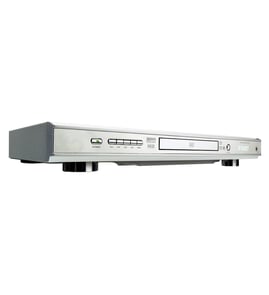
Magnavox Dvd player Parts — Browse All Models
Magnavox DVD players use the latest technology to produce the best video and audio playback possible from digital recordings. Progressive scanning in Magnavox DVD players create improved pictures that are near perfect. When your Magnavox DVD player acts up and needs repairs, find the replacement parts you need to fix the problem at Sears PartsDirect.
Browse by Category
DVD Players

 Owner’s manual
Frequently bought Magnavox parts

Sony Service Manual
In Stock
$75.99

Qty

Cover
In Stock
$31.99
Qty
Magnavox Owner's Manual
Part #IB48310001
This item is not returnable
In Stock
$4.99
Qty
Magnavox Part
In Stock
$25.71
Qty
Service Manual
In Stock
$76.99
Qty
Coil
Part #3617990008
This item is not returnable
In Stock
$8.18
Qty
Popular maintenance items for DVD Players
Pcb Assembly
In Stock
$161.04
Qty
Thermistor
In Stock
$17.87
Qty
Holder
In Stock
$29.10
Qty
Ant-008sm
In Stock
$62.37
Qty
Gear
Part #424565101
This item is not returnable
In Stock
$2.57
Qty
Fuse
Part #152306751
This item is not returnable
In Stock
$2.65
Qty
Playing a disc on your Magnavox DVD player
- Turn on your television and select the video input mode that your DVD player is connected to on your television (HDMI In).
- If you connected the DVD player to an external audio system, turn on your audio system receiver and select the correct audio input on the receiver to play the DVD audio.
- Press the Open/Close button on the DVD player to open the disc tray.
- Position the DVD disc gently into the tray with the disc's label facing upward.
- Press the Open/Close button to close the disc tray.
- Press the Play button to play the DVD disc.
Connecting your Magnavox DVD player to the television
- Refer to the user's manual of the television for information on connecting the DVD player to the television. Follow the user's manuals instructions on selecting the type of cable and television connection jack or jacks to use when connecting the DVD player to the television.
- Turn off the DVD player and the television before connecting the DVD player to the television.
- To connect the DVD player to the television using the HDMI cable, plug the HDMI cable into the HDMI Out jack on the DVD player. Plug the other end of the HDMI cable into the HDMI In jack of the television.
- To connect the DVD player to the television using an HDMI-DVI cable and audio cable, plug the HDMI plug into the HDMI Out jack on the DVD player. Plug the DVI connector into the DVI In jack on the television. Connect the audio cable to the Audio Out jacks on the DVD player and the Audio In jacks on the television.
Parts & More
Bottom-Mount Refrigerator
Dump Cart Attachment
Engine & Drivetrain
Gas Grill
Household Fan
Laundry Center
Parts