- Kenmore refrigerator water filters
- Whirlpool refrigerator water filters
- Samsung refrigerator water filters
- GE refrigerator water filters
- LG refrigerator water filters
- Frigidaire refrigerator water filters
- KitchenAid refrigerator water filters
- Maytag refrigerator water filters
- Kenmore Elite refrigerator water filters
- Estate refrigerator water filters
- GE Profile refrigerator water filters
- Amana refrigerator water filters
- Bosch refrigerator water filters
- Dacor refrigerator water filters
- Electrolux refrigerator water filters
Top DIY repair help
View All Repair Categories
Appliances
Lawn & Garden
Power Tools
Home Improvement
Sports & Leisure
Heating & Cooling
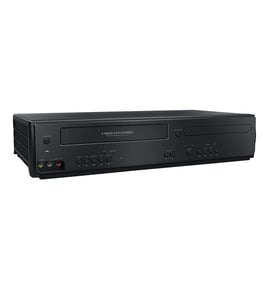
Magnavox Dvd/vcr combo Parts — Browse All Models
Magnavox DVD/VCR combo players use the latest technology to produce the best video and audio playback possible from digital recordings. Control boards in Magnavox DVD/VCR players create improved pictures that are near perfect. When your Magnavox DVD/VCR player acts up and needs repairs, find the replacement parts you need to fix the problem at Sears PartsDirect.
Browse by Category
DVD/VCR Combos
 Owner’s manual
Frequently bought Magnavox parts

Magnavox Owner's Manual
Part #IB38330001
This item is not returnable
In Stock
$4.99

Qty

Magnavox Diode Brdg
Part #996500039490
This item is not returnable
In Stock
$2.16
Qty
Magnavox Pcb Assembly
In Stock
$38.90
Qty
Magnavox Power Supply
In Stock
$97.99
Qty
Service Manual
In Stock
$109.99
Qty
Magnavox Lid Cass R
In Stock
$38.82
Qty
Popular maintenance items for DVD/VCR Combos
Calbe,ffc
In Stock
$27.13
Qty
Ic-pwm Con
In Stock
$52.26
Qty
Cable
In Stock
$28.35
Qty
Ic Memory
In Stock
$55.81
Qty
Ic
Part #988510672
This item is not returnable
In Stock
$7.22
Qty
Jack-pin
In Stock
$31.79
Qty
Steps to take when the television won't play your Magnavox DVD/VCR combo player's video
- Check the television settings and select the correct video input source on the television if necessary.
- Check the HDMI or video cable connections on the back of the DVD/VCR combo player and the television. Reconnect any loose cables. Connect the cables correctly if the cables were connected to the wrong jacks.
- Check the DVD disc or video cassette to make sure it's inserted in the tray properly. The label of the DVD disc should be facing upward.
- Check the DVD disc for deposits or scratches. Clean the DVD disc thoroughly if you find spills or deposits on the disc.
- Reset the DVD/VCR combo player control board by unplugging the DVD/VCR combo player from the electrical wall outlet for several minutes. Plug the DVD/VCR combo player power cord back in to the electrical outlet and attempt to play the DVD disc or video cassette again.
Playing a disc on your Magnavox DVD/VCR combo player
- Turn on your television and select the video input mode that your DVD/VCR combo player is connected to on your television (HDMI In).
- If you connected the DVD/VCR combo player to an external audio system, turn on your audio system receiver and select the correct audio input on the receiver to play the DVD/VCR combo audio.
- Press the Open/Close button on the DVD player of the DVD/VCR combo to open the disc tray.
- Position the DVD disc gently into the tray with the disc's label facing upward.
- Press the Open/Close button to close the disc tray.
- Press the Play button to play the DVD disc.
Parts & More
Chipper/Shredder
Electric Range
Front-Engine Lawn Tractor
Gas Grill
Gas Line Trimmer
Outdoor Grill
Parts
Refrigerator
Vacuum Cleaner
Water Softener
Weight System