Owner’s manual
 Error Codes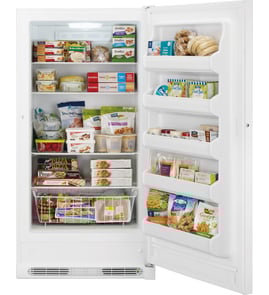



How long does a Kenmore upright freezer last?
A Kenmore upright freezer like model KLFU018AWD typically lasts 10 to 15 years with normal household use. Consistent temperatures, good airflow, and keeping the door closed during outages help you get the longest life from the compressor and sealed system.
Typical lifespan and what affects it
Most upright freezers land in the same general range, but these factors make the biggest difference:
- Room conditions: hot garages and tight enclosures make the unit run longer and wear faster
- Door habits: frequent openings and poor door sealing increase run time
- Airflow: blocked vents or overpacking can reduce cooling efficiency
- Power events: repeated outages or surges can stress electrical components
- Maintenance: keeping the interior clean and the unit level reduces strain
What we recommend to help it reach 10 to 15 years
Use these practical habits for the KLFU018AWD:
- Allow about 4 hours for the freezer to cool fully after plugging it in before loading unfrozen food
- Avoid overloading with fresh food; freeze in smaller batches when possible
- Keep the door closed during a power failure; the manual notes food can stay frozen at least 24 hours if the door remains closed
- Secure shelves and bins if you move the freezer; keep it upright during transport
- Use the control lock correctly so settings do not get changed accidentally (press and hold Mode for 3 seconds)
Quick reference: lifespan vs. warning signs
| What you see | What it can mean | What to do first |
|---|---|---|
| Runs almost constantly | airflow issue, warm room, door not sealing | reduce packing near vents, verify door closes fully |
| Temps swing, food softens | control setting changed, frequent openings | confirm settings and lock panel |
| Loud clicking or repeated restarts | electrical start issue or compressor stress | unplug for safety and schedule service |
| Frost buildup or door hard to close | door left ajar, gasket not sealing | check for packages blocking the door |
Why it matters
A freezer that runs longer than it should uses more electricity and shortens the life of key components like the compressor. Good loading and outage habits protect food quality and help the unit reach its expected service life.
For model-specific operating details and care steps, use the KLFU018AWD owner's manual.
Last updated: February 2026
How do you reset a Kenmore stand up freezer?
For the Kenmore KLFU018AWD upright freezer, a “reset” is typically done by power-cycling the unit and then reselecting your temperature settings on the control panel. If the controls are locked, unlock them first so the buttons respond normally; see the owner's manual for the exact control steps.
Quick reset steps (most effective)
- Unplug the freezer (or switch the circuit breaker off).
- Wait 5 minutes to let the control board fully power down.
- Restore power.
- If the panel is locked, press and hold Mode for 3 seconds to unlock.
- Set the freezer temperature back to your preferred setting.
- Allow 4 hours for temperatures to stabilize after changes.
If the control panel will not change settings
The KLFU018AWD uses a Lock function that prevents temperature changes until the panel is unlocked.
- Unlock: Press and hold Mode for 3 seconds until the Lock icon blinks and turns off.
- Lock: Press and hold Mode for 3 seconds until the Lock icon stays on.
- The panel can auto-lock after about 20 seconds of no button presses.
Temperature settings you can expect
These are common setpoint options shown in the control logic for this style of Kenmore upright freezer.
| Setting | Approx. set temperature |
|---|---|
| Cold | 6°F (-15°C) |
| Colder | 0°F (-18°C) |
| Coldest | -6°F (-21°C) |
Why it matters
A power-cycle clears many “stuck” control states after a brief outage or button sequence issue, while unlocking the panel ensures the freezer actually accepts your new temperature selection. This helps prevent warm-ups, soft ice cream, or excessive run time.
Last updated: February 2026
Why would my upright freezer suddenly stop working?
Your Kenmore KLFU018AWD upright freezer can suddenly stop working because of a power interruption, a control setting issue, or an electrical or cooling-system failure. Start by confirming the outlet has power and the controls are on; then protect food by keeping the door closed while you troubleshoot.
Quick checks first (5 to 10 minutes)
- Make sure the freezer is plugged in firmly and the cord is not damaged.
- Check the house breaker or GFCI outlet; reset if tripped.
- Confirm the temperature control is set for Freezer mode and not accidentally changed.
- If the door was just closed, wait about 1 minute before trying again; temporary pressure can make the door feel “stuck.”
- If the unit was off or unplugged for several hours, keep the door closed as much as possible to hold the cold.
If you have food at risk
The manual notes frozen food can stay frozen for at least 24 hours if the door stays closed during a power failure. If the outage continues, dry ice can help maintain safe temperatures.
| Situation | What to do now | Why |
|---|---|---|
| Power is out | Keep door closed | Preserves cold air longest |
| Power is back but freezer is warm | Limit door openings | Speeds recovery time |
| Extended outage | Use dry ice (with gloves) | Helps keep food frozen longer |
Common “sudden stop” causes after power is confirmed
- Failed start components or compressor (no cooling, may be silent or click)
- Defrost system problem leading to heavy frost and airflow blockage
- Evaporator fan not running (freezer warms, little or no air movement)
- Control or wiring issue (intermittent operation)
Why it matters
A freezer that stops unexpectedly can thaw food quickly and may take longer to pull temperatures back down if the door is opened repeatedly. Following the power-failure guidance in the owner's manual helps you prevent food loss while you pinpoint the cause.
Last updated: February 2026
How to tell if a Kenmore refrigerator compressor is bad?
If your Kenmore KLFU018AWD upright freezer is warm and you hear repeated clicking, long run times, or the compressor is extremely hot to the touch, the sealed system (compressor, start device, or refrigerant circuit) is likely failing. Use the owner's manual to confirm normal operation and temperature settings first.
Quick checks before blaming the compressor
- Confirm the control is set to a colder setting and the door is sealing fully.
- Make sure the condenser area has airflow; blocked vents can mimic compressor failure.
- Listen for a pattern: hum for a few seconds, then click off (often a start device or compressor issue).
- Check the evaporator fan: if the fan is not running, cooling will be poor even with a good compressor.
- Look for heavy frost on the back interior panel; that points to a defrost/airflow problem, not the compressor.
What “bad compressor” symptoms look like
A compressor problem usually shows up as one of these combinations:
| What you notice | What it often means | What to do next |
|---|---|---|
| Clicking every few minutes, little or no cooling | Start device overload tripping or compressor locked | Unplug, let it cool 30 minutes, retry; then test electrically |
| Runs constantly, still warm | Low refrigerant, weak compressor, or restricted system | Check fans and frost pattern; sealed system diagnosis |
| Silent unit, warm cabinet | No power to compressor or failed control/start device | Verify outlet power and wiring connections |
| Compressor very hot, then shuts off | Overheating from hard start or internal failure | Stop running it; schedule service |
Electrical tests that confirm the diagnosis
These checks are typically done with a multimeter and clamp meter:
- Continuity and resistance at the compressor terminals (open winding indicates failure).
- Amp draw at startup and while running (high locked-rotor amps suggests a seized compressor).
- Start device and overload test for shorts/burn marks.
For safe testing steps and tool basics, use our guides: how to use a multimeter to test electrical parts video and how to tell if a fuse is blown.
Why it matters
A true compressor or sealed system failure is a major repair; many “compressor symptoms” are actually caused by airflow issues (fan, frost buildup, dirty condenser area) or a failed start device. Correctly identifying the cause prevents unnecessary parts and downtime.
Last updated: February 2026