 Owner’s manual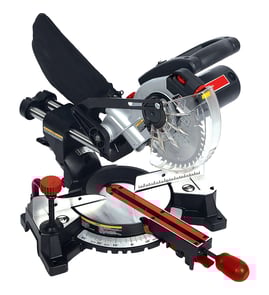

Where can I buy Craftsman replacement parts?
You can buy replacement parts for your Craftsman miter saw model 137186290 through our Craftsman parts listings and model-based parts diagrams; using the model number helps match the correct components for your exact saw. For part identification and diagrams, use the 137186290 owner's manual.
Best way to buy the right part for model 137186290
- Confirm the full model number on the saw’s data label: 137186290
- Use the parts list and exploded views to identify the exact component name and location
- Match fasteners by size and thread when listed (for example, M5 or M6 hardware)
- Replace worn consumables as needed (for example, blades wear with normal use)
- Keep your saw unpowered while inspecting parts and recording details
What information to gather before ordering
| What to collect | Why it matters | Example for this saw |
|---|---|---|
| Model number | Ensures correct fit | 137186290 |
| Part description | Prevents ordering the wrong item | Guard, switch, motor cover |
| Hardware size | Helps match screws/washers | M5 x 0.8, M6 x 1.0 |
| Symptom | Narrows likely parts | Won’t start, won’t bevel, excessive vibration |
Why it matters
Miter saw parts can look similar across Craftsman models, but small differences in assemblies (like guards, covers, switches, and mounting hardware) affect fit and safety. Using the model-specific parts list reduces returns and gets your saw back to accurate, safe cutting faster.
Last updated: February 2026
What are the parts of a miter saw?
A Craftsman miter saw like model 137186290 is built around a cutting head (motor and blade), a rotating miter table, and safety and control parts that hold the workpiece steady and let you set accurate miter and bevel angles. For diagrams and names, use the owner's manual.
Main parts you will use most
- Switch handle and On/Off trigger switch: starts and stops the saw; many models also include a safety lock-off button.
- Blade guard: forms a barrier between you and the spinning blade.
- Fence (including sliding fence on some cuts): supports the workpiece and helps prevent movement during cutting.
- Miter handle and miter scale: rotates the table left or right and shows the selected miter angle.
- Positive stop locking lever and miter table lock (quick-cam lock): snaps into common detents and locks the table at the chosen angle.
- Mounting holes: let you secure the saw to a stable bench or stand.
Angle-setting parts (miter and bevel)
The manual describes common positive miter detents at 0°, 15°, 22.5°, 31.6°, and 45° left and right, plus 60° right. If you need an in-between angle, you lock the table at the desired position using the miter table lock.
Sliding fence note for bevel cuts
When making bevel cuts, the sliding fence must be positioned to provide blade clearance. Extending and locking the fence correctly helps prevent the blade from contacting the fence.
Quick reference table
| Part | What it does | Why it matters |
|---|---|---|
| Fence / sliding fence | Supports and aligns the workpiece | Improves accuracy and helps reduce shifting and binding |
| Miter scale + detents | Sets common miter angles | Faster setup for trim and framing angles |
| Guard | Shields you from the blade | Key safety component during every cut |
| Lock stop latch | Locks saw in lowered position | Safer, more compact storage and transport |
Why it matters
Knowing these part names makes it easier to follow setup steps, adjust the saw for a compound cut, and troubleshoot issues like misalignment (heel) or kickback caused by binding or pinching.
Last updated: February 2026
How to unlock an old Craftsman miter saw?
On the Craftsman miter saw model 137186290, “unlocking” usually means releasing the cutting head lock and, if equipped, the slide carriage lock so the saw head can rise and the rails can move for cutting.
Unlock the cutting head (down-lock)
Use this when the saw is stuck in the lowered, transport position.
- Unplug the saw.
- Push down slightly on the cutting head to take pressure off the lock.
- Pull the lock stop latch out of the locking hole.
- Let the cutting head rise to the uppermost position under control.
- Keep the lock stop latch for transport and storage only (not for holding the head down while cutting).
For the exact latch location and illustrations, use the owner's manual.
Unlock the slide carriage (rail lock)
Use this when the head will not slide forward and back on the rails.
- Find the slide carriage lock knob on the right side of the slide carriage.
- Loosen the knob to free the slide.
- Tighten the knob again before transporting or storing the saw.
If it still will not move
These checks fix most “old miter saw won’t unlock” complaints.
- Confirm the lock stop latch is fully disengaged from the hole.
- Check for sawdust packed around the pivot, latch, or rail area; clean it out.
- Verify the miter table lock is not clamped so tightly that it is binding movement.
- Inspect for bent hardware or damage from being carried by the handle or arm.
- Add a light dry lubricant to sliding surfaces (avoid oily buildup that traps dust).
Quick reference: what’s locked?
| Symptom | Most likely lock | What to do |
|---|---|---|
| Head stuck down | Lock stop latch | Push head down slightly, pull latch out |
| Head will not slide | Slide carriage lock knob | Loosen knob on right side |
| Table will not rotate | Miter table lock | Lift quick-cam lock, set angle, press down to lock |
Why it matters
Unlocking the correct mechanism prevents forcing the handle or arm, which can damage the locking hole, misalign the saw, and create unsafe cutting conditions.
Last updated: February 2026
Why is the brake on my miter saw not working?
On the Craftsman 137186290 miter saw, the electric blade brake is designed to stop the blade quickly after you release the trigger. When the blade keeps coasting, the most common causes are worn motor brushes, a trigger switch problem, or poor electrical contact in the motor circuit. Use the owner's manual to confirm the operating notes and troubleshooting steps for your saw.
What to check first (safe, quick checks)
- Unplug the saw before any inspection or cleaning.
- Make sure the blade is not rubbing the guard, fence, throat plate, or table (drag can mimic brake issues).
- Blow out or vacuum sawdust around the motor vents and pivot points.
- Inspect the power cord for cuts and confirm the outlet provides steady power.
- Test with no load: run the saw briefly, release the trigger, and observe whether stopping is consistently slow.
Likely causes and what fixes them
Brush wear is a frequent root cause on brushed motors; the manual’s troubleshooting guidance also points to brush replacement as a corrective action for several electrical and control symptoms.
| What you notice | Common cause | Typical fix |
|---|---|---|
| Blade coasts longer than normal every time | Worn carbon brushes | Replace brushes; retest braking |
| Brake works sometimes, sometimes not | Trigger switch or loose connection | Inspect switch and wiring; repair/replace as needed |
| Saw power feels weak and braking is weak | Dirty/worn commutator or motor wear | Brush service and commutator cleaning; motor service if needed |
Why it matters
A strong brake reduces coast-down time so you can keep control of the workpiece and work more safely between cuts. If any electrical parts do not work correctly, unplug the saw and correct the problem before using it again.
Last updated: February 2026