 Owner’s manual




How do I get my GE washing machine out of lock mode?
On the GE GFW510SCN2WW washer, “lock mode” is usually the Control Lock feature. Press and hold the Control Lock pad (sometimes shared with the Light-Control Lock pad) for about 3 seconds until the control lock icon turns off and the controls respond again (see the GFW510SCN2WW owner’s manual).
Quick steps to unlock Control Lock
- Press Power to wake the display.
- Locate the Control Lock pad (or Light-Control Lock pad, depending on the panel).
- Press and hold that pad for 3 seconds.
- Listen for the confirmation sound; the lock icon should go out.
- Try selecting a cycle and pressing Start/Pause.
If it still won’t unlock
Control Lock is a keypad feature, so anything that prevents the pad from “registering” can make it seem stuck.
- Wipe the control panel dry; moisture can interfere with touch pads.
- Make sure no pad is physically stuck.
- Unplug the washer for 60 seconds, plug it back in, then try the 3-second hold again.
- If the display is showing a message and the controls won’t respond, wait out any timed lockout (some conditions trigger a short control lockout).
When it may be a part issue
If the washer won’t start or behaves like it is locked even after Control Lock is off (for example, door won’t lock/unlock correctly), the door lock system can be involved.
| Symptom | What it often points to | What to check next |
|---|---|---|
| Control Lock icon is off, but cycle won’t start | Door not sensing closed/locked | Door alignment, strike, latch |
| Door won’t lock or unlock reliably | Door lock mechanism issue | Inspect door lock and wiring |
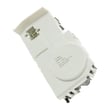
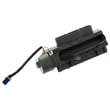
For compatible replacement options for this model, see the GE washer door lock WH01X29528.
Why it matters
Control Lock prevents accidental button presses (especially with kids). Unlocking it restores normal cycle selection and helps you avoid unnecessary resets or interrupted cycles.
Last updated: January 2026
How do I trick my washer into filling with more water?
GE washer model GFW510SCN2WW is designed to weigh the load and add what it considers the proper amount of water; we do not recommend trying to “trick” it by pausing or restarting fills because it can lead to oversudsing, poor rinsing, or drain issues. Use the built-in options that legitimately add water instead.
The correct way to get more water on GFW510SCN2WW
The GFW510SCN2WW owner’s manual describes a More Water option (on some cycles) that adds about 3 gallons to the wash and rinse.
- Pick a cycle that offers More Water (availability varies by cycle).
- Press More Water before pressing Start for the most consistent results.
- If selected during wash, it adds water then and again at rinse.
- If selected after wash is complete, it can add water to rinse only (or be inactive if the cycle is too far along).
- Keep using HE detergent and measure carefully; more water does not mean more detergent.
If it still seems like “not enough water”
Front-load washers clean by tumbling through a shallow pool, not by fully submerging clothes. These changes usually improve results more than forcing extra fill:
- Load loosely so items can tumble freely.
- Choose the best cycle for the load (Bulky Bedding, Towels, Whites, etc.).
- Increase Soil level to extend wash time.
- Use Extra Rinse if you see detergent residue.
- Make sure both supply faucets are fully open and hoses are not kinked.
When low water is actually a fill problem
If the washer fills slowly, stops mid-fill, or shows an H2O supply message, check the basics first. If the inlet valve is failing, a compatible replacement for this model is the water valve WH23X29541.
| Symptom | Common cause | What to check |
|---|---|---|
| Slow fill | Low pressure, clogged inlet screens | Faucets, screens, hose kinks |
| No fill | Closed faucet, failed inlet valve | Supply, then valve |
| Stops mid-fill | Fill error condition | Display message or code |
Why it matters
Using the washer’s designed settings keeps load-sensing accurate and helps prevent oversudsing, leaks, and incomplete rinsing.
Last updated: January 2026
What is the most common problem with GE washers?
On the GE GFW510SCN2WW washer, the most common service complaints are “won’t drain or leaves clothes wet” and “won’t start or stops mid-cycle.” On this front-load design, a clogged pump filter, a door-lock sensing issue, or oversudsing from non-HE detergent are frequent root causes.
What we check first on model GFW510SCN2WW
Start with the troubleshooting and care steps in the GFW510SCN2WW owner’s manual and installation instructions. Then focus on these quick wins:
- Redistribute the load and run Rinse & Spin if the load is wetter than normal.
- Clean the pump filter (coins, lint, small socks can restrict draining).
- Confirm the door closes firmly; wipe residue from the door glass and gasket.
- Use only HE detergent and avoid overfilling; oversudsing can slow draining.
- Note any display messages or error codes before you reset power.
Common symptoms and likely causes
| Symptom | What it often means | Typical next step |
|---|---|---|
| Water left in tub | Restriction at pump filter or drain path | Clean filter; check hoses for kinks |
| Stops mid-cycle, wet load | Out-of-balance correction or drain issue | Rebalance; run Drain/Spin or Rinse/Spin |
| Won’t start, door message | Door not locking or not being sensed | Inspect latch area; check door lock |
| Leak at front | Door boot not sealing or clamp issue | Inspect boot for tears and debris |
Parts that commonly relate to these problems (for this model)
If troubleshooting points to a failed component, these are model-compatible parts we commonly see involved:
- GE washer door lock WH01X29528 (door won’t lock, won’t start)
- Door latch WH01X32580 (door not latching consistently)
- Drain pump housing WH11X29644 (drain pump area damage or leakage)
- Tub to pump hose WH41X29628 (restriction or leak between tub and pump)
Why it matters
On the GFW510SCN2WW, a simple blockage in the pump filter or a door-lock sensing problem can look like a major failure. Checking the easy items first helps prevent unnecessary part replacement and reduces repeat wet-load and odor issues.
Last updated: January 2026


