 Owner’s manual




Why does my vacuum run but no suction?
If your Kenmore Elite vacuum model 12510441710 runs but has little or no suction, airflow is being restricted. The most common fixes are emptying the dust cup and cleaning or replacing the filters, then checking for a blockage in the suction inlet, hose, or nozzle. See the owner's manual for the model-specific troubleshooting table and maintenance steps.
- Empty the dust cup; a full cup is the top cause of weak pickup.
- Clean the filters per the maintenance instructions.
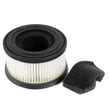
- Replace the filters if cleaning does not restore suction.
- Check for clogs in the suction inlet, hose path, and nozzle air channels.
- Inspect the brush roll area for packed hair and debris that can restrict airflow.
- Recharge the battery; low battery can reduce performance.
If suction improves briefly after cleaning but drops again, the filters are usually the next step.
| Symptom | Most likely cause | What to do |
|---|---|---|
| Runs normally, weak pickup | Dust cup full | Empty dust cup |
| Weak pickup after a few minutes | Filter needs cleaning | Clean filters |
| Weak pickup even after cleaning | Filter worn or clogged | Replace filter set |
| Turns off, then restarts later | Inlet or hose blocked, or overload | Clear blockage, let unit cool |
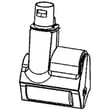
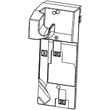
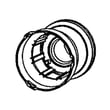
Recommended model-matched part:
Restricted airflow makes the vacuum work harder, reduces cleaning performance, and can contribute to overheating shutoffs. Keeping the dust cup and filters maintained is the fastest way to protect suction and day-to-day pickup.
Last updated: February 2026
How to fix a blocked vacuum?
For the Kenmore Elite 12510441710 upright vacuum, fixing a blockage means turning the vacuum OFF, separating the nozzle from the telescoping wand, removing debris from the hose and suction path (without sharp tools), then reassembling and testing airflow. Use the steps in the owner's manual.
- Switch the vacuum OFF before you start.
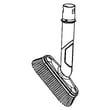
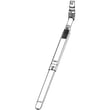
- Press the release button on the telescoping wand and pull the motorized nozzle away.
- Carefully remove debris from inside the hose and the suction inlet.
- Reattach the nozzle to the wand.
- Turn the vacuum ON briefly to confirm normal airflow.
A jammed brush roll can make the vacuum shut off or lose pickup.
- Turn the unit on its side to access the brush roll area.
- Unlock the brush roll by rotating the metal ring to the unlocked symbol.
- Pull out the brush roll and remove hair, string, and debris.
- Reinstall the brush roll, align it with the drive gear, and rotate it by hand to confirm it turns freely.
- Lock the metal ring back to the locked symbol.
- Do not use scissors, knives, or other sharp objects inside the hose.
- Do not run the vacuum while the hose is sealed or fully blocked.
- Do not force the brush roll back in if it will not seat; clear debris first.
| Symptom | Most likely cause | What to check first |
|---|---|---|
| Weak suction | Hose or inlet blockage; full dust cup; dirty filter | Hose path, dust cup, filters |
| Vacuum shuts off | Brush roll blocked; suction inlet blocked | Brush roll area, hose/inlet |
| Dust escaping | Filter missing or installed wrong | Filter seating and condition |
A blockage restricts airflow, which reduces cleaning performance and can overload the brush motor. Clearing the hose and brush roll restores suction and helps prevent repeated shutoffs.
Last updated: February 2026
How to change the belt on a Kenmore vacuum?
On the Kenmore Elite vacuum model 12510441710, belt access depends on which floor nozzle you’re using (carpet motorized nozzle, bare floor motorized nozzle, or Pet PowerMate). We follow the nozzle’s service steps in the owner's manual and replace the belt whenever it’s stretched, cracked, or the brush stops turning.
- Turn the vacuum off.
- Remove the battery pack before any maintenance.
- Work on a flat surface with good lighting.
- Clear wrapped hair and thread from the brush roll while you’re in there.
- Keep screws and covers organized for reassembly.
- Remove the nozzle from the wand or hand vacuum.
- Flip the nozzle over and remove the bottom plate screws.
- Lift off the bottom plate to expose the brush roll and belt.
- Slide the brush roll out; remove the old belt from the brush roll and motor pulley.
- Install the new belt around the motor pulley first, then stretch it onto the brush roll.
- Reinstall the brush roll; make sure it spins freely and sits fully in its end supports.
- Reinstall the bottom plate and tighten screws evenly.
- Reinstall the battery pack and test on carpet for 10 to 15 seconds.
- Confirm the belt is seated on the motor pulley and centered on the brush roll.
- Make sure the brush roll end caps are fully seated (a mis-seated brush can bind).
- Clean debris from the nozzle air path and brush area.
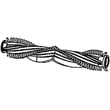
- If the brush roll is worn or damaged, replace it with the Kenmore elite vacuum beater bar 561025117.
| Symptom | Most common cause | What we do |
|---|---|---|
| Brush stops on carpet | Stretched or broken belt | Replace belt and clean brush roll |
| Burning rubber smell | Belt slipping on jammed brush | Clear jam; replace belt |
| Loud rattling | Worn brush roll or end supports | Inspect; replace brush roll if needed |
A healthy belt keeps the brush roll at the right speed for carpet agitation. A worn belt reduces pickup, can overheat from slipping, and can make the nozzle sound rough or inconsistent.
Last updated: February 2026
Why is my Kenmore 12510441710 upright vacuum brush not spinning?
On the Kenmore Elite 12510441710, the motorized nozzle brushroll usually stops spinning because the brush roll is jammed, installed incorrectly, or the belt is broken. Clearing the obstruction and resetting or reinstalling the brush roll restores normal rotation in most cases (see the owner's manual).
- Turn the vacuum OFF before handling the nozzle.
- Remove hair, string, and debris wrapped around the brush roll.
- Reinstall the brush roll so it fully seats into the housing and meshes with the drive gear.
- Rotate the brush roll by hand to confirm it turns freely before powering the vacuum back on.
- If the nozzle motor runs but the brush does not turn, the belt is broken.
The manual notes the unit can automatically stop power to the brush roll if it is blocked or overloaded. Use this sequence:
- Switch the unit to OFF.
- Remove the obstruction from the brush roll area.
- Remove and reinstall the brush roll, aligning it to the brush drive; rotate the roll slowly until it matches the drive gear.
- Lock the brush roll in place by rotating the metal ring to the locked position.
If cleaning and reinstalling do not fix it, replacement parts commonly involved include:
- Brush roll: Kenmore elite vacuum beater bar 561025117
- Filters (restricted airflow can contribute to poor performance and frequent shutdowns): vacuum filter set 561025105
| What you notice | Most likely cause | What to do next |
|---|---|---|
| Brushroll stops suddenly | Jam or overload | Clear debris; reset brush roll |
| Brushroll never starts | Brush roll not installed correctly | Remove and reinstall brush roll |
| Motor spins, brush does not | Broken belt | Inspect belt; replace the failed component |
A non-spinning brush roll reduces carpet agitation, leaves debris behind, and can overheat or overload the nozzle drive system. Keeping the brush roll clear and correctly locked in place helps protect the nozzle and improves cleaning performance.
Last updated: February 2026


