Owner’s manual




Is Samsung a good over the range microwave?
Samsung over-the-range microwaves, including the Samsung SMH2117S, are typically a solid choice when you want a modern look, convenient cooking features, and built-in hood ventilation in one appliance. Overall satisfaction is often high, but long-term durability can vary by model and installation conditions; we recommend comparing features you will actually use and planning for routine maintenance.
What to look for when deciding
- Ventilation performance: match the fan power and venting setup (recirculating vs. outside vent) to your cooking style.
- Fit and clearance: confirm cabinet depth and mounting height so the unit does not protrude more than you expect.
- Controls and usability: sensor cook, one-touch presets, and a readable display matter day-to-day.
- Interior and turntable: easy-clean cavity surfaces and a stable turntable reduce hassles.
- Serviceability: choose a model with readily available common wear items (filters, lamps, door hardware).
Common pros and cons (typical for Samsung OTR microwaves)
| Area | What people like | What can be frustrating |
|---|---|---|
| Design | Sleek styling, good lighting | Some models sit forward of standard cabinets |
| Cooking | Sensor options, even reheating | Learning curve on presets |
| Vent hood | Convenient 2-in-1 appliance | Performance depends heavily on correct venting |
| Ownership | Feature-rich for the price | Door/handle wear and occasional control issues can happen |
Model-specific guidance for SMH2117S
We cannot confirm model-by-model reliability outcomes from the model identifier alone, but we can help you make a confident decision for SMH2117S by verifying the exact venting configuration, mounting requirements, and operating features listed in the SMH2117S manual. Those details are the best way to ensure the microwave fits your kitchen and performs as expected.
Why it matters
An over-the-range microwave is both a microwave and a range hood. If the venting path, mounting height, or cabinet fit is off, you can end up with poor smoke capture, extra noise, or a unit that feels awkward to use even if the microwave itself is “good.”
Quick decision checklist
- Confirm your venting option (recirculating or outside vent) before buying.
- Measure cabinet opening width and depth, plus cooktop-to-microwave clearance.
- Clean or replace grease filters regularly to keep airflow strong.
Last updated: January 2026
How to hard reset a Samsung microwave?
For the Samsung SMH2117S microwave/hood combo, the closest thing to a “hard reset” is a power reset: unplug the microwave (or turn the breaker off) for about 1 to 2 minutes, then restore power. This clears many control glitches; model-specific key sequences are listed in the SMH2117S/XAA-01 microwave manual.
Reset options that usually apply to SMH2117S
- Power reset (recommended first): unplug for 1 to 2 minutes, then plug back in.
- Breaker reset: switch the microwave circuit breaker OFF, wait 1 to 2 minutes, then ON.
- Control lock check: if the keypad seems “dead,” confirm the control lock is not enabled (lock behavior varies by model).
- Filter reminder reset: some Samsung over-the-range models use a button-hold to clear the filter indicator; use the exact steps in the manual for SMH2117S.
Step-by-step: power reset (safe, no disassembly)
- Press Stop/Cancel to end any cooking cycle.
- Unplug the power cord (or turn the breaker OFF).
- Wait 60 to 120 seconds.
- Restore power.
- Set the clock and test a short cook cycle with a cup of water.
What a “hard reset” can and cannot fix
| Symptom | Reset may help | More likely cause |
|---|---|---|
| Display frozen, buttons lagging | Yes | Control glitch, power surge |
| Fan or light acting oddly | Sometimes | Stuck relay, control board issue |
| No heat but runs | Rarely | High-voltage component problem |
| Completely dead (no display) | Sometimes | Blown fuse, door switch, outlet issue |
Why it matters
A reset is the fastest way to clear temporary electronic faults without replacing parts. If the SMH2117S keeps locking up or goes dead repeatedly, that points to an electrical or component issue that a reset will not permanently resolve.
If the unit is dead after a reset, we typically move next to basic power checks (outlet, breaker) and then internal protection devices like the fuse; our how to replace a microwave fuse guide explains the general process.
Last updated: January 2026
What does C do mean on a microwave?
On the Samsung SMH2117S microwave/hood combo, C-DO (often shown as C DO) indicates a door error: the control is not sensing the door as fully closed and latched. This is usually caused by a door switch issue, latch alignment problem, or buildup around the latch area; see the SMH2117S/XAA-01 microwave manual for model-specific guidance.
What typically causes a C-DO door error
These are the most common causes we see on over-the-range Samsung microwaves like SMH2117S:
- Food splatter or grease blocking the latch hooks or door switch actuator
- Door not closing squarely because the unit is slightly out of level
- Loose door hinge screws or a sagging door
- Worn, stuck, or failed door interlock switch (primary/secondary/monitor switch)
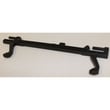
- Broken or misaligned latch bracket or latch head
Quick checks you can do safely
Before any disassembly, try these steps:
- Press Stop/Cancel, open the door, then close it firmly (do not slam)
- Clean the latch area on the door and the mating surfaces on the frame
- Check that the door closes evenly (no rubbing, no visible gap)
- Confirm the microwave is mounted level and not twisted in the cabinet
- Power reset: unplug (or switch off the breaker) for 1 minute, then restore power
What to do if the code returns
If C-DO comes back after cleaning and reseating the door, the issue is usually in the door interlock system.
| Symptom | Most likely area | Typical next step |
|---|---|---|
| Code appears as soon as you close the door | Door switch not actuating | Inspect latch alignment and switch mounts |
| Code is intermittent | Loose hinge/latch or sticking switch | Tighten hardware, check for binding |
| Door feels “soft” or doesn’t pull in tight | Latch head/bracket wear | Inspect latch parts for damage |
For repair planning and safety reminders, we recommend reviewing are diy appliance repairs safe.
Why it matters
A microwave uses door interlock switches to prevent operation with the door open. When the control cannot confirm a safe, fully latched door, it will stop operation and show a door-related code like C-DO.
Last updated: January 2026