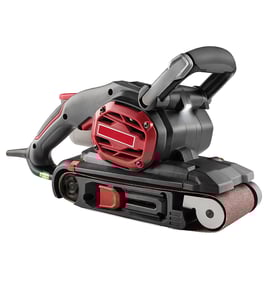

How to use a power sander?
To use a power sander like the Craftsman 31511581, keep the pad flat, start the tool before it touches the work, and guide it with light pressure. Let the sander do the cutting; your job is to control direction and keep it moving.
Quick start steps (safe, clean results)
- Wear eye protection and a dust mask or respirator; sanding dust is hazardous.
- Secure the workpiece with clamps so it cannot shift.
- Choose the right grit: coarse removes material fast, fine smooths.
- Start the sander off the surface, then lower it onto the work.
- Move in steady, overlapping passes; do not stop in one spot.
- Lift the sander off the work before turning it off.
Pressure and motion: what works best
Use light, even pressure. Pushing down hard slows the pad, creates swirl marks, and can overheat the motor. Keep the base flat and use a controlled back-and-forth or side-to-side pattern with about 25% to 50% overlap on each pass.
Grit selection guide
| Task | Typical grit range | What to expect |
|---|---|---|
| Strip paint or level rough wood | 40 to 80 | Fast removal, visible scratches |
| General smoothing | 100 to 150 | Flattens and blends |
| Pre-finish sanding | 180 to 220 | Smooth surface for stain or paint |
Common mistakes to avoid
- Tilting the sander (causes gouges and uneven sanding)
- Skipping grits (deep scratches can show through finish)
- Sanding against loose edges or nails/screws (tears paper, damages pad)
- Letting dust build up (reduces cut and increases heat)
Why it matters
Good technique protects the pad and motor, reduces swirl marks, and helps your sandpaper last longer. It also improves finish quality, especially before stain, paint, or clear coat.
For electrical troubleshooting basics (power cord, switch, internal leads), use our guide: how to repair broken or damaged wires video.
Last updated: February 2026
Where can I buy Craftsman replacement parts?
You can buy replacement parts for your Craftsman 31511581 power sander directly through our parts listings on Sears PartsDirect. Using the exact model number helps match the correct components (like switches, cords, bearings, or housings) so the part fits and performs correctly.
Best way to get the right part for model 31511581
- Confirm the model number on the tool’s data plate is 31511581 (match every digit).
- Identify the failed area: power (cord/switch), drive (bearings), or housing/fasteners.
- Compare your tool’s symptoms to common failures before ordering.
- If the tool is intermittent, inspect wiring and connections before replacing parts.
- Order by model number to avoid “looks the same” mismatches.
What you’ll typically need to identify before ordering
| What to check | Why it matters | Example on a sander/polisher |
|---|---|---|
| Model number | Ensures correct parts list | 31511581 |
| Symptom | Narrows likely parts | Won’t start, sparks, low power |
| Visual condition | Confirms failure | Cracked cord, burnt switch, worn bearings |
| Electrical test result | Prevents wrong purchase | Continuity test on cord/switch |
Quick troubleshooting before you buy
- No power: check outlet, then inspect cord for cuts and the plug for looseness.
- Runs only when you wiggle the cord: cord or internal lead connection is failing.
- Sparks or burning smell: stop using it; inspect brushes (if equipped) and wiring.
- Loud grinding: bearings or internal drive components are worn.
Why it matters
Power tools like the Craftsman 31511581 often have multiple similar-looking versions; ordering by the exact model number reduces returns and gets your sander/polisher back to safe, reliable operation faster.
Last updated: February 2026
How to attach sandpaper to an electric sander?
To attach sandpaper on a Craftsman 31511581 power sander, match the paper to the sander’s pad size, align the holes (if your paper and pad are perforated), then secure it using your sander’s clamp, hook-and-loop pad, or adhesive backing so the sheet sits flat and tight.
Identify your sander’s paper attachment style
Most electric sanders use one of these systems. Use the one your Craftsman 31511581 has:
- Clamp (spring lever) system: You tuck each end of the sheet into a clamp and lock it down.
- Hook-and-loop (Velcro-style) pad: You press the sheet onto the pad; it grips across the whole surface.
- PSA (peel-and-stick) disc/sheet: You peel the liner and stick the abrasive to the pad.
Clamp-style steps (most common for sheet sanders)
- Unplug the sander.
- Open the clamp on one end.
- Slide the sandpaper edge in straight; keep it centered.
- Close the clamp to lock the paper.
- Pull the sheet snug across the pad (no wrinkles).
- Open the opposite clamp, tuck the other end in, then close it.
Quick fit check
- Paper should be flat with no bubbles.
- Edges should be even so the sheet does not tear.
- If the pad has dust holes, line them up to improve dust pickup.
Hook-and-loop or PSA tips (to prevent slipping and tearing)
- Clean dust off the pad before installing a new sheet.
- Press firmly across the whole surface, especially at corners.
- Replace worn hook-and-loop pads or contaminated PSA pads; poor grip causes chatter and uneven sanding.
Common problems and fixes
| Symptom | Likely cause | What to do |
|---|---|---|
| Paper tears quickly | Paper not centered or too loose | Reinstall; pull snug before closing the second clamp |
| Sander vibrates more than normal | Wrinkled paper or debris under sheet | Remove sheet; clean pad; reinstall flat |
| Dust collection is weak | Holes not aligned or paper has no holes | Use perforated paper and align holes when possible |
Why it matters
A tight, flat sheet cuts evenly, reduces vibration, and helps protect the sanding pad and bearings from extra stress.
For tool and repair safety basics before working on wiring, switches, or cords, follow are diy appliance repairs safe.
Last updated: February 2026
What are the parts of a sander?
A Craftsman sander/polisher like model 31511581 is built from a drive system (motor and bearings), a sanding interface (pad/platen and fasteners), and control and safety components (switch, cord, housing, and dust collection). These parts work together to spin or orbit the sanding surface smoothly and safely.
Common sander parts you will see
- Motor (armature/field on corded tools): provides the power to spin or orbit
- Bearings: support the rotating shaft and reduce friction
- Fan/blower: moves cooling air through the housing; often helps push dust toward the port
- Switch (and sometimes a speed control): turns the tool on/off and may control RPM/OPM
- Power cord and strain relief: delivers power and prevents cord pullout damage
- Housing/caps/lids: protects internal components and provides airflow paths
- Handle/grip: improves control and reduces fatigue
Sanding and dust-collection components
These are the parts most tied to sanding performance and cleanup.
| Component | What it does | Common symptom when worn/damaged |
|---|---|---|
| Sanding pad/platen | Holds the sanding disc/sheet and transfers motion | Poor finish, uneven sanding, disc won’t stay put |
| Backing pad fasteners | Keep the pad tight and aligned | Vibration, wobble, pad loosens |
| Dust port, hose, or tube | Routes dust to a bag or vacuum | Dust everywhere, clogging, weak suction |
| Seals/gaskets (if used) | Helps maintain airflow for dust pickup | Reduced dust collection |
Why it matters
Knowing the major assemblies helps you troubleshoot faster. For example, squealing or grinding usually points to bearings, overheating often involves airflow (fan, vents, dust blockage), and excess vibration commonly traces to the pad/platen or loose fasteners.
Quick troubleshooting checks before ordering parts
- Unplug the sander; inspect the cord for cuts and the strain relief for looseness.
- Check the pad/platen for cracks, warping, or missing hook-and-loop material.
- Spin the pad by hand; roughness or noise suggests bearing wear.
- Clear dust from vents and the dust path; clogged airflow can overheat the motor.
- If the tool is dead, test the switch and cord continuity using a meter (see how to use a multimeter to test electrical parts video).
Last updated: February 2026