 Owner’s manual
 Error Codes







How to reset LG electric stove?
To reset your LG LSES6338F electric range, we recommend doing a full power reset: turn the range off, shut off power at the circuit breaker for 1 minute, then restore power and set the clock. For Wi-Fi features, you can also reset the network connection using the Wi-Fi button.
Quick reset steps (power reset)
- Turn all surface burners and the oven off.
- Switch the range circuit breaker OFF.
- Wait 60 seconds (this clears many control glitches).
- Switch the breaker ON.
- Re-set the clock and test Bake and a surface element.
If you mean “reset” for LG ThinQ or Wi-Fi
The LSES6338F has a Wi-Fi button used to reconnect the appliance to your home network.
- Press and hold the Wi-Fi button for 3 seconds.
- Reconnect in the app following the on-screen steps.
- If your router name or password changed, remove the range from the app and add it again.
(We outline these steps in the LSES6338F owner's manual.)
When a reset does not fix it
A reset helps with control lockups, display glitches, or minor software hiccups. If the oven or a burner still will not heat after a reset, the issue is usually a failed heating circuit or control.
Common causes to check:
- House power problem (tripped breaker, loose cord/terminal connection)
- Failed surface control switch for the affected burner
- Failed oven temperature sensor
- Failed electronic control board
Parts that often relate to “no heat” symptoms
| Symptom | What it points to | Example part for this model |
|---|---|---|
| One surface burner will not heat | Surface element control switch | Range surface element control switch EBF62174906 |
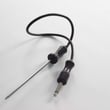
| Oven temperature is erratic or oven will not regulate heat | Oven temperature sensor | LG range oven temperature sensor EBG61305805 |
| Multiple functions dead or intermittent | Power/control board issue | Range power control board EBR31737803 |
Why it matters
Resetting is a safe first step because it can restore normal operation without replacing parts. If heat still fails afterward, focusing on the specific circuit (surface burner vs. oven) helps you avoid replacing the wrong LG range parts.
You can order replacement parts for your LG LSES6338F from the parts list for this model, or search by model number on Sears PartsDirect.
Last updated: February 2026
Why did my LG stove stop working?
When an LG LSES6338F electric range stops working, the most common causes are a power supply problem (tripped breaker or loose cord/terminal connection) or a failed control component such as the power control board or a user interface/display issue. Use the LSES6338F owner's manual to match symptoms to checks.
Quick checks we recommend first
- Reset the range by turning the double breaker OFF for 1 minute, then back ON.
- Confirm the range has 240V power (a range can look “on” at 120V but not heat).
- If the display is blank or erratic, inspect for a loose connection at the back terminal block (power off first).
- If the oven heats poorly or shuts down mid-cycle, check the oven temperature sensor circuit.
- If only one surface burner quit, focus on that burner’s control switch.
What usually failed (and what it affects)
| Symptom | Most likely area | Common part to check on this model |
|---|---|---|
| Entire range dead or randomly resets | Power supply, control electronics | Range power control board EBR31737803 |
| Display works but oven temperature is inaccurate | Sensor feedback | LG range oven temperature sensor EBG61305805 |
| One surface element will not regulate heat | Infinite switch for that element | Range surface element control switch EBF62174906 |
| Convection fan not running (convection bake/roast issues) | Fan motor or wiring | Range convection fan motor EAU62343001 |
Why it matters
A “dead” range can be as simple as a power interruption, but repeated shutdowns and no-heat symptoms often point to a failing control board or sensor. Checking the symptom pattern first helps you replace the right LG range part and avoid repeat repairs.
Parts and ordering tips
- Match parts by model number LSES6338F and the symptom you see.
- If multiple burners act up, prioritize the control electronics before individual switches.
- Order replacement parts from the parts list for this model, or search by model on Sears PartsDirect.
Last updated: February 2026
Why is my LG electric oven not heating up?
If your LG LSES6338F electric range oven is not heating, the most common causes are a power supply problem (tripped breaker or loose plug), incorrect control settings, or a failed heating circuit component such as the oven temperature sensor or control board. Start with power and settings checks, then test components.
Quick checks first (no tools)
- Confirm the range cord is fully seated in the outlet.
- Reset the circuit breaker (or replace a blown fuse) and try Bake again.
- Make sure the oven controls are set correctly for Bake or Convection Bake; see the LSES6338F owner's manual.
- If the oven is “too hot” and recently ran Self Clean, let it cool below the locking temperature and retry.
- Listen for light clicking during heating; element cycling can be normal as the oven maintains temperature.
What usually fails when power and settings are OK
These parts commonly affect oven heat on electric ranges:
- Oven temperature sensor: if it reads wrong, the oven may underheat or not heat.
- Power/control board: if it cannot send power to the heating circuit, the oven will not heat.
- Selector/control inputs: if the selector or related switch is failing, the oven may not engage heat.
Model-matched parts we stock for LSES6338F
| Symptom | Likely part to check | What it does |
|---|---|---|
| Oven temperature seems wrong or oven won’t regulate heat | LG range oven temperature sensor EBG61305805 | Senses oven temperature for the control |
| Oven won’t heat in any mode, display works | Range power control board EBR31737803 | Routes power and manages heating outputs |
| Mode selection issues (Bake/Broil/Convection not engaging) | Range oven selector switch EBF63054503 | Sends mode selection signals to the control |
Safe troubleshooting steps (before replacing parts)
- Disconnect power at the breaker before accessing internal wiring or components.
- If the cooktop glass, door glass, or any heating unit is damaged, stop using the range and schedule service.
- Avoid pouring cold water into a hot oven; it can cause malfunctions.
Why it matters
An oven that will not heat is often a simple power or control-setting issue, but a failing sensor or control board can also prevent proper heating. Checking the basics first helps you avoid replacing good parts and gets your LG range back to baking safely.
If you need to order parts for your LSES6338F, use the parts list for this model or search by model number on Sears PartsDirect.
Last updated: February 2026




