
How to replace router bits sears Craftsman router?
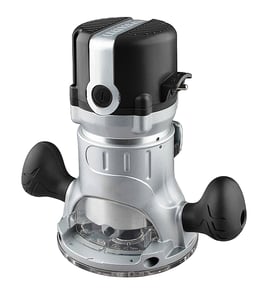
To replace a router bit on your Craftsman 315174440 router, we loosen the collet nut, remove the old bit, insert the new bit to the correct depth, then tighten the collet securely. Always unplug the router first so the bit cannot start unexpectedly.
Steps to change the bit (collet-style router)
- Unplug the router and remove it from the workpiece or router table.
- Press the spindle lock (if your router has one) or hold the shaft with the correct wrench.
- Turn the collet nut counterclockwise until the bit releases.
- Remove the old bit; clean dust from the collet and nut.
- Insert the new bit shank fully, then pull it back out about 1/16 to 1/8 inch so it is not bottomed out.
- Tighten the collet nut clockwise until the bit is firmly clamped.
Correct bit depth and tightening
Most Craftsman routers clamp best when the bit is not bottomed out in the collet. Seating the bit fully and backing it out slightly helps the collet grip evenly and reduces the chance of the bit slipping.
| What you do | Why it helps |
|---|---|
| Back the bit out slightly after inserting | Prevents bottoming out; improves clamping force |
| Clean the collet before tightening | Reduces wobble and slipping |
| Tighten firmly (not over-forced) | Keeps the bit secure without damaging threads |
Quick safety checks before you power on
- Confirm the bit clears the base opening and any router table insert.
- Spin the bit by hand to verify it does not rub.
- Make sure the collet nut is fully engaged on the collet threads.
- Use the correct shank size (commonly 1/4 inch or 1/2 inch) for your collet.
Why it matters
A properly installed router bit cuts cleaner and runs truer. Correct collet tightening and bit depth help prevent chatter, burning, and bit slippage, which protects your workpiece and your router.
For general DIY safety practices before working on power tools, review are diy appliance repairs safe.
Last updated: February 2026
How to remove router bit from Craftsman router?
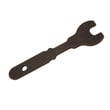
To remove a router bit on a Craftsman 315174440 router, unplug the tool, lock the spindle (or hold the shaft) and use the correct wrenches to loosen the collet nut counterclockwise; once loose, the bit slides out of the collet.
Step-by-step: removing the bit safely
- Unplug the router (do not rely on the switch).
- Remove the base or open access as needed so you can reach the collet nut.
- Engage the spindle lock button if your router has one; if not, hold the shaft with the second wrench.
- Put one wrench on the spindle/shaft flats and the other on the collet nut.
- Turn the collet nut counterclockwise to break it loose.
- Keep loosening until the bit releases; pull the bit straight out.
If the bit is stuck in the collet
A bit can “hang up” from resin buildup or because the collet is gripping the shank.
- Loosen the collet nut a few turns (do not remove it).
- Tap the wrench lightly to help the collet relax its grip.
- Remove the bit; wipe the shank clean.
- If you see pitch or corrosion, clean the collet and nut, then reinstall.
Correct reinstallation (prevents future sticking)
| What to do | What to avoid | Why |
|---|---|---|
| Insert the bit shank fully, then pull it back out about 1/16 to 1/8 inch before tightening | Bottoming the bit out in the collet | Helps the collet clamp evenly |
| Tighten firmly with the proper wrenches | Overtightening | Reduces collet wear and sticking |
| Use clean, straight-shank bits | Clamping on a dirty or nicked shank | Improves grip and accuracy |
Why it matters
A properly released and tightened collet keeps the bit centered, reduces vibration, and helps prevent bit slippage or chatter during routing.
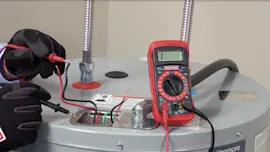
For basic electrical checks if the router will not run after reassembly, use our guide: how to use a multimeter to test electrical parts video.
Last updated: February 2026
What is a Sears Craftsman router?
A Sears Craftsman router (like model 315174440) is a handheld, corded power tool used to shape wood by spinning a router bit at high speed. We use it for edging, trimming, cutting grooves (dados), and making decorative profiles in woodworking projects.
What it’s used for
Common jobs a Craftsman router handles well include:
- Rounding over or beveling edges on boards
- Cutting grooves, rabbets, and dadoes for joinery
- Flush-trimming laminate or wood to a template
- Making decorative edge profiles with specialty bits
- Cutting hinge mortises or recesses with a guide
Key parts and features you’ll see on most routers
Even without model-specific documentation, most Craftsman routers share these core components:
- Motor housing (drives the bit)
- Collet and collet nut (clamps the router bit shank)
- Base (fixed or plunge style; supports the tool on the work)
- Depth adjustment (sets how deep the bit cuts)
- On/off switch (sometimes with a lock)
- Optional guides (edge guide, template guide, dust collection)
Quick router types comparison
| Router type | Best for | What to expect |
|---|---|---|
| Fixed-base | Edge profiles, consistent depth cuts | Simple depth setting, stable feel |
| Plunge-base | Grooves, mortises, starting cuts in the middle | Spring plunge action, depth stop turret |
| Trim/palm | Light trimming, laminate work | Smaller size, less power |
Why it matters
Choosing the right router setup (bit type, base style, and depth setting) directly affects cut quality and safety. A properly set collet and correct feed direction help prevent chatter, burning, and kickback.
Safety and setup essentials
Before using your Craftsman router:
- Unplug the router before changing bits or adjusting depth
- Insert the bit shank fully, then pull it back slightly before tightening
- Tighten the collet firmly; recheck after the first few seconds of use
- Make shallow passes instead of one deep cut
- Use eye and hearing protection; secure the workpiece
For general DIY safety practices, see are diy appliance repairs safe.
Last updated: February 2026
Does Craftsman make a router table?
Craftsman has offered router tables and router-table accessories over the years, but router tables are not model-specific to the Craftsman 315174440. The right choice depends on matching the table’s insert plate (or mounting system) to your router’s base and screw pattern.
How to choose a router table that fits a Craftsman 315174440
Use these checks to confirm compatibility before you buy:
- Insert plate compatibility: The plate must support your router’s screw-hole pattern or accept a universal mounting kit.
- Base clearance: The router base and motor housing must clear the plate opening and any lift mechanism.
- Bit access and adjustment: Make sure you can safely change bits and adjust height without removing the router constantly.
- Switch and power control: A large, easy-to-reach switch improves safety when the router is mounted under a table.
- Dust collection: A fence port (and optional cabinet port) helps keep the cut line visible and reduces cleanup.
Features that matter most (quick comparison)
| Router table feature | What it does | Why it matters |
|---|---|---|
| Fence | Guides straight cuts | Improves accuracy and repeatability |
| Insert plate or lift | Mounts the router | Keeps the router stable and level |
| Miter slot | Supports jigs | Helps with controlled, repeat cuts |
| Dust collection | Captures chips | Improves visibility and safety |
Why it matters
A properly matched router table makes your Craftsman router more stable for edge profiles, rabbets, and repeatable cuts. Fit is the priority; a poor match can cause vibration, misalignment, or unsafe mounting.
Best next step for your model
Confirm the exact mounting pattern and base dimensions on your Craftsman 315174440, then shop by those measurements. If you need help identifying the model number format used for parts lookups, use how to find your appliance model number (and what it means for parts).
Last updated: February 2026