Owner’s manual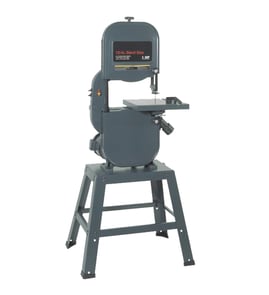

What does 14 mean on a bandsaw?
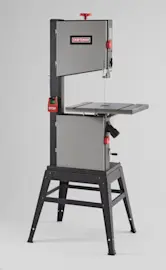
On a band saw, “14” most often refers to the saw’s size class, usually based on the approximate wheel diameter (the upper and lower wheels the blade rides on). For your Companion model 17221399, confirm what “14” refers to in the 17221399 owner's manual.
What “14” usually means
In band saw specs and marketing, the “14-inch” label is commonly tied to wheel diameter; it helps compare machines across brands and frames.
- It typically describes the wheel diameter class.
- It is used to compare overall capacity between saws.
- It often correlates with blade length ranges, but does not define one exact blade length.
What “14” does not tell you by itself
The number alone is not a complete specification; you still need the saw’s published capacities and setup limits.
- Maximum cut height (resaw capacity)
- Throat depth (distance from blade to frame)
- Motor horsepower and cutting speed under load
- Blade width range and recommended tooth count (TPI)
Quick reference table
| Marking you see | What it usually refers to | What to check next |
|---|---|---|
| 14-inch | Wheel diameter class | Wheel size, blade length, capacity specs |
| Resaw height | Max cut height under guides | Guidepost travel, fence setup |
| Throat | Depth from blade to frame | Max workpiece width |
Why it matters
Understanding what “14” represents helps you choose the right blade and set realistic expectations for cutting performance; most cutting problems come from blade selection, tension, tracking, and guide adjustment, not the size label.
If you are troubleshooting cut quality
Use these common checks first:
- Match blade TPI and width to the material and curve radius
- Set blade tension and tracking correctly
- Adjust blade guides and thrust bearing
- Let the motor reach full speed before feeding stock
- Support long workpieces to prevent binding
For symptom-based help, use band saw common questions.
Last updated: January 2026
What is the 3-tooth rule for bandsaws?
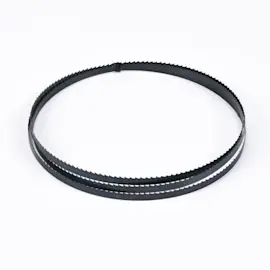
The 3-tooth rule means you choose a band saw blade so at least three teeth are engaged in the material at all times during the cut. On the Companion 17221399 band saw, following this rule helps reduce tooth snagging, rough cuts, and blade damage while improving control and cut quality.
How to apply the 3-tooth rule (blade TPI selection)
Use the workpiece thickness to pick a teeth-per-inch (TPI) range that keeps multiple teeth in the cut.
- Aim for 3 or more teeth contacting the material at once.
- If the blade has too few teeth in the cut, teeth can grab and strip, and the cut can feel jumpy.
- If the blade has too many teeth in the cut, gullets can pack with sawdust or chips, which slows cutting and heats the blade.
- For thin stock, use a higher TPI blade.
- For thicker stock, use a lower TPI blade.
- Keep feed pressure light; our manual advises not forcing the work into the blade and feeding with steady control (see the 17221399 owner's manual).
Quick reference table (rule-of-thumb)
These are typical starting points for many small shop band saws; match the blade to your material and cut type.
| Material thickness | Typical TPI range | What you’ll notice if TPI is wrong |
|---|---|---|
| 1/8 to 1/4 in. | 14 to 24 TPI | Snagging (too low TPI) or slow cutting (too high TPI) |
| 1/4 to 3/4 in. | 6 to 14 TPI | Rough cut (too low) or heat buildup (too high) |
| 3/4 to 2 in. | 3 to 6 TPI | Vibration (too low) or clogging and drift (too high) |
Setup checks that matter as much as TPI
Even with the right blade, setup drives results. The manual calls out adjustments that prevent twisting, deflection, and accidental contact.
- Set the upper blade guide and guard to just clear the workpiece.
- Adjust blade guides so they support the blade but do not ride on the teeth.
- Confirm blade teeth point downward toward the top of the worktable.
- Use a clean, sharp blade; dull blades increase drifting and kickback risk.
- Let the blade reach full speed before starting the cut.
Why it matters
The 3-tooth rule is about stability and chip clearance. When tooth engagement is correct, the blade tracks better, cuts straighter, and lasts longer, and you are less likely to experience grabbing, stalling, or ragged cuts.
Last updated: January 2026
How do I find the model number on my 17221399?
Your Companion band saw’s model number is typically printed on the tool’s rating/ID label (often on the frame or base). Once you find that label, match the number exactly; for this unit, the model is 17221399. Use the [17221399 owner's manual] for label and identification details.
Where to look on the saw
Check these common locations for the model/serial label:
- On the rear of the upper housing (near the motor area)
- On the side of the main frame/column
- On or under the base or stand
- Near the power switch or cord entry point
- Inside a door/cover you open for blade access (look along the edge of the opening)
What the label looks like
On many band saws, the label is a small sticker or metal plate that includes electrical and safety information.
| Label field | What it means | What to do |
|---|---|---|
| Model number | Identifies the exact saw version | Record it exactly as shown (here: 17221399) |
| Serial number | Identifies your specific unit | Write it down for parts lookup and service records |
| Electrical ratings | Volts, amps, Hz | Use to confirm correct power source and extension cord needs |
Tips to make the number easy to read
- Unplug the saw before cleaning around the label.
- Wipe dust off with a dry cloth; avoid soaking the label.
- Use a flashlight and take a close-up photo to zoom in.
Why it matters
The model number ensures you get the correct diagrams, manual information, and compatible replacement parts for your Companion band saw.
Last updated: March 2026