


What is the best quality wall oven?
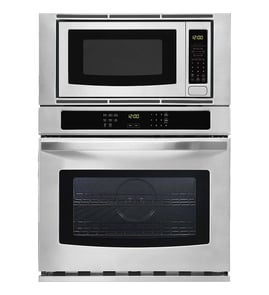
The best quality wall oven is the one that bakes evenly, holds temperature accurately, and matches how you cook (convection, steam, smart features, or speed cooking). For many homes, premium lines like Wolf, Miele, and Thermador lead in build quality; KitchenAid models like KOCE500ESS23 are a strong value when you want a wall oven plus microwave combo.
What “best quality” means for wall ovens
Quality is less about a single brand and more about performance, durability, and serviceability.
- Temperature accuracy and stability (less hot spotting, more consistent results)
- Convection performance (even browning across multiple racks)
- Door seal and insulation (better heat retention, safer exterior temps)
- Controls and electronics reliability (responsive touch panel, fewer glitches)
- Parts availability (heating elements, fuses, switches, control boards)
Quick brand tier guide (typical expectations)
| Tier | Brands commonly known for | Best for |
|---|---|---|
| Ultra-premium | Wolf, Gaggenau, Miele | Maximum build quality, precision cooking, long-term ownership |
| Premium mainstream | Thermador, GE Profile, KitchenAid | Strong features and performance with broader service networks |
| Value-focused | Many standard GE, Whirlpool, Frigidaire lines | Solid basics, fewer premium features |
How to choose the right “best” oven for your kitchen
If you are comparing a single wall oven to a combo unit like KitchenAid KOCE500ESS23, focus on how you actually cook day to day.
- Choose true convection if you bake frequently on multiple racks.
- Choose a combo if you want to save cabinet space and use the microwave daily.
- Look for simple, durable controls if you prefer fewer electronics.
- Confirm cutout fit and electrical requirements before buying.
- Check that common wear parts are easy to source, such as a range bake element W11545804 or fuse mda 20a W11188752.
Why it matters
A “best quality” wall oven reduces re-bakes and uneven cooking, and it typically costs less to own over time because key components (like a bake element, thermostat, or fuse) are straightforward to replace when they wear out.
Last updated: February 2026
What is the life expectancy of a KitchenAid oven?
KitchenAid ovens typically last 10 to 15 years. For your KitchenAid KOCE500ESS23 wall oven/microwave combo, lifespan depends most on heat exposure, how often you run self-clean, and whether key wear items (like the bake element and cooling fan) are kept in good working order.
Typical lifespan and what affects it
Most electric wall ovens land in the same general range, but these factors move the needle:
- Usage frequency: daily cooking shortens life compared to occasional use.
- Self-clean cycles: frequent high-heat self-cleaning stresses wiring, controls, and door parts.
- Ventilation and cooling: restricted airflow can overheat electronics.
- Power quality: repeated surges can damage control boards.
- Timely part replacement: replacing a failed heating or cooling part early prevents secondary damage.
Parts that commonly impact longevity on an oven/microwave combo
If performance changes, these are common “keep it running” items to check or replace:
- Range bake element W11545804 (weak heat, uneven baking, longer preheat)
- Assembly, cooling fan W11344874 (overheating, shutdowns, hot control area)
- Range high-limit thermostat WP4449751 (unexpected shutoff, overheating protection trips)
- Appliance light bulb 8009 (interior light out; simple maintenance item)
Quick “is it aging normally?” checklist
Use this as a practical guide for KOCE500ESS23:
| Symptom | What it often points to | What to do next |
|---|---|---|
| Longer preheat, uneven browning | Heating element weakening | Inspect/replace bake element |
| Unit shuts off during baking | Overheat protection, airflow issue | Check fan operation and vents |
| Control panel glitches or resets | Heat stress or power issues | Verify cooling, consider surge protection |
| Door won’t close or seal well | Door wear/misalignment | Inspect hinges, latch, and door alignment |
Why it matters
A wall oven/microwave combo packs more electronics into a tight space. Keeping heating and cooling components healthy helps prevent heat-related failures that can shorten the appliance’s overall life.
Last updated: February 2026
How to know if the KitchenAid wall oven thermostat is bad?
If your KitchenAid KOCE500ESS23 wall oven overheats, swings widely in temperature, or never reaches the set temperature even after calibration, the oven temperature control system is failing. On this model, the most common causes are a bad temperature-sensing circuit, a stuck relay on the control, or an overheat safety opening.
Common signs the temperature control is failing
- Food consistently burns on the outside or stays undercooked inside
- Oven temperature is off by more than about 25°F to 50°F when checked with an oven thermometer
- Preheat takes much longer than normal or never finishes
- Temperature overshoots the set point and keeps climbing
- Oven shuts off mid-cycle and later works again (overheat protection behavior)
Quick checks we recommend (before replacing parts)
- Verify the temperature: Place an oven thermometer in the center of the oven and compare readings across several cycles.
- Try calibration: If your control allows an offset adjustment, recalibrate and re-test.
- Check for airflow issues: Blocked vents or a failed cooling fan can cause overheating and shutdowns.
- Look for obvious damage: Burn marks, melted connectors, or brittle wiring near the sensor or control area.
Parts that commonly cause “bad thermostat” symptoms on KOCE500ESS23
In many modern KitchenAid wall ovens, temperature regulation is handled by the electronic control using sensor feedback, not a simple mechanical thermostat. These parts are frequent culprits:
| Symptom | Most likely area | Example part to consider |
|---|---|---|
| Overheats or won’t cycle off | Control relay stuck closed | Control W10776407 |
| Shuts down during baking | Overheat safety opens | Range high-limit thermostat WP4449751 |
| No heat or intermittent heat | Heating circuit issue | Range bake element W11545804 |
Why it matters
Accurate temperature control prevents overheating, protects internal wiring and electronics, and keeps baking results consistent. Replacing the wrong part can waste time and money, so confirming the symptom pattern first is the fastest path to a reliable fix.
Last updated: February 2026
Does KitchenAid sell replacement parts?
Yes. KitchenAid sells replacement parts and accessories, and for the KitchenAid KOCE500ESS23 wall oven/microwave combo we also stock many common service parts so you can repair issues like a door not latching, no heat, or a microwave that will not run.
What you can replace on KOCE500ESS23
For this electric oven/microwave combo, the most commonly replaced items are safety switches, heating parts, and small electrical components.
- Microwave door safety components (interlock switch, fuses)
- Oven heating components (bake element)
- Turntable drive parts (motor, coupler, support)
- Cooling and airflow parts (cooling fan)
- Lighting (appliance light bulb)
Examples of parts we carry for this model
Here are a few KOCE500ESS23 parts that customers replace often, depending on the symptom:
| Symptom | Likely area | Example part for KOCE500ESS23 |
|---|---|---|
| Microwave will not start | Door interlock circuit | Switch W10211972 |
| Microwave dead, no display | Line protection | Fuse mda 20a W11188752 |
| Oven not baking evenly or not heating | Oven heat source | Range bake element W11545804 |
| Turntable not rotating | Turntable drive | Microwave turntable motor W10911403 |
Why it matters
Using the correct KitchenAid parts for KOCE500ESS23 helps restore proper fit and function, especially for safety-related items like door interlock switches and fuses. It also reduces repeat failures caused by mismatched electrical ratings or mounting styles.
Quick tips before you order
- Match the full model number exactly: KOCE500ESS23.
- Compare the part ID and part name, not just the description.
- For “no power” or “won’t start” symptoms, test the fuse and door switch circuit first.
- Unplug the unit or shut off the breaker before accessing internal components.
Last updated: February 2026
How do I reset my KitchenAid wall oven?
To reset your KitchenAid KOCE500ESS23 wall oven/microwave combo, we recommend doing a power reset: turn the unit off, cut power at the breaker for 1 minute, then restore power and test Bake or Broil. This clears many control glitches and display issues.
Quick reset steps (power cycle)
- Press Cancel/Off to stop any active cooking cycle.
- Turn OFF the circuit breaker(s) for the oven (and microwave if on a separate breaker).
- Wait 60 seconds.
- Turn the breaker(s) ON.
- Set the clock if prompted, then test a simple function like Bake.
If the reset does not fix it
A reset helps with temporary control lockups, but it will not correct a failed part. These checks narrow it down:
- If the display is dead after power is restored, check the home breaker and wiring connections.
- If the microwave side runs but will not heat, a failed inverter is a common cause; see inverter W11578579.
- If the unit is completely unresponsive or blows power, inspect the internal fuse; see fuse mda 20a W11188752.
- If the microwave door must be slammed to start, the door interlock switch can be the issue; see switch W10211972.
What a reset does (and does not) do
| Situation | Reset helps? | What to do next |
|---|---|---|
| Control panel frozen or acting erratically | Yes | Power reset, then retest |
| Error returns immediately | Sometimes | Look for a failing sensor, control, or wiring |
| No heat in oven or microwave | Sometimes | Test heating circuit or inverter/fuse |
| Breaker trips repeatedly | No | Stop using and troubleshoot electrical/short |
Why it matters
A proper power reset is the fastest, safest first step for KOCE500ESS23 when the display blanks, keys stop responding, or cooking modes will not start. It restores the electronic control to a known good state before you replace parts.
Last updated: February 2026
What are the major parts of a microwave oven?
For the KitchenAid KOCE500ESS23 wall oven/microwave combo, the microwave section is built around a high-voltage heating system, a sealed cooking cavity, and safety interlocks. The major parts work together to generate microwave energy, circulate air, rotate food, and prevent operation when the door is open.
Major microwave components (what they do)
- Magnetron: creates the microwave energy that heats food.
- High-voltage power system (transformer or inverter): supplies the magnetron with the correct high voltage.
- Waveguide and waveguide cover: directs energy from the magnetron into the cavity and shields the feed area from splatter.
- Cooking cavity: the metal box that contains the energy and holds the food.
- Door and door interlock system: mechanical latches and switches that stop operation if the door is open.
- Cooling fan and airflow ducting: removes heat from the magnetron and electronics.
- Turntable system: tray, support, coupler, and motor that rotate food for more even heating.
- Control panel and control board: user interface and “brain” that runs cook programs and monitors inputs.
- Thermal protection (fuses, thermostats): shuts the unit down if overheating or an electrical fault occurs.
KOCE500ESS23 parts you may replace most often
| Symptom | Common part involved | Example part for this model |
|---|---|---|
| Microwave will not start, door feels “closed” but no run | Door interlock switch | Switch W10211972 |
| Turntable does not rotate | Turntable motor or coupler | Microwave turntable motor W10911403 |
| Unit dead or intermittent power loss | Fuse | Fuse mda 20a W11188752 |
Why it matters
Knowing the major parts helps you troubleshoot faster. For example, a “won’t start” complaint often points to the door interlock system, while “heats poorly” more often involves the high-voltage system (magnetron, inverter, or related controls).
Quick safety notes before troubleshooting
- Disconnect power at the breaker before removing panels.
- Do not open or test high-voltage components unless you are trained; microwaves can store dangerous voltage.
- Start with simple checks: door closing, turntable seating, and visible damage.
Last updated: February 2026
Can you replace the microwave on a wall oven microwave combo?
For the KitchenAid KOCE500ESS23 wall oven/microwave combo, the microwave is built into the combo chassis and is not designed to be swapped as a standalone “microwave unit.” In most cases, you either repair the microwave section (using serviceable parts) or replace the entire combo appliance.
What you can do instead (most common options)
- Repair the microwave section if the failure is limited to a service part (door switch, fuse, turntable drive, etc.).
- Troubleshoot the symptom first (no heat, no power, won’t start, door error) to avoid replacing the wrong part.
- Replace the full combo if the microwave cavity, frame, or integrated assemblies are damaged or if multiple major components have failed.
- Use model-specific parts to keep fit and electrical ratings correct for KOCE500ESS23.
Quick checks before you decide
Always shut off power at the breaker before opening panels.
- If the unit is dead/no display: check for a blown microwave fuse.
- If it runs but does not heat: suspect a high-voltage component (often not a DIY repair on built-in combos).
- If it won’t start and the door must be slammed: suspect an interlock switch issue.
- If the tray does not rotate: check the turntable motor or coupler.
Parts that commonly fix “microwave-side” problems
| Symptom | Commonly involved part | Example for KOCE500ESS23 |
|---|---|---|
| Won’t start, door error, intermittent running | Door interlock switch | Switch W10211972 |
| Completely dead (no lights/display) | Fuse | Fuse mda 20a W11188752 |
| Turntable not rotating | Turntable motor | Microwave turntable motor W10911403 |
Why it matters
On a built-in wall oven/microwave combo, the microwave is integrated with shared mounting, ventilation, and electrical routing. Repairing a specific failed component is usually the fastest, most cost-effective path, while full replacement is typically reserved for major structural or high-voltage failures.
Last updated: February 2026
Why is the display not working on my KitchenAid microwave oven combo?
If the display is blank on your KitchenAid KOCE500ESS23 wall oven/microwave combo, the most common causes are a power interruption (outage, tripped breaker, GFCI trip) or a control that locked up after a surge. Restoring power with a full reset often brings the display back.
Quick checks (start here)
- Confirm the unit has power; check the kitchen breaker and any nearby GFCI outlet.
- Do a hard reset: turn the circuit breaker OFF for 3 to 5 minutes, then turn it ON.
- If the display returns, reset the clock and test microwave and oven functions.
- If the display is still dead, listen for cooling fan or relay clicks when you press keys.
- If the display is dim or flickers, suspect a failing control or loose wiring connection.
Parts that commonly relate to a dead or intermittent display
A blank display can be caused by a failed control board, a blown fuse, or a safety circuit that is open. These model-listed parts are common starting points for diagnosis and replacement.
What each part typically does
| Symptom | Most likely area | What to check first |
|---|---|---|
| Completely blank display, no response | Power feed or fuse | House breaker, then fuse continuity |
| Display flickers or goes out randomly | Control or wiring | Harness connections, control board |
| Keys beep but display is blank | Display/control circuit | Control board and connectors |
Why it matters
The display is part of the control system; when it is out, the microwave and oven may not heat, may not respond to keypad input, or may behave unpredictably after a surge. A proper reset and basic power checks prevent unnecessary part replacement.
Safety notes before troubleshooting
- Turn off the breaker before removing any panels.
- If you use a meter, follow a proven test method; see how to use a multimeter to test electrical parts video.
- If the microwave section needs internal electrical testing beyond basic access panels, we recommend using a service technician.
Last updated: February 2026