Owner’s manual
 Error Codes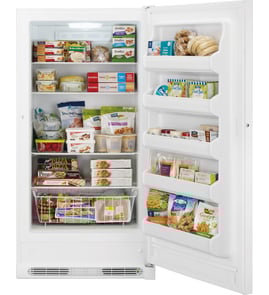



Are upright freezers worth fixing?
Yes, an upright freezer is worth fixing when the problem is in common service items (door sealing, airflow, controls, or electrical supply) and the cabinet is in good shape. For a Winia upright freezer like model WAFU021AWE0, we recommend using the troubleshooting steps in the owner's manual to confirm the failure before deciding.
Quick decision guide
- Fix it when the freezer is cooling but temperature is too warm, the door is not sealing, or it was recently unplugged and needs time to recover.
- Fix it when the issue is intermittent power, a tripped breaker, or a loose cord connection.
- Fix it when the freezer runs but performance is affected by loading habits (warm food, frequent door openings).
- Replace it when the sealed system is failing (compressor or refrigerant-related symptoms) and repair cost is high.
- Replace it when the cabinet is damaged, rusted through, or the door will not align even after hinge adjustment.
What to check first (fast, no-parts checks)
The manual’s troubleshooting guidance points to a few high-impact items that often make a freezer seem “bad” when it is not:
- Give it time after power loss or unplugging: freezer mode needs about 4 hours to cool completely after plugging in.
- Reduce door openings: warm air enters every time the door is opened; frequent openings can keep temps high.
- Confirm the temperature setting: set the control colder and allow several hours to stabilize.
- Check door seating: a door that is not sealing properly can cause warm temperatures and longer run times.
- Know what “warm outside walls” means: exterior surfaces can feel warm while the compressor moves heat out of the cabinet.
Repair vs. replace: simple cost and risk comparison
| Situation | Typical outcome | Best choice |
|---|---|---|
| Warm temps caused by settings, door use, or recent unplugging | Correctable with adjustments and time | Repair (DIY checks) |
| Door not sealing or not closing | Often correctable with alignment/cleaning | Repair |
| No cooling plus loud clicking, repeated start attempts, or long-term poor cooling | Often sealed-system related | Replace (usually) |
| Power failure event | Food can stay frozen about 24 hours if door stays closed | Repair only if it will not restart |
Why it matters
A freezer that is simply mis-set, frequently opened, or recovering from being unplugged can look like a major failure. Doing the quick checks first prevents unnecessary replacement and helps protect food safety and energy use.
Last updated: February 2026
How to reset WAFU021AWE0 upright freezer?
To reset your Winia WAFU021AWE0 upright freezer’s controls, unlock the control panel first, then restore the control settings back to their default state. This is the right step when the panel is unresponsive or settings were changed accidentally.
Reset steps (control panel)
- Unlock the controls: Press and hold Mode for 3 seconds until the Lock icon blinks and turns off.
- Return to a known-good setting: Press Mode to cycle the freezer temperature setting (Cold, Colder, Coldest).
- If you need a full control reset: Unplug the freezer for 5 minutes, then plug it back in and allow it to restart.
- The control panel auto-locks after about 20 seconds of no button presses.
- After restoring power, allow 4 hours for the freezer to cool completely before loading unfrozen food.
- If you recently used Quick Freeze, cancel it and return to a normal set temperature.
What “reset” means on this model
On the WAFU021AWE0, a reset typically means either unlocking the panel, selecting a standard temperature setting, or power-cycling the unit to clear a temporary control glitch.
| Reset type | What it does | When to use it |
|---|---|---|
| Control unlock | Lets you change settings | Buttons do nothing, Lock icon is on |
| Temperature reselect | Puts you back on a normal setpoint | Temps were changed, food too soft/hard |
| Power reset (unplug) | Clears minor electronic hiccups | Display odd behavior, settings not responding |
Why it matters
A locked control panel or a temporary control error can look like a failure, even when the compressor and cooling system are fine. Resetting correctly helps you restore normal operation without changing parts.
For the exact button layout and feature descriptions for your door control panel, use the WAFU021AWE0 owner's manual.
Last updated: February 2026
How to update WAFU021AWE0 software?
The Winia WAFU021AWE0 upright freezer does not use updatable “software” like a smart device; its controls are fixed-function. For this model, the practical “update” is setting the correct mode (Freezer or Fridge) and temperature using the control panel steps in the WAFU021AWE0 owner's manual.
What you can adjust on the control panel
These are the user-adjustable functions that change how the freezer operates day to day:
- Unlock or lock the control panel (required before most changes)
- Switch between Freezer mode and Fridge mode
- Change the set temperature using the “+” and “-” buttons
- Use Quick Freeze/Quick Fridge to rapidly cool contents
- Switch the temperature display between °F and °C
How to change mode and temperature (Freezer or Fridge)
- Unlock the panel: Press and hold Lock for 3 seconds.
- Switch modes (if needed): Press and hold Mode for 3 seconds.
- Freezer mode default: 0°F (-18°C)
- Fridge mode default: 37°F (3°C)
- Adjust temperature: Press “+” or “-” to step through the available setpoints.
Typical setpoint ranges shown for this model
| Mode | Setpoint range (°F) | Setpoint range (°C) |
|---|---|---|
| Freezer | 6 to -8 | -15 to -22 |
| Fridge | 45 to 33 | 7 to 1 |
How to switch the temperature scale (°F ↔ °C)
The scale change only works when the panel is locked.
- Confirm the panel is locked (Lock icon lit)
- Press and hold “+” and “-” together for 5 seconds
Why it matters
If the freezer seems “off” after a power interruption or settings change, it is almost always a mode/temperature setting issue, not a firmware update. Correct settings help prevent thawing, temperature alarms, and food spoilage.
Last updated: February 2026
What is the latest version of the WAFU021AWE0 OS?
The Winia WAFU021AWE0 upright freezer does not use an operating system (OS) like a phone or game console; it uses an electronic control to manage temperature and modes. For model-specific control features and settings, use the WAFU021AWE0 owner's manual.
What you can update or change on this freezer
On the WAFU021AWE0, “updates” are really just control settings and normal maintenance, not software downloads.
- Adjust the freezer temperature setpoint using the control panel
- Switch modes if your unit supports freezer and refrigerator modes
- Use the control lock and unlock function (if equipped)
- Restore normal operation after a power interruption by rechecking settings
- Keep airflow clear inside the cabinet so temperatures stay stable
Common control settings (typical ranges)
Many upright freezers with electronic controls offer setpoints in the neighborhood of 6°F down to about -8°F (or -15°C to -22°C), depending on the control design.
| Setting goal | Typical setpoint | When to use it |
|---|---|---|
| Everyday frozen storage | 0°F (-18°C) | Best balance of food safety and efficiency |
| Faster freezing | -6°F to -8°F (-21°C to -22°C) | After loading a lot of unfrozen food |
| Energy saving (light load) | 4°F to 6°F (-16°C to -15°C) | When the freezer is lightly loaded |
Why it matters
Looking for an “OS version” usually means something is acting up (warm temps, beeping, controls not responding). On an upright freezer, the fastest path is confirming the set temperature, mode, and lock status, then checking basics like door seal and airflow.
When a repair is more likely than a setting
If the freezer will not hold temperature after you confirm correct settings, these are the most common suspects:
- Door gasket not sealing (frost buildup, warm spots)
- Evaporator fan not running (no airflow inside)
- Dirty condenser or blocked ventilation
- Defrost problem (heavy frost on the back wall)
- Control or sensor issue (erratic temps)
If you’re doing electrical checks, use safe testing practices and follow a step-by-step guide such as how to use a multimeter to test electrical parts video.
Last updated: February 2026