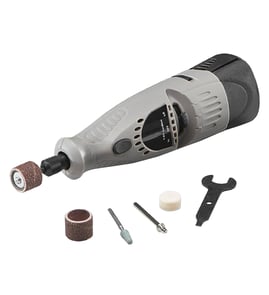
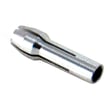

Are all rotary tool bits the same size?
No. Rotary tool bits come in different shank sizes, and your Dremel 332-5 rotary tool will only accept bits that match the collet or chuck you have installed. The most common rotary accessory shank size is 1/8 inch, but smaller and larger shanks are also used.
Most rotary accessories are identified by their shank diameter (the smooth round stem that goes into the tool).
- 1/8 inch (3.18 mm), the most common for many Dremel-style accessories
- 3/32 inch (2.35 mm), common for smaller engraving and detail bits
- 1/16 inch (1.6 mm), used for very small accessories
- 1/4 inch (6.4 mm), more common on heavier-duty rotary or flex-shaft setups
Use this quick check before buying or installing accessories.
- Look at the shank size printed on the accessory packaging
- Check whether your tool is using a collet (size-specific) or an adjustable chuck (covers a range)
- Match the shank to the installed collet size; do not force a larger shank into a smaller collet
- Tighten the collet nut or chuck firmly; a loose bit can wobble and slip
- If you see wobble, reseat the bit and inspect the collet for wear or debris
| What you have on the tool | What it means for bit size | Typical outcome |
|---|---|---|
| Collet installed | Only one shank size fits | Most secure fit when matched correctly |
| Adjustable chuck installed | Multiple shank sizes may fit | More convenience, but still needs proper tightening |
Shank size affects fit, safety, and performance. A mismatched shank can cause wobble, poor cutting control, and accessory slippage. Also, larger-shank accessories are commonly rated for lower maximum RPM than smaller-shank accessories, so matching the accessory to the job helps protect the tool and the workpiece.
Last updated: February 2026
How to change rotary tool bits?
To change bits on your Dremel 332-5 rotary tool, unplug the tool, lock the spindle, loosen the collet nut, swap the accessory, then tighten the collet nut until the bit is firmly clamped. A properly tightened bit seats straight and does not wobble at speed.
- Unplug the rotary tool (or remove the battery if your setup uses one).
- Press and hold the spindle lock button.
- While holding the lock, turn the collet nut (the outer nut at the nose) to loosen.
- Pull the old bit or accessory straight out.
- Insert the new bit shank fully, then back it out slightly (about 1/16 inch) so it is not bottomed out.
- Hold the spindle lock again and tighten the collet nut until snug.
| What you notice | What it usually means | What to do |
|---|---|---|
| Bit slips under light pressure | Collet nut not tight enough | Tighten with spindle lock held; re-seat the bit |
| Bit wobbles | Bit not centered, wrong collet size, or bent shank | Reinstall; verify correct collet; replace bent accessory |
| Nut feels tight but bit still loose | Collet dirty or worn | Clean collet and nut; replace if needed |
A rotary tool spins at high RPM; a loose or off-center accessory can chatter, damage the workpiece, and wear the collet, spindle, and bearings faster. Correct seating also improves cut quality when sanding, grinding, or polishing.
If you are troubleshooting a tool that will not power on after a bit change, use how to tell if a fuse is blown to rule out a simple electrical issue in your power source.
Last updated: February 2026
Will Dremel accessories fit other rotary tools?
Many Dremel accessories will fit other rotary tools, but compatibility depends on the tool’s collet size, accessory shank diameter, and whether the attachment uses a brand-specific mounting interface. For the Dremel 332-5 rotary tool, match the accessory’s shank size and attachment style to avoid wobble, slippage, or poor performance.
- Shank diameter: Most rotary accessories use common shank sizes (often 1/8 inch), but some use smaller sizes that require a different collet.
- Collet or chuck type: A multi-size chuck is more universal; fixed collets are less forgiving.
- Attachment interface: Some attachments (guides, guards, specialty heads) are designed around a specific nose cap or housing shape.
- Speed range: Make sure the accessory’s rated RPM matches how you plan to use the tool.
- Tool power and duty: Heavier accessories (wire wheels, larger sanding drums) can overload smaller rotary tools.
| Accessory type | Usually cross-brand compatible? | What matters most |
|---|---|---|
| Bits, burrs, sanding drums (shank-mounted) | Often yes | Shank diameter and collet/chuck fit |
| Cutoff wheels with mandrels | Often yes | Mandrel shank size and tool speed |
| Polishing wheels and felt bobs | Often yes | Mandrel system and RPM |
| Specialty attachments (guides, guards, flex shaft) | Sometimes | Mounting threads/interface and housing fit |
A “fits” accessory that is slightly mismatched can run off-center, vibrate, or slip. That reduces cut quality, increases wear on the collet/chuck, and can make the rotary tool harder to control.
- Confirm the shank size printed on the accessory packaging.
- If the accessory is loose or won’t seat fully, switch to the correct collet or a compatible chuck.
- Test-run at low speed first; increase speed only after it spins true.
- For electrical concerns (sparking, intermittent power), use a basic test approach like how to use a multimeter to test electrical parts video.
Last updated: February 2026