 Owner’s manual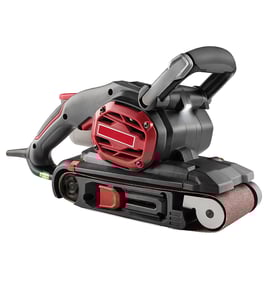

How to install belt on Craftsman belt sander?
To install a sanding belt on your Craftsman 315117151 3-inch dustless belt sander, lift the tension release lever to loosen the rollers, slide the belt on with the arrow pointing in the direction of rotation, then lower the lever to re-tension and track the belt with the tracking screw.
Step-by-step: install the sanding belt
- Unplug the sander before you start.
- Lift the tension release lever straight up to release belt tension.
- Remove the old sanding belt.
- Slide the new belt over the rollers.
- Match the belt direction: the arrow inside the belt must point clockwise when looking into the open side of the sander.
- Roughly center the belt on the rollers.
- Lower the tension release lever to secure the belt.
Adjust belt tracking (so it stays centered)
After the belt is installed, we use the tracking screw to keep the belt from walking off the rollers.
- Plug the sander in.
- Set the sander upside down (for adjustment only).
- Pull and release the trigger briefly; watch where the belt moves.
- If the belt runs inward, turn the tracking screw clockwise.
- If the belt runs outward, turn the tracking screw counterclockwise.
- Repeat short trigger pulls until the belt runs stable and the belt edge is even with the base edge.
Quick reference table
| What you see | What to do | Result |
|---|---|---|
| Belt is hard to remove/install | Lift tension release lever | Rollers move back; belt loosens |
| Belt walks inward | Turn tracking screw clockwise | Belt shifts outward |
| Belt walks outward | Turn tracking screw counterclockwise | Belt shifts inward |
| Belt keeps changing position | Re-check tracking after a few seconds of running | New belts often need a few adjustments |
Why it matters
Correct belt direction and tracking prevents the sanding belt from rubbing internal parts, improves sanding control, and helps the belt last longer. For the exact lever and screw locations on model 315117151, follow the diagrams in the 315117151 owner's manual.
If you need replacement parts beyond what is listed for this model, we use the model number to search by category at Sears PartsDirect.
Last updated: February 2026
What are the main parts of a belt sander?
On the Craftsman 315117151 3 inch dustless belt sander, the main parts are the sanding belt (3 inch x 21 inch), the front idler pulley and rear drive pulley system, the belt-tension mechanism, the tracking adjustment, the dust collection (dust bag and exhaust), and the handles/switch used to control the tool. For diagrams and part names, use the 315117151 owner's manual.
Main components you will see on this model
- Sanding belt: the abrasive belt that does the cutting and smoothing
- Drive system: motor-driven pulley that powers the belt movement
- Front idler pulley: supports the belt at the front and helps guide it
- Tension release lever: loosens and tightens the belt for removal/installation
- Tracking adjustment (tracking knob/screw): centers the belt so it runs straight
- Dust collection: dust exhaust/blower cover and dust bag to capture sanding dust
- Controls and grip points: rear handle, front handle, switch, and lock-on button
How these parts work together
The motor turns the drive pulley, which moves the sanding belt around the pulleys. Tension keeps the belt from slipping, and the tracking adjustment keeps the belt from walking off the rollers. Dust is pulled toward the exhaust and into the dust bag during operation.
| Part group | What it does | Common symptom when it needs attention |
|---|---|---|
| Sanding belt | Removes material and smooths surfaces | Poor finish, slow sanding, burning wood |
| Tracking/tension | Keeps belt centered and tight | Belt drifts, frays, or jumps off |
| Dust bag/exhaust | Helps control dust | Excess dust, reduced visibility, clogged airflow |
| Covers/guards | Protects you and the drive system | Unsafe operation, debris entering drive area |
Why it matters
Knowing the main parts helps you pick the right sanding belt grit, correct belt tracking quickly, and keep dust collection working. It also helps you identify what to inspect first when the belt slips, wanders, or the tool runs rough.
Parts and documentation tips
- Disconnect power before adjusting tracking, changing belts, or installing the dust bag.
- Use standard 3 inch x 21 inch sanding belts; coarse grit removes more material, fine grit finishes smoother.
- Keep guards and covers installed during use.
- When you need to look up diagrams or order items by model number, start with the model parts list, or search by model at Sears PartsDirect.
Last updated: February 2026
Why did my belt sander suddenly stop working?
On the Craftsman 315117151 3-inch dustless belt sander, a sudden stop is typically caused by belt tracking or tension problems, a belt jam from dust/debris, or motor overload from pushing too hard. We start with the belt tracking and tension-release procedure in the 315117151 owner's manual.
Quick checks (fastest fixes first)
- Unplug the sander; inspect the sanding belt for tears, glazing, or a lifted seam.
- Use the tension release lever to remove and reinstall the belt; confirm it is seated on both rollers.
- Check belt tracking; if the belt walks inward or outward, it can rub internal parts and stall.
- Empty and reseat the dust bag; heavy buildup increases drag and heat.
- Reduce pressure; this sander is designed to sand using its own weight.
Belt tracking and tension (most common)
Use the manual method: place the sander upside down for adjustment only, briefly pull and release the trigger, then adjust the tracking screw.
| Belt movement you see | Tracking screw adjustment |
|---|---|
| Belt runs inward | Turn clockwise |
| Belt runs outward | Turn counterclockwise |
New belts often need several small adjustments until the belt becomes pliable and stabilizes.
Overload and technique issues
- Let the motor reach full speed before contacting the work.
- Keep the sander moving; holding it in one spot increases load.
- Use a coarser grit belt for heavy removal instead of pushing harder.
Electrical checks (if it will not run at all)
- Test a known-good outlet; check the cord and plug for damage.
- Check the circuit breaker or fuse for the outlet.
- If wiring looks damaged, follow how to repair broken or damaged wires video.
Why it matters
Correct tracking and proper pressure prevent belt rub, reduce heat, and protect the motor from overload; they also extend sanding belt life.
You can look up diagrams and replacement parts by model number on Sears PartsDirect.
Last updated: February 2026