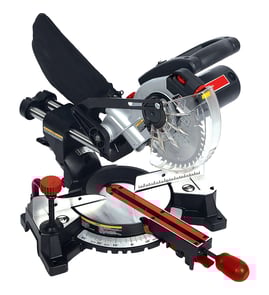

What should you never cut with a miter saw?
On a Delta 36-235 12" compound miter saw, we never cut materials the saw is not designed for (like masonry or steel), and we never cut small, unstable pieces that put hands close to the blade. These situations create high kickback and binding risk.
- Ferrous metals (steel, iron) unless you have a saw and blade specifically rated for it
- Masonry products (brick, concrete, tile, stone)
- Glass, ceramics, or brittle composites that can shatter
- Pressure-treated or wet wood if it is likely to bind or twist during the cut
- Unknown materials (mixed scrap, embedded fasteners) until inspected and cleared
- Rip cuts (cutting with the grain) because a miter saw is built for crosscuts and angled crosscuts
- Freehand cuts without the workpiece firmly against the fence and table
- Tiny offcuts that cannot be clamped safely (hands end up too close to the blade path)
- Warped, bowed, or twisted boards unless you can clamp them flat and stable
- Cuts beyond the saw’s capacity (too thick or too wide), which increases binding and motor strain
| What you want to do | Better tool choice | Why it’s safer |
|---|---|---|
| Rip a board | Table saw or circular saw with a guide | Designed to control long rip cuts |
| Cut steel/iron | Metal-cutting chop saw | Correct speed and blade type |
| Cut brick/tile | Masonry saw or angle grinder with masonry wheel | Controls dust and prevents shattering |
| Cut very small parts | Use a jig and clamp, or a different tool | Keeps hands away from the blade |
Most miter saw injuries and tool damage come from binding and kickback. Keeping the workpiece supported, clamped, and appropriate for the blade type protects the saw’s guard system, the motor, and your hands.
If you are troubleshooting a guard, fence alignment, switch, or wiring issue on the 36-235, use the model diagrams and parts lookup, or search by model on Sears PartsDirect.
Last updated: February 2026
Why is 31.6 on a miter saw?
The 31.6° mark on a miter saw (including the Delta 36-235 12" compound miter saw) is a common preset used for compound crown molding cuts. It pairs with a typical 33.9° bevel setting to create tight corner joints when crown molding is cut using standard spring angles.
On most compound miter saws, the 31.6° detent is there to speed up crown molding work so you do not have to calculate angles every time.
Common uses include:
- Cutting crown molding for inside corners and outside corners
- Making repeatable cuts using the saw’s miter detents (preset stops)
- Pairing a miter setting (31.6°) with a bevel setting (often 33.9°)
- Reducing layout errors when doing multiple pieces in a room
- Helping produce a corner that closes up cleanly when the molding spring angle matches the common assumptions
These presets are based on common crown molding “spring angles” used in trim work.
| Crown molding spring angle | Typical miter setting | Typical bevel setting |
|---|---|---|
| 38° spring angle | 31.6° | 33.9° |
| 45° spring angle (less common) | Different values | Different values |
The key is matching the method to how you are holding the molding.
- Nested method (against the fence): Crown sits at the same “installed” angle; you often use different miter settings than the 31.6° shortcut.
- Flat method (lying on the table): This is where the 31.6° miter and 33.9° bevel presets are commonly used.
Practical tips:
- Make a test cut on scrap crown first and check the corner fit.
- Mark the piece as ceiling edge and wall edge to avoid flipping mistakes.
- Confirm you are reading the correct scale: miter (table rotation) vs bevel (blade tilt).
- Use a stable setup; crown molding is tall and can rock if not supported.
Crown molding corners are compound angles; small setup errors create visible gaps. The 31.6° detent is there to make one of the most common crown setups faster and more repeatable on saws like the Delta 36-235.
If you are tuning accuracy (detents, fence alignment, bevel stops, or pivot play), use the model diagrams and parts lookup for Delta 36-235, or search by model on Sears PartsDirect.
Last updated: February 2026
How do I find the model number on my 36-235?
The model number on your Delta 36-235 12-inch compound miter saw is printed on the saw’s identification label (often called the rating plate). Once you find it, match the full model number exactly so you get the correct diagrams and replacement parts.
Check these common label locations on the Delta 36-235:
- On the rear of the saw body near the motor housing
- On the side of the base or turntable (near the miter scale)
- Under the saw base (you may need to tilt the saw or look from underneath)
- Near the handle area or upper arm (on some versions)
- On the nameplate close to the power cord entry
On the same label as the model number, you typically see:
- Model number (for example, 36-235)
- Serial number
- Electrical rating (volts and amps)
- Manufacturing date code (varies by brand)
| Item | What it’s used for | Example format |
|---|---|---|
| Model number | Identifies the exact saw design for parts lookup | 36-235 |
| Serial number | Identifies your specific unit | Letters and numbers |
Delta miter saw parts can change by production run; using the exact model number (and sometimes the serial number range) prevents ordering the wrong switch, brush set, guard parts, or arbor hardware.
Use these steps to still identify the saw accurately:
- Clean the label area with a dry cloth and a flashlight at an angle
- Look for an embossed or stamped number on the base casting
- Compare key features (12-inch blade size, compound bevel style, guard shape) to diagrams once you locate the closest match
- Use our model-number tips in [how to find your appliance model number (and what it means for parts)]
Last updated: March 2026