
Which is better, 118 or 135 degree drill bits?
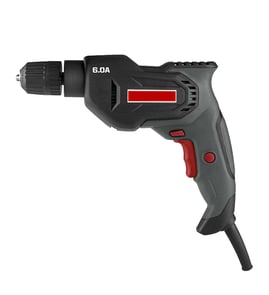
A 118° drill bit is better for general drilling in softer materials (wood, plastic, aluminum), while a 135° drill bit is better for harder metals and cleaner, more accurate starts. For a Craftsman 31510491 3/8" electric drill, we typically recommend 135° for steel and 118° for everyday mixed use.
Quick pick guide (by material)
- Wood, plastic, drywall: 118°
- Aluminum, brass, copper: 118° (135° also works well if you want less walking)
- Mild steel, angle iron, sheet steel: 135°
- Stainless steel and harder alloys: 135° (prefer a split point)
- Round stock or curved surfaces: 135° (starts more predictably)
What the angles change (and why it matters)
The point angle affects how the bit starts and how much force the drill needs. A 135° point is flatter, so it tends to self-center (especially with a split point) and reduces wandering. A 118° point is sharper and can cut aggressively in softer materials, but it is more likely to “walk” on metal unless you center punch first.
118° vs 135° at a glance
| Feature | 118° point | 135° point |
|---|---|---|
| Best for | Softer materials | Harder metals, precision starts |
| Starting behavior | More likely to walk on metal | More self-centering |
| Feed pressure needed | Often higher in metal | Often lower in metal |
| Common tip style | Standard point | Often split point |
Tips to get better results with either bit
- Use a center punch on metal to prevent walking (especially with 118°).
- Run slower speeds on metal; faster speeds on wood.
- Use cutting oil on steel to reduce heat and extend bit life.
- Keep the bit sharp; a dull bit overheats and strains the motor.
- Clamp the workpiece; don’t hold metal by hand.
Related DIY help
If you’re troubleshooting power, overheating, or intermittent operation while drilling, use our guide: how to use a multimeter to test electrical parts video.
Last updated: February 2026
What do numbers on a power drill do?
On the Craftsman 31510491 3/8" electric drill, the numbered ring behind the chuck is the clutch (torque) setting. Higher numbers let the drill apply more twisting force before the clutch slips; lower numbers help prevent stripping screws or overdriving fasteners.
What the numbers control (and what they do not)
The clutch is mainly for driving screws.
- Lower numbers: clutch slips sooner; best for small screws and soft materials (drywall, pine)
- Higher numbers: more torque before slipping; best for larger screws and denser wood
- Drill icon (if your collar has it): clutch is typically bypassed for drilling holes
- The numbers are not RPM and not a universal torque value; “10” on one drill is not the same as “10” on another
How to choose the right setting
Use this quick method to dial it in:
- Start at low (for example 3 to 6)
- Drive a test screw into scrap material
- If the clutch slips too early, increase the number a few clicks
- Stop increasing once the screw seats flush without cam-out or stripping
- For drilling, switch to the drill mode (if present) and use the correct bit
Quick guide by task
| Task | Typical clutch range | Goal |
|---|---|---|
| Small screws in softwood | 3 to 8 | Avoid stripping |
| Medium screws in wood | 8 to 14 | Seat screw cleanly |
| Large screws or dense wood | 14 to max | Prevent stalling |
| Drilling holes | Drill mode (if available) | Full power, no clutch slip |
Why it matters
Using the clutch correctly protects the screw head, the workpiece, and the drill’s geartrain. It also makes driving consistent, especially when you are assembling cabinets, furniture, or decking.
For more DIY electrical testing help when troubleshooting a corded drill, see how to use a multimeter to test electrical parts video.
Last updated: February 2026
Where can I buy Craftsman replacement parts?
You can buy replacement parts for your Craftsman 31510491 3/8" electric drill by using the model-based parts list for model 31510491 on Sears PartsDirect, which helps match the correct components (like switches, brushes, cords, and chucks) to your exact tool.
Best way to buy the right part for model 31510491
- Confirm the model number on the drill’s nameplate is 31510491.
- Use the model parts diagrams and parts list to identify the exact part description you need.
- Compare your old part to the diagram location (common for housings, triggers, and wiring).
- Order using the model-based listing so you avoid look-alike parts that do not fit.
- If you are unsure which component failed, test first (for example, cord, switch, or motor brushes).
Common replacement parts people look for on corded drills
| Symptom | Most common part areas to check | Typical quick check |
|---|---|---|
| Won’t start | Power cord, trigger switch, brushes | Wiggle-test cord; check brush wear |
| Runs intermittently | Switch, cord strain relief, internal wiring | Inspect for loose terminals |
| Sparks heavily | Motor brushes, commutator | Check brush length and spring tension |
| Chuck slips | Chuck, spindle/gear components | Verify jaws tighten evenly |
Why it matters
Craftsman power tools often have multiple versions that look similar. Buying by model 31510491 reduces returns and downtime because the mounting points, wiring connectors, and brush style must match the drill’s exact build.
Helpful DIY testing before you order
- Unplug the drill before opening the housing.
- Check the cord for cuts, kinks, or a loose strain relief.
- Inspect brushes for heavy wear or sticking in the holders.
- Look for heat-darkened terminals at the switch.
- Use a meter to confirm power continuity through the cord and switch.
For step-by-step electrical testing basics, use our guide: how to use a multimeter to test electrical parts video.
Last updated: February 2026
Can you put an SDS bit in a regular drill?
No. For a Craftsman 31510491 3/8" electric drill (standard 3-jaw chuck), an SDS or SDS-Plus bit will not lock in correctly because the slotted SDS shank is made for an SDS hammer-drill chuck. Using it in a regular chuck commonly causes wobble, slipping, and chuck damage.
What works instead
- Use a round-shank or hex-shank drill bit that matches your chuck capacity (up to 3/8").
- If you need to drill masonry, use a carbide-tipped masonry bit designed for standard drills.
- If you need SDS performance (fast concrete drilling), use an SDS rotary hammer with SDS bits.
- If you already own SDS bits, use an SDS-to-keyless/keyed chuck adapter only when the adapter is rated for your bit type (SDS-Plus vs SDS-Max).
When an adapter is OK (and when it is not)
Adapters can help in a pinch, but they do not turn a standard drill into a rotary hammer.
| Situation | Recommended setup | Why |
|---|---|---|
| Light drilling in brick/block | Standard drill + masonry bit | Better grip and less runout |
| Repeated concrete holes | SDS rotary hammer + SDS-Plus bit | Correct shank retention and impact action |
| Occasional use of SDS bits you already own | SDS adapter + careful, low-load drilling | Reduces slipping risk, still limited |
Why it matters
SDS bits rely on the SDS chuck to capture the shank grooves and control the bit under load. A 3-jaw chuck clamps on the outside of the shank; on an SDS shank that grip is inconsistent, so the bit can spin in the chuck, overheat, and wear the jaws.
Quick safety checklist before drilling
- Unplug the drill before changing bits.
- Tighten a keyed chuck in all three key positions (if applicable).
- Start at low speed to confirm the bit runs true.
- Stop immediately if you see wobble or hear clicking/grinding.
For general electrical troubleshooting steps and safe testing practices, use our guide: how to use a multimeter to test electrical parts video.
Last updated: February 2026
How to change drill bits on a power drill?
To change drill bits on your Craftsman 31510491 3/8" electric drill, loosen the chuck, remove the old bit, insert the new bit fully, then tighten the chuck securely so the bit runs straight and does not slip under load.
Steps to change a drill bit (keyed or keyless chuck)
- Unplug the drill (corded models) before touching the chuck or bit.
- Open the chuck:
- Keyless chuck: hold the rear sleeve and turn the front sleeve counterclockwise.
- Keyed chuck: insert the chuck key and turn counterclockwise in each keyhole position.
- Remove the old bit and wipe the shank clean.
- Insert the new bit:
- Push the bit in, then pull it back slightly so the jaws can clamp evenly.
- Center the bit between the jaws.
- Tighten the chuck:
- Keyless: hand-tighten firmly; then give it an extra snug twist.
- Keyed: tighten in all keyholes for the most secure grip.
- Test for wobble: run the drill briefly and re-tighten if the bit wobbles.
Quick checks if the bit slips or wobbles
- Make sure the bit is not clamped on the flutes (it should clamp on the smooth shank when possible).
- Tighten the chuck with steady pressure, not quick short twists.
- If the chuck jaws look dirty, open the chuck fully and blow out dust; a small amount of light oil on the jaws can help prevent sticking.
Keyed vs. keyless chuck: what’s different?
| Chuck type | How you loosen/tighten | Most common issue | Best practice |
|---|---|---|---|
| Keyless | Twist by hand | Not tightened enough | Snug firmly, then re-check after a few seconds of drilling |
| Keyed | Use chuck key | Tightened in only one hole | Tighten in all keyholes for even clamping |
Why it matters
A properly tightened chuck protects the bit, improves hole accuracy, and reduces the chance of the bit spinning in the jaws (which can damage the bit shank and the chuck).
For general DIY safety habits before repairs or adjustments, see are diy appliance repairs safe.
Last updated: February 2026