Installation guide
 Owner’s manual
 Error Codes



Why did my electric cooktop stop working?
If your Jenn-Air JED8230ADS electric cooktop suddenly stopped working, the most common causes are a tripped breaker or blown fuse, a loose/incorrect power connection, or a failed internal electrical part such as a surface element control switch. Start with the home power supply checks before inspecting components.
- Reset the cooktop circuit breaker fully OFF, then back ON (or replace a blown fuse).
- Confirm the cooktop is properly connected to the home electrical circuit (loose connections can stop all functions).
- If nothing on the cooktop operates, focus on power supply and wiring connections first.
- If only one burner will not heat, the issue is usually localized to that burner circuit (switch, element, or wiring).
- If the downdraft fan runs but burners do not, the cooktop may have a heating circuit issue rather than a total power loss.
The installation instructions for this cooktop call out proper grounding, correct wire connections (black to black, red to red, white to white, green/bare to green/bare), and using the correct wire size. A loose connection at the wiring box or a damaged terminal connection can shut the cooktop down.
| Symptom | Most likely area to check | Typical next step |
|---|---|---|
| Nothing works (no heat, no indicators) | Breaker/fuse, supply wiring, terminal connections | Verify power, then inspect wiring/terminal block |
| One element will not heat | Burner control switch, element, wiring | Test switch and element for continuity |
| Indicator light behavior is abnormal | Indicator light circuit | Inspect indicator light and related wiring |
If power is confirmed good and the cooktop still will not heat, a failed control component is a common cause.
- A bad infinite switch can prevent an element from heating or cause intermittent operation.
- A burned or loose terminal connection can interrupt power distribution.
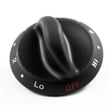
If you suspect a control issue, the model-specific part we commonly see involved is the range surface element control switch W11088181.
A cooktop that is not getting proper voltage or has loose/burned connections can stop working completely and can also damage wiring and controls over time. Verifying the power supply first prevents unnecessary part replacement.
For model-specific troubleshooting steps and safety guidance, use the JED8230ADS owner’s manual and follow the electrical safety steps in the installation instructions.
Last updated: January 2026
Can an electric cooktop be repaired?
Yes. We repair many issues on the Jenn-Air JED8230ADS electric cooktop by replacing serviceable parts (such as a control switch, indicator light, or vent filter) and correcting power or wiring problems; always disconnect power before servicing and follow the wiring and grounding requirements in the JED8230ADS installation guide.
Many “cooktop not working” complaints come down to a few repeat causes. Start with the simplest checks, then move to parts.
- Reset a tripped breaker or replace a blown fuse (if nothing operates)
- Confirm the cooktop is properly connected to the home electrical circuit
- Replace a failed burner control (infinite) switch if an element will not regulate heat
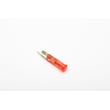
- Replace a failed hot-surface indicator if the light stays on or never comes on
- Clean or replace the downdraft grease filter if ventilation is weak
These are model-matched parts we commonly see used in repairs for the JED8230ADS.
| Symptom | Likely area | Example part for this model |
|---|---|---|
| Element will not heat or won’t adjust | Surface element control | Range surface element control switch W11088181 |
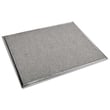
| Downdraft not pulling smoke well | Filter and airflow path | Range downdraft vent grease filter WP707929 |
| “Hot surface” light issue | Indicator circuit | Cooktop indicator light (match by diagram) |
Cooktops combine high voltage and sharp metal edges. We follow these basics before any repair or inspection.
- Disconnect power before servicing (shock hazard)
- Use proper wire size and grounding practices for the circuit
- Allow heating areas to cool before touching components
- Never cook on a broken cooktop surface; stop use and arrange service
- If the cooktop must be moved, use two or more people to prevent injury
A targeted repair usually restores safe heating performance and proper downdraft ventilation without replacing the entire cooktop. It also helps prevent repeat issues caused by loose electrical connections, incorrect installation, or restricted airflow.
Last updated: January 2026
How do I reset a JennAir cooktop?
To reset your Jenn-Air cooktop model JED8230ADS, turn the cooktop off and cycle power at the home breaker for about 1 minute, then restore power and watch for about 1 minute to confirm normal operation and that any error code does not return.
- Turn all surface controls to OFF.
- Turn OFF the cooktop circuit breaker (or remove the fuse) for 1 full minute.
- Turn the breaker ON (or reinstall the fuse).
- Wait 1 minute and check the display/indicator behavior.
- Test each element briefly on a low setting to confirm normal heating.
A reset will not correct a tripped breaker, blown fuse, or a wiring connection issue. The installation instructions note that if the cooktop does not work after turning power on, you should check for a tripped breaker or blown household fuse and then use the troubleshooting guidance in the use and care information. Use the JED8230ADS owner's manual for model-specific operating and troubleshooting steps.
- Confirm the breaker is fully reset (switch OFF, then ON).
- Check for a blown fuse (if your home uses fuses).
- Verify the cooktop is seated correctly and not pinching wiring.
- If you recently installed the unit, recheck the electrical connections and cover installation per the installation guide.
| What you see | What a reset helps with | What to check next |
|---|---|---|
| Error code or odd indicator behavior | Clears temporary control glitches | If it returns, troubleshoot the specific symptom in the manual |
| No heat on any element | Sometimes restores control logic | Breaker/fuse, terminal block connections |
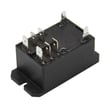
| Downdraft fan not running | Sometimes restores fan control | Fan control/relay, wiring, filter airflow |
Power-cycling clears the cooktop’s electronic control state after a voltage fluctuation or control lockup. It is the fastest safe first step before deeper electrical or parts troubleshooting.
Last updated: January 2026
How long do JennAir cooktops last?
Most Jenn-Air electric cooktops like model JED8230ADS typically last 10 to 15 years with normal use and basic care. Keeping the surface clean, avoiding overheating, and maintaining the downdraft system (if equipped) helps you reach the upper end of that range.
A cooktop’s service life depends most on heat stress, cleaning habits, and how hard the controls and elements are used.
- Daily cooking load: frequent high-heat cooking shortens element and switch life
- Cleaning routine: spills left to bake on can damage finishes and increase overheating
- Cookware fit: oversized pans can overheat areas around the element
- Ventilation upkeep: clogged filters can strain the blower and reduce cooling
- Electrical connections: loose or overheated connections can cause intermittent power issues
The JED8230ADS manual emphasizes safe handling and routine cleaning, plus avoiding practices that overheat components. See the JED8230ADS owner's manual for model-specific care and cleaning guidance.
- Let the cooktop cool before cleaning to prevent damage and burns
- Clean after each use to reduce staining and baked-on residue
- Avoid running high heat settings for long periods when not needed
- Use properly sized cookware (do not let pans extend far beyond the element)
- Keep the downdraft area clean and maintain airflow
| What wears | Common symptom | Typical fix |
|---|---|---|
| Element control switch | burner won’t regulate heat, stuck on high/low | replace switch |
| Indicator light | hot surface light stays off/on incorrectly | replace light |
| Grease filter (downdraft) | weak venting, more smoke/odors | clean or replace filter |
If your downdraft performance is dropping, replacing the range downdraft vent grease filter WP707929 is a common first step.
A cooktop that is overheating, venting poorly, or cycling erratically can wear out switches, wiring, and heating elements faster. Simple upkeep protects performance and helps you avoid premature part failures.
Last updated: January 2026