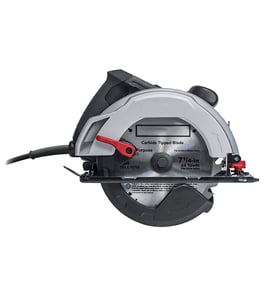

How to change an old Craftsman circular saw blade?
To change the blade on your Craftsman circular saw model 31510864, unplug the saw, lock the spindle (arbor), loosen the arbor bolt, remove the outer washer, swap the blade, then reinstall and tighten everything securely before testing the guard movement.
- Unplug the saw (or remove the battery if it is cordless)
- Wear cut-resistant gloves and eye protection
- Set the saw on a stable bench with the blade facing away from you
- Retract the lower blade guard and confirm it springs back freely
- Use the correct wrench for the arbor bolt (avoid adjustable wrenches that can slip)
- Unplug the saw.
- Press and hold the spindle lock button (often near the upper blade guard).
- While holding the lock, use the wrench to loosen the arbor bolt.
- Retract the lower guard and remove the outer washer (flange).
- Slide the old blade off the arbor.
- Install the new blade with the arrow on the blade matching the saw’s rotation direction.
- Reinstall the outer washer and arbor bolt; tighten firmly while holding the spindle lock.
- Spin the blade by hand to confirm it clears the guard and base; then do a brief no-load test.
Most circular saws use a standard right-hand thread, so you loosen by turning counterclockwise and tighten clockwise. If the bolt does not break free with steady pressure, stop and check the threading direction stamped near the arbor area.
| Task | What “right” looks like | What to fix |
|---|---|---|
| Blade direction | Blade arrow matches saw rotation | Flip blade orientation |
| Guard action | Guard retracts and snaps back | Clean debris, check spring |
| Tightness | Bolt snug, washers seated flat | Reseat washers, retighten |
A correctly installed blade reduces kickback risk, keeps cuts straight, and prevents damage to the arbor, washers, and lower guard.
For help confirming you have the correct model number before ordering parts, use how to find your appliance model number (and what it means for parts).
Last updated: February 2026
How to unlock circular saw blade?
On the Craftsman 31510864 circular saw, you unlock the blade by engaging the spindle (arbor) lock so the blade cannot rotate; then you can loosen the arbor bolt and remove the blade safely. This is the standard method when changing a circular saw blade.
- Unplug the saw (corded) or remove the battery (cordless) before touching the blade.
- Raise the lower blade guard and hold it out of the way.
- Press and hold the spindle/arbor lock button (often near the upper blade guard).
- While holding the lock, rotate the blade by hand until you feel the lock “drop in” and the blade stops turning.
- Use the correct wrench to loosen the arbor bolt, then remove the outer flange/washer.
- Slide the blade out (usually down and out), keeping track of the flange parts for reassembly.
Most circular saws use a standard right-hand thread, but some use a left-hand thread to resist loosening in use.
| What you see | What to do | What it means |
|---|---|---|
| Bolt loosens turning left (counterclockwise) | Keep turning left to remove | Standard thread |
| Bolt loosens turning right (clockwise) | Keep turning right to remove | Left-hand thread |
Holding the spindle lock prevents the motor and gears from taking the force of the wrench. That protects the drive components and helps you remove the bolt without slipping and damaging the blade, flange, or guard.
- Rotate the blade slowly by hand while pressing the lock; it engages only at certain positions.
- Clean sawdust around the lock button and guard area.
- Use a properly fitting wrench; rounded bolt heads are common when the wrench slips.
- If the bolt is seized, apply steady pressure (not sudden impacts) and keep the guard held clear.
For general DIY safety practices before repairs, see are diy appliance repairs safe.
Last updated: February 2026
Are circular saw blades reverse threaded?
Most circular saw blades are not reverse threaded; the arbor nut is typically designed so the blade’s normal rotation tends to keep the nut tight. On a Craftsman 31510864 circular saw, the nut usually loosens by turning it in the direction opposite the blade’s rotation (often counterclockwise), but confirm by checking the rotation arrow on the blade guard.
Use the saw’s rotation direction as your guide, not a “reverse thread” assumption.
- Unplug the saw (corded) or remove the battery (cordless) before touching the blade.
- Find the rotation arrow on the upper blade guard or on the blade.
- The arbor nut generally loosens by turning it against the blade’s rotation.
- Use the spindle lock (if equipped) to keep the arbor from turning.
- If the nut is stuck, use steady pressure; avoid hammering the wrench.
| Item | What you’ll usually see | What it means for removal |
|---|---|---|
| Blade rotation | Forward at the top of the blade (toward the front guard) | Nut is designed to self-tighten in use |
| Arbor nut thread | Standard right-hand thread on many saws | Often loosens counterclockwise |
| Left-side blade saws | Blade mounted on the left | Loosening direction can feel “opposite” depending on access |
- Lock the spindle (or hold the blade with a block of wood against the shoe).
- Fit the wrench fully on the arbor nut.
- Turn the wrench against blade rotation until the nut breaks free.
- Remove the outer washer/flange, then lift off the blade.
Turning the nut the wrong way can round the nut, damage the flange/washer, or make the blade change harder next time. Using the rotation arrow prevents mistakes across different Craftsman circular saw designs.
For more help identifying the exact model marking you should use when ordering parts, see how to find your appliance model number (and what it means for parts).
Last updated: February 2026
Why is my Craftsman circular saw not spinning?
If your Craftsman circular saw model 31510864 powers on but the blade will not spin, the most common causes are worn motor brushes, a seized blade/arbor area, or a failed trigger switch. Start with the brush and blade checks because they are the fastest ways to pinpoint a no-spin condition.
- Unplug the saw and confirm the blade turns by hand (with gloves). If it binds, the issue is mechanical (blade, arbor, guard, or bearings).
- Check that the blade bolt is tight and the blade is installed correctly (not pinched by washers).
- Inspect the lower blade guard; if it sticks, it can jam the blade at startup.
- Smell for burnt odor or look for heavy sparking at the vents; that points to brushes or the armature.
- If the saw is completely dead (no sound, no hum), suspect the trigger switch, cord, or internal wiring.
Motor brushes carry power to the spinning armature. When brushes wear down, chip, or lose spring tension, the motor can lose contact and the blade will not turn.
What to look for:
- Brush is very short (near the end of its usable length)
- Cracked or burnt brush face
- Weak spring pressure or brush sticking in its holder
If one brush is worn, replace both as a set so the motor wears evenly.
Use this table to match symptoms to likely parts:
| Symptom | Most likely cause | What to do next |
|---|---|---|
| Hums but blade does not move | Jammed blade/arbor, seized bearing, weak brushes | Free the bind; then inspect brushes |
| Runs intermittently | Worn brushes, loose wiring, failing switch | Check brushes and connections |
| No sound at all | Trigger switch, power cord, internal wiring | Test cord and switch continuity |
For safe testing steps, use how to use a multimeter to test electrical parts video.
A circular saw that will not spin is often a simple wear item (brushes) or a mechanical bind. Fixing it early prevents overheating, switch damage, and armature failure.
Last updated: February 2026
