Owner’s manual
 Error Codes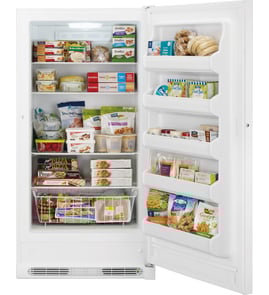



How do you reset a Kenmore stand up freezer?
On the Kenmore KLFU018AWD0 upright freezer, a “reset” is typically done by unlocking the control panel and reselecting your temperature or mode. Press and hold Mode for 3 seconds to unlock, then adjust settings; if the controls are unresponsive, power-cycle the freezer.
Quick reset options (most common)
- Unlock the controls: Press and hold Mode for 3 seconds until the Lock icon turns off.
- Re-select the temperature: Press Mode to cycle temperature targets (Cold, Colder, Coldest) or use + / - if your panel uses those buttons.
- Return to default Freezer mode: Press and hold Mode for 3 seconds to switch modes; Freezer mode defaults to 0°F (-18°C).
- Cancel Quick Freeze (if active): Press the Quick Freeze button again to turn it off.
- Power-cycle reset (when the panel is frozen): Unplug the freezer (or switch off the breaker) for 5 minutes, then restore power.
What the buttons do on this model
Use this as a fast reference while you reset settings.
| Control | What it does | What you should see |
|---|---|---|
| Mode (hold 3 sec) | Locks or unlocks the control panel | Lock icon blinks, then turns off (unlocked) |
| Mode (press) | Cycles temperature setting (varies by mode) | Temperature target changes |
| + / - (if present) | Steps set temperature up or down | Setpoint changes in small increments |
| Quick Freeze | Temporarily boosts freezing | Quick Freeze icon lights |
Why it matters
If the control panel is locked, temperature changes will not take effect. Resetting by unlocking and reselecting the setpoint helps restore normal operation and prevents food from warming due to an unchanged or unintended setting.
Parts and documentation help
For the exact control layout and temperature sequences used on your KLFU018AWD0, follow the control-panel steps in the owner's manual. If you need to look up replacement parts by model number, search by KLFU018AWD0 on Sears PartsDirect.
Last updated: February 2026
How long does a Kenmore upright freezer last?
A Kenmore upright freezer like model KLFU018AWD0 typically lasts 10 to 15 years. With steady temperatures, good airflow, and clean door seals, many units reach the high end of that range before major sealed-system or compressor issues show up.
Typical lifespan and what to expect
Most upright freezers follow a similar wear pattern over time.
- 0 to 5 years: Usually routine maintenance only (cleaning, leveling, minor adjustments)
- 5 to 10 years: Higher chance of fan, thermostat/control, or door gasket wear
- 10 to 15 years: Common window for major repairs (compressor start components, sealed-system leaks)
- 15+ years: Possible, but efficiency and repair frequency typically become the deciding factors
What shortens (or extends) freezer life
These factors have the biggest impact on longevity and performance.
- Keeping the door closed as much as possible (reduces run time and frost load)
- Allowing proper airflow around the cabinet and not blocking vents inside
- Avoiding overloading with warm food (the manual recommends waiting about 4 hours to fully cool before loading unfrozen food after startup)
- Maintaining a tight door seal (prevents moisture intrusion and heavy frost)
- Protecting it during moves by keeping it upright and securing shelves and bins
Quick checklist: signs your freezer is nearing end of life
| Symptom | What it often points to | What we recommend |
|---|---|---|
| Runs almost constantly | Poor airflow, dirty condenser area, weak seal, low refrigerant | Check airflow and door seal first; then diagnose cooling system |
| Heavy frost buildup | Door left ajar, gasket leak, frequent openings | Inspect gasket and door alignment |
| Warm temps or thawing | Control issue, fan issue, sealed-system problem | Verify settings; then test components |
| Loud clicking/humming changes | Start device or compressor strain | Troubleshoot electrical start components |
Why it matters
A freezer that is struggling to hold temperature can waste energy and put food at risk during longer run cycles or power interruptions. The owner's manual also notes that keeping the door closed helps frozen foods stay frozen longer during a power failure.
For model-specific operating guidance (temperature control, loading limits, and power-failure tips), use the owner's manual. For replacement parts and diagrams, start with the model parts list, or search by model number on Sears PartsDirect.
Last updated: February 2026
Why would my upright freezer suddenly stop working?
If your Kenmore KLFU018AWD0 upright freezer suddenly stops working, the most common causes are a power interruption, a control setting issue (including the control lock), or airflow and loading problems that make the compressor run poorly. Start with power and control checks, then move to cooling and airflow basics.
Quick checks (fastest fixes first)
- Confirm the outlet has power (try a lamp or small appliance).
- Make sure the power cord is fully seated in a grounded 3-prong outlet.
- Check the temperature control panel: the Power On light should be illuminated when the unit is powered.
- Unlock the control panel if needed: press and hold Mode for 3 seconds (the lock icon should turn off).
- If the freezer was just plugged back in, allow 4 hours to cool completely before judging performance.
Cooling and airflow issues that can look like “stopped working”
Poor airflow can make temperatures rise quickly, even if the freezer is still running.
- Avoid overloading; freeze only about 3 lb of fresh food per cubic foot at one time.
- Do not line shelves or bins with foil, wax paper, or paper towels; liners block cold-air circulation.
- Limit door openings; organize food so the door is open for less time.
- Let hot foods cool to room temperature before loading.
If there was a power outage
During a power failure, frozen foods typically stay frozen for at least 24 hours if the door stays closed. If power is restored and the freezer still will not run, use the troubleshooting steps in the owner's manual and then plan the next repair step.
Food protection guide
| Situation | What we recommend | Why it helps |
|---|---|---|
| Power out, door closed | Keep door shut | Preserves internal temperature |
| Off for several hours | Do not open unnecessarily | Reduces recovery time when restarted |
| Extended outage | Use dry ice (with gloves) | Maintains safe frozen temps longer |
Why it matters
A freezer that is off, locked out, or starved for airflow can thaw food quickly. Power, control lock status, and proper loading are the highest-impact checks to prevent food loss and avoid unnecessary part replacement.
For model-based parts lookup and diagrams, search by model number on Sears PartsDirect.
Last updated: February 2026
How do I know if my compressor is bad in my Kenmore freezer?
If your Kenmore KLFU018AWD0 upright freezer runs almost constantly, won’t hold safe freezing temperatures, or trips the breaker, the compressor system is a top suspect. We confirm the diagnosis by checking airflow, door sealing, and electrical readings before replacing major sealed-system components; see the KLFU018AWD0 owner's manual.
Common signs that point to a compressor problem
- Freezer is warm or temperatures swing even with the control set correctly
- Compressor runs for very long periods with little or no improvement in temperature
- Clicking, buzzing, or repeated start attempts (start device overload cycling)
- Compressor shell is extremely hot to the touch (use caution)
- House breaker trips shortly after the compressor tries to start
Quick checks to do first (often not the compressor)
Before blaming the compressor, we rule out the most common causes of “runs all the time” cooling complaints:
- Door seal and door closing: look for gaps, torn gasket, or packages preventing full closure
- Load and airflow: avoid overloading; don’t block vents or line shelves with foil or paper (it restricts cold-air circulation)
- Room conditions: keep the freezer away from heat sources and direct sunlight
- Hot food and frequent openings: hot food and long door openings force longer run times
What you should see vs. what it suggests
| What you notice | More likely cause | Next step |
|---|---|---|
| Runs a lot but still freezes solid | Normal heavy use or warm room | Improve airflow, reduce door openings |
| Runs a lot and food is soft | Airflow issue, door leak, or sealed-system issue | Check gasket, vents, frost pattern |
| Clicks repeatedly, won’t start | Start device, capacitor, or compressor | Electrical tests with a meter |
| Trips breaker on start | Compressor short or wiring issue | Inspect wiring, test compressor windings |
How we confirm a “bad compressor”
A compressor is considered failed when it won’t start with a known-good start device, has abnormal winding resistance, is shorted to ground, or can’t build pressure (sealed-system performance issue). For safe electrical testing practices, use how to use a multimeter to test electrical parts video.
Why it matters
A compressor is part of the sealed system; misdiagnosing it can lead to unnecessary cost. The manual’s energy-saving guidance also helps reduce run time and prevents symptoms that look like compressor failure.
If you need to look up diagrams or order replacement parts by model number, use the parts list for KLFU018AWD0 or search on Sears PartsDirect.
Last updated: February 2026