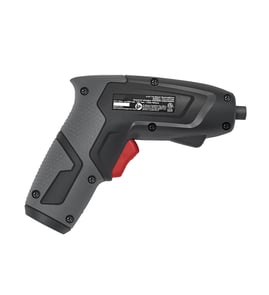

What is an 11 in 1 screwdriver?
An 11-in-1 screwdriver is a multi-bit hand tool that combines one handle with multiple interchangeable tips (and often nut drivers) so you can handle common fasteners without carrying several separate screwdrivers. It is a general tool concept and is not specific to the Craftsman 315111200 cordless screwdriver.
What “11-in-1” usually includes
Most 11-in-1 screwdrivers are designed around the most common jobsite fasteners and typically include a mix of:
- Phillips bits (common sizes)
- Slotted (flat) bits
- Square (Robertson) bits
- Torx bits (on some versions)
- Nut drivers (often 1/4-inch and 5/16-inch)
- A reversible or double-ended bit system stored in the handle
How it’s different from a cordless screwdriver
A Craftsman 315111200 cordless screwdriver is a powered driver meant to spin screws quickly; an 11-in-1 is a manual tool meant for control and convenience.
| Feature | 11-in-1 screwdriver (manual) | Cordless screwdriver (powered) |
|---|---|---|
| Power source | Hand force | Battery/motor |
| Best for | Light duty, tight spaces, delicate fasteners | Faster driving, repetitive screws |
| Torque control | High control by feel | Depends on clutch/trigger control |
When an 11-in-1 is the right choice
- You need one tool for multiple screw head types
- You are working in a tight area where a drill is awkward
- You want better “feel” to avoid stripping small screws
- You are doing occasional household or light electrical box work
Why it matters
Using the right driver tip and size reduces cam-out (bit slipping), stripped screw heads, and damaged fasteners. That saves time and helps protect parts and housings on tools and equipment.
For more help identifying the correct model number when you are shopping for tool parts, use how to find your appliance model number (and what it means for parts).
Last updated: February 2026
Is it worth getting an electric screwdriver?
Yes; an electric (cordless) screwdriver is worth it for most households because it drives lots of screws faster with less wrist strain than a manual screwdriver, while giving more control than a full-size drill for light-duty tasks. For a Craftsman 315111200 cordless screwdriver, it is a practical tool for assembly and quick repairs.
When it’s most worth it
- Assembling furniture, cabinets, grills, and shelving (dozens of screws)
- Installing switch plates, hinges, drawer slides, and hardware
- Working in tight spaces where a drill is bulky
- Reducing hand fatigue if you have arthritis or repetitive-use pain
- Doing light DIY where you want controlled torque and fewer stripped screws
Electric screwdriver vs. drill: quick comparison
| Task | Electric screwdriver | Drill/driver |
|---|---|---|
| Furniture assembly | Best choice | Often overpowered |
| Small screws (soft materials) | Best control | Easier to strip heads |
| Large fasteners, long screws | Limited | Best choice |
| Drilling holes | Usually not | Yes |
What to look for (so it actually feels “worth it”)
- Adjustable clutch/torque settings: helps prevent stripping screw heads
- Forward/reverse switch: speeds up removal and rework
- Comfort and balance: reduces fatigue on long projects
- Bit compatibility: common 1/4-inch hex bits are the most convenient
- Battery type and runtime: enough capacity for your typical project size
Why it matters
Using the right tool protects your fasteners and materials. A controlled cordless screwdriver helps avoid cam-out (bit slipping), stripped Phillips heads, and cracked plastic, while still saving time compared to hand-driving.
Parts and support note
If you are maintaining a Craftsman 315111200 and need help identifying the correct replacement part by model number, use how to find your appliance model number (and what it means for parts) to match the tool to the right parts listing.
Last updated: February 2026
How to release a bit from an electric screwdriver?
To release a bit from your Craftsman 315111200 cordless screwdriver, first make the tool safe (battery out), then open the chuck or bit holder by turning the collar counterclockwise or pulling the quick-release sleeve, and slide the bit straight out.
Quick steps (most common methods)
- Remove the battery pack (or unplug the charger) before handling the chuck.
- If your tool has a keyless chuck: hold the chuck body and turn the front collar counterclockwise to loosen.
- If your tool has a quick-release hex bit holder: pull the release sleeve/collar forward (sometimes backward, depending on design).
- Pull the bit straight out; do not twist hard because it can wedge the shank.
- If the bit is stuck, re-seat it fully, release again, then pull out.
If the bit is stuck
A stuck bit is usually caused by debris, a slightly rounded shank, or the chuck jaws gripping unevenly.
- Tap the bit lightly while the chuck is loosened (use a small block of wood, not a hammer directly on the bit).
- Spray a small amount of light oil into the chuck jaws or bit holder, then work the collar/sleeve a few times.
- Wipe the bit shank clean and check for burrs; replace damaged bits.
- For a keyless chuck, tighten slightly first, then loosen again to help the jaws re-center.
Keyless chuck vs quick-release holder (what you are looking for)
| What you see on the tool | How it releases | What the bit looks like |
|---|---|---|
| Rotating chuck with jaws | Turn collar counterclockwise | Round shank (drill/driver bit) |
| Smooth nose with sliding sleeve | Pull sleeve to unlock | 1/4-inch hex shank bit |
Why it matters
Removing the bit the right way prevents stripped chuck jaws, damaged hex holders, and rounded bit shanks, which can cause slipping under load and poor screw control.
Related DIY help
If you suspect a wiring or switch issue while you are working on the tool, use a meter to confirm power flow safely: how to use a multimeter to test electrical parts video.
Last updated: February 2026
Is 5 nm torque good for a screwdriver?
Yes. 5 Nm is a solid torque level for a cordless screwdriver for light-duty fastening; it’s ideal when you want control to avoid stripping screw heads. For the Craftsman model 315111200, use torque as a guide for what the tool can comfortably drive, not as a confirmed spec.
What 5 Nm is best for
- Assembling furniture and fixtures
- Installing cabinet hardware, hinges, and drawer slides
- Driving small wood screws (best with pilot holes)
- Driving machine screws into threaded holes or inserts
- Light electrical cover plates and low-load brackets
When 5 Nm can feel underpowered
- Long screws into studs or dense hardwood without pilot holes
- Large-diameter screws (structural, lag-type fasteners)
- Repetitive fastening where speed and power matter
- Any drilling beyond very small pilot holes
Quick torque guide (typical ranges)
| Torque (Nm) | Typical tool type | Typical use |
|---|---|---|
| 2 to 6 | Cordless screwdriver | Light fastening, precision control |
| 6 to 15 | Light drill/driver | General household screwdriving |
| 15 to 35 | Drill/driver | Medium screws, light drilling |
| 35+ | Impact driver / heavy drill | Large fasteners, demanding work |
Why it matters
Torque is the tool’s ability to keep turning under load. Around 5 Nm helps you seat small to medium fasteners cleanly with fewer stripped heads, but it won’t reliably drive long screws into dense material without prep.
Tips to get better results with lower torque
- Match the bit type and size (Phillips, Torx, square) to the screw head
- Drill a pilot hole in hardwood or for longer screws
- Keep the battery fully charged; low charge reduces usable power
- Apply steady, straight pressure to prevent cam-out
For basic electrical testing steps if the tool won’t run, use: how to use a multimeter to test electrical parts video.
Last updated: February 2026