Installation guide
 Owner’s manual




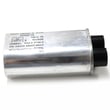

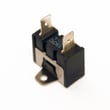
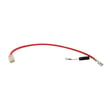
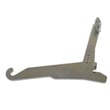
Can you replace the oven heating element in a Kenmore oven?
Yes. On the Kenmore Elite 79049113410 wall oven/microwave combo, you can replace a failed oven heating element (typically the bake element) by shutting off power, removing the mounting screws, pulling the element forward, transferring the wires, and reinstalling the new element securely. Use the 79049113410 owner’s manual for model-specific access and safety notes.
- Turn off power at the breaker; this is a hardwired wall oven in many installations.
- Confirm the oven is completely cool; heating elements and nearby surfaces stay hot after use.
- Pull the oven racks out for working room.
- Wear work gloves; sharp sheet metal edges are common around the rear panel.
- Take a photo of the wire connections before disconnecting anything.
- Remove the oven racks.
- Remove the screws holding the element mounting plate to the rear oven wall.
- Gently pull the element a few inches into the cavity.
- Disconnect the two element wires (do not let them slip back through the insulation).
- Connect the wires to the new element terminals, then remount the element and reinstall screws.
- Restore power and test Bake.
- Power supply: A wall oven needs full voltage; a tripped breaker can leave the oven partially powered.
- Control and relays: A failed relay on the control can prevent the element from energizing.
- Temperature sensing: If the oven misreads temperature, it can underheat or shut the element off early; the range oven temperature sensor 5304504897 is a common suspect when temps are erratic.
- Wiring/terminals: Look for burned connectors or heat-damaged insulation.
| Symptom | Most likely cause | What we recommend |
|---|---|---|
| Element is blistered or broken | Element failed | Replace the element and inspect terminals |
| Oven heats sometimes | Loose connection or relay issue | Check terminals, then control/relay circuit |
| Temperature swings widely | Sensor or airflow issue | Test sensor, verify cooling fan operation |
A weak or open heating element causes long preheat times, uneven baking, and can overwork the control system. Replacing the element promptly helps restore normal bake performance and protects wiring from heat damage.
Last updated: February 2026
How do I reset my Kenmore oven control board?
To reset the electronic oven control on your Kenmore Elite 79049113410 wall oven/microwave combo, turn the unit off at the household breaker for 1 to 5 minutes, then restore power and re-set the clock. This clears many temporary control glitches.
- Press STOP/CLEAR to cancel any active Bake, Broil, or Self-Clean cycle.
- Turn OFF the oven at the circuit breaker (or unplug if your installation allows).
- Wait 1 to 5 minutes.
- Turn power back ON.
- Set the time of day and test Bake and Broil.
For control features and button sequences (audio mode, F/C display, energy saver), follow the 79049113410 owner’s manual.
A reset helps when the control is “confused”, but it will not correct a failed sensor, stuck key, or a board problem.
Common next checks:
- Oven heats incorrectly or shows a temp-related fault: test the range oven temperature sensor 5304504897.
- Oven shuts down or overheats: check the high-limit thermostat and cooling airflow.
- Display works but oven will not heat: inspect wiring connections and power supply at the terminal block.
- Microwave side acts up after reset: door interlock issues can prevent operation.
Your model uses internal cooling fans; they can run during cooking and may continue running after the oven is turned off to cool the unit. That is normal behavior and not a control-board failure.
| Symptom after reset | Most likely direction | What we do next |
|---|---|---|
| Blank display, no response | Power supply issue | Check breaker, wiring, terminal block connections |
| Heats but temperature is off | Sensor/calibration | Test sensor; review calibration steps in manual |
| Random beeping or odd tones | Audio setting or keypad issue | Verify audio mode settings; inspect keypad/control panel |
| Microwave will not start | Door switch/interlock | Check door latches and interlock switch operation |
Resetting at the breaker is the fastest way to clear a temporary electronic control lockup without replacing parts. If the problem returns quickly, the symptom pattern helps pinpoint whether the issue is the control board, a temperature sensor, a thermostat, or a door interlock.
Last updated: February 2026
How high should a wall oven microwave combo be?
For the Kenmore Elite 79049113410 wall oven/microwave combo, the cabinet cutout height is typically 44 1/4 to 44 1/2 inches. If your opening is taller, the installation instructions allow shimming or a larger bottom trim so the unit sits at the correct finished height (and looks built-in).
Use the cutout height (H) guidance in the 79049113410 installation guide. In many kitchens, the “how high” question really means two things: the rough opening height and the finished mounting position.
- Target cutout height: 44 1/4 to 44 1/2 inches
- If cutout height is 44 1/2 to 45 1/8 inches: add 2-inch wide wood shims (one on each side) under the appliance side rails
- If cutout height is 45 1/8 to 46 7/8 inches: use a larger bottom trim (ordered through service)
- Keep the support surface level front-to-back and side-to-side
- Plan the electrical junction box location so it does not interfere with the oven chassis
| Cutout height (H) | What we recommend | Why |
|---|---|---|
| 44 1/4 to 44 1/2 in | Install normally | Best fit and clean reveal |
| 44 1/2 to 45 1/8 in | Add 2-in wide wood shims | Raises unit to hide gaps |
| 45 1/8 to 46 7/8 in | Order larger bottom trim | Covers extra opening height |
Correct height prevents visible gaps above or below the trim, keeps the unit properly supported, and helps the door alignment and ventilation clearances match the Kenmore installation requirements.
Last updated: February 2026
Where to find model number on Kenmore Elite oven?
On Kenmore Elite model 79049113410, the model and serial number are printed on the serial plate along the interior side trim of the oven; you can see it when you open the lower oven door. Confirm the exact location and label details in the 79049113410 use and care guide.
Check these common label locations in this order:
- Open the lower oven door and look along the interior side trim (most common for this model)
- Look on the front frame/door jamb area around the oven opening
- Check the side trim near the control panel area (if accessible with the door open)
- If the unit has been removed from the cabinet before, check any installation paperwork you saved
The serial plate usually lists the model number and serial number you need for parts lookup, wiring diagrams, and service.
| You need this | Why it matters | Example for this unit |
|---|---|---|
| Model number | Ensures parts fit your exact Kenmore Elite configuration | 79049113410 |
| Serial number | Helps match production run details for some parts | Printed on the same plate |
- Use a flashlight; the trim area can be shadowed
- Wipe grease or film off the trim with a damp cloth so the print is readable
- Write the model and serial number down exactly as shown (numbers only, no spaces added)
- Take a clear photo before ordering parts
Kenmore Elite wall oven/microwave combos can look similar across model series, but parts like a control board, door switch, or temperature sensor can vary by model. Using the serial plate info prevents wrong-part returns and repeat repairs.
Last updated: February 2026