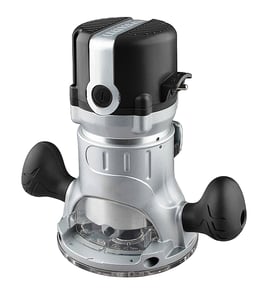

What size shank is a Craftsman router?
Most Craftsman routers use 1/4-inch shank router bits; some full-size models also support 1/2-inch shank bits when the correct collet is installed. For the Craftsman 31517310 router, confirm the shank size by checking the collet opening and any markings on the collet nut.
Unplug the router, remove the bit, and measure the inside diameter of the collet (or test-fit a known bit shank).
- 1/4-inch shank: common on trim and mid-size routers
- 1/2-inch shank: common on larger routers for heavier cuts
- Check for two collets in your kit (a 1/4-inch and a 1/2-inch)
- Look for stamped markings like “1/4” or “1/2” on the collet
- If the bit slips, the collet may be worn or the wrong size
| Bit shank size | Typical use | What you need |
|---|---|---|
| 1/4-inch | edge profiles, light to medium routing | 1/4-inch collet installed |
| 1/2-inch | larger bits, deeper cuts, smoother results | 1/2-inch collet installed |
Using the correct shank size helps the bit clamp securely in the collet, which reduces vibration, improves cut quality, and helps prevent bit slippage during routing.
Match the bit shank to the collet you have installed, and use your model number 31517310 when searching diagrams and replacement items on Sears PartsDirect.
Last updated: February 2026
What is a Sears Craftsman router?
A Sears Craftsman router (including the Craftsman 31517310) is a handheld power tool used to shape, trim, and cut wood by spinning a router bit at high speed. It is commonly used for edge profiles, dadoes/grooves, rabbets, and hinge or hardware mortises.
- Round over, chamfer, or decorative-profile edges on boards
- Cut grooves and dadoes for shelves and joinery
- Flush-trim laminate or wood to a template
- Cut rabbets for cabinet backs and panels
- Make mortises for hinges and hardware
Even without model-specific documentation, most corded Craftsman routers like model 31517310 share these core components:
| Feature or part | What it does | Why you care |
|---|---|---|
| Motor and switch | Powers the bit and controls on/off | A worn switch or brushes can cause intermittent running |
| Collet and collet nut | Clamps the router bit shank | Incorrect size or a dirty collet can cause bit slippage |
| Base (fixed or plunge style) | Sets cutting depth and stability | Base wear affects accuracy and safety |
| Depth adjustment | Controls how deep the bit cuts | Prevents over-cutting and kickback |
| Dust exhaust/collection port (if equipped) | Helps manage chips | Improves visibility and reduces cleanup |
- Unplug the router before changing bits or adjusting depth.
- Match the bit shank to the collet size (commonly 1/4 inch or 1/2 inch).
- Insert the bit fully, then pull it back slightly before tightening to avoid bottoming out.
- Make multiple shallow passes instead of one deep cut.
- Secure the workpiece and keep the cord clear of the cutting path.
Using the right bit fit, depth setting, and pass depth helps you get cleaner cuts and reduces the chance of chatter, burning, or kickback, especially on detailed woodworking edges and joinery.
For general repair and troubleshooting skills that also apply to corded power tools, we recommend starting with are diy appliance repairs safe.
Last updated: February 2026
How to replace router bits sears Craftsman router?
To replace a router bit on your Craftsman 31517310 router, unplug the tool, loosen the collet nut, remove the old bit, then insert the new bit and tighten the collet securely. This prevents bit slippage and helps you get clean, controlled cuts.
- Unplug the router (never rely on the switch alone).
- Remove the base if it blocks access to the collet (common on some fixed bases).
- Press the spindle lock (if equipped) or hold the spindle with the correct wrench.
- Loosen the collet nut counterclockwise until the bit releases.
- Pull the bit out, then insert the new bit.
- Back the bit out slightly (about 1/16 inch) before tightening so it seats correctly.
- Tighten the collet nut firmly; do not overtighten.
| What to check | What “good” looks like | Why it matters |
|---|---|---|
| Bit shank size | Matches the collet (commonly 1/4 inch or 1/2 inch) | Prevents wobble and slipping |
| Insertion depth | Shank fully supported; not bottomed out | Reduces vibration and breakage |
| Tightness | Bit cannot be rotated or pulled by hand | Keeps the cut accurate and safe |
- Bit stuck in the collet: Loosen the nut a bit more; many collets “pop” the bit free as the nut backs off.
- Bit slips during a cut: Re-seat the bit (do not bottom it out), then retighten; also clean dust from the collet.
- Excess vibration or chatter: Confirm the bit is straight, the shank is clean, and the collet is not worn.
A properly seated router bit keeps the Craftsman 31517310 cutting smoothly, protects the collet and spindle, and reduces kickback risk, especially when routing hardwood or using larger profile bits.
For more general DIY safety guidance before repairs, review are diy appliance repairs safe.
Last updated: February 2026
How to remove collet from Craftsman router?
To remove the collet on a Craftsman 31517310 router, unplug the tool, remove any bit, then loosen the collet nut with the proper wrenches until the collet releases and can be pulled out. This is the standard collet-and-nut design used on most Craftsman routers.
- Unplug the router before touching the collet or bit.
- Remove the base if it blocks access to the collet nut.
- Hold the spindle still using the router’s wrench flats (or the second wrench if your model uses two).
- Turn the collet nut counterclockwise to loosen.
- Keep loosening until the collet relaxes its grip, then slide the bit out.
- If you’re removing the collet itself, unthread the nut fully and pull the collet straight out of the nut/spindle area.
- Re-thread the nut a turn or two, then loosen again to help it unseat.
- Clean sawdust and resin from the nut and collet slots.
- Try a different bit with a clean shank to confirm the collet is not binding on the bit.
- Replace the collet or nut if you see cracks, heavy wear, or damaged threads.
| Item | Normal condition | Replace if you see |
|---|---|---|
| Collet slots | Even spacing, no chips | Cracks, spread slots, burrs |
| Collet nut | Threads turn smoothly | Cross-threading, rounded wrench flats |
| Bit shank | Clean and smooth | Scoring, rust, heavy pitch buildup |
A clean, undamaged collet grips the bit shank evenly. If the collet sticks or is worn, the bit can slip or run out, which hurts cut quality and increases kickback risk.
For general DIY safety practices while servicing tools, use are diy appliance repairs safe.
Last updated: February 2026