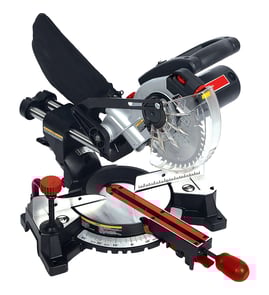

How to unlock a pro tech miter saw?
On the Pro-Tech 7203 8-1/4" miter saw, “unlocking” usually means releasing the miter table lock and, if needed, the head (down) lock pin so the saw can pivot or the arm can raise. Loosen the front miter lock knob or handle, move to the angle you want, then tighten it back down.
What to check first (common lock points)
- Miter lock knob/handle (front of the base): Loosen to rotate the table left or right.
- Miter detent latch (near the miter scale): Press or pull to move off common preset angles (detents).
- Head lock pin (rear hinge area): Pull the pin out (or rotate it, depending on style) while holding the handle; then let the head rise slowly.
- Bevel lock knob/lever (side or rear): Loosen to tilt the saw for bevel cuts.
- Slide lock (if equipped): Loosen to allow the head to slide forward and back.
Quick steps to unlock and set a miter angle
- Unplug the saw.
- Loosen the miter lock knob/handle.
- If it stops at a detent and you need a non-standard angle, hold the detent latch to bypass the stop.
- Rotate the table to your desired angle on the miter scale.
- Tighten the miter lock firmly; then recheck the angle before cutting.
If the saw will not unlock (troubleshooting)
| Symptom | Most likely cause | What we do |
|---|---|---|
| Table will not rotate | Lock knob still tight, debris in base | Fully loosen knob; clean sawdust from the turntable area |
| Stuck at common angles | Detent latch not released | Press/pull detent latch while rotating |
| Head will not raise | Head lock pin engaged | Support handle, pull/rotate lock pin, raise slowly |
| Movement feels gritty | Packed sawdust or pitch | Brush/vacuum; wipe and lightly lubricate pivot points (avoid the blade area) |
Why it matters
A fully locked miter or bevel mechanism can shift during a cut if it is only partially tightened, which affects cut accuracy and can cause binding. Unlocking and re-locking correctly helps keep your Pro-Tech 7203 cuts square and repeatable.
For general DIY safety and prep before adjustments, use our guide: are diy appliance repairs safe.
Last updated: February 2026
What are the parts of a miter saw?
A Pro-Tech 7203 (8-1/4 inch) miter saw is built around a motor-driven blade on a pivoting arm, plus angle-setting controls that let us make accurate crosscuts and miter cuts. Most models share the same core parts even if the exact shapes and labels vary.
Main parts you will see on most miter saws
- Blade and arbor: The circular blade mounts to the arbor (spindle) and is held by an arbor bolt and washers.
- Blade guard (upper and lower): Covers the blade; the lower guard retracts as we lower the handle.
- Motor and brushes (on many saws): The motor drives the blade; some motors use replaceable carbon brushes.
- Handle and trigger switch: The on/off trigger is typically in the handle; some saws also have a lock-off button.
- Pivot arm and hinge: The arm swings down to cut; the hinge area is where wear can create play.
- Base and turntable: The work sits on the base; the turntable rotates left and right for miter angles.
- Miter scale and pointer: Shows the selected miter angle; accuracy depends on calibration.
- Miter lock (knob or lever): Locks the turntable at the chosen angle.
- Fence (left and right): Supports the workpiece and helps keep it square to the blade.
- Clamp (work clamp): Holds material against the fence for safer, more repeatable cuts.
- Depth stop (if equipped): Limits how far the blade lowers for dado-like or partial-depth cuts.
- Dust port and dust bag (or vacuum adapter): Captures sawdust at the rear of the blade area.
Quick “what it does” table
| Part | What it controls | Why it matters |
|---|---|---|
| Turntable + miter lock | Left/right angle | Accurate miters and repeatable setups |
| Fence + clamp | Workpiece position | Straighter cuts and safer handling |
| Guard system | Blade exposure | Reduces accidental contact |
| Trigger switch | Power to motor | Reliable starts and stops |
Why it matters
Knowing the part names helps us troubleshoot faster (for example, a cut that is not square often points to fence alignment, turntable calibration, or hinge play rather than the blade itself).
Helpful DIY reference
If you are diagnosing a power issue (no start, intermittent run), use how to use a multimeter to test electrical parts video to safely check the switch, cord, and motor circuit.
Last updated: February 2026
What should you never cut with a miter saw?
You should never use a Pro-Tech 7203 8-1/4" miter saw to cut tiny, unsupported pieces near the blade, rip-cut lumber (with the grain), or cut materials the saw is not designed for (such as steel/iron or masonry). Avoid freehand cuts and any cut where the workpiece is not firmly supported and secured.
Materials and cuts to avoid
- Rip cuts (with the grain): A miter saw is for crosscuts, miters, and bevels, not ripping boards.
- Ferrous metals (steel/iron): These can shatter abrasive wheels, damage teeth, and create dangerous sparks and kickback.
- Masonry (brick, concrete, tile): Dust and impact loads can damage the saw and create serious airborne hazards.
- Very small parts: If your fingers would be within the “danger zone” near the blade, do not make the cut.
- Warped, twisted, or round stock without support: Unstable stock can roll or shift into the blade.
- Anything thicker or wider than the saw’s capacity: Forcing the cut increases binding and kickback risk.
Safer alternatives (what to do instead)
- Use a table saw or circular saw with a guide for rip cuts.
- Use the correct metal-cutting saw or approved non-ferrous setup (only if your blade and saw are rated for it).
- Use a masonry saw for brick, stone, or concrete.
- For short pieces, use a stop block and clamp; keep hands well away from the blade path.
- For warped boards, clamp the workpiece and support both sides so it cannot rock.
Quick decision table
| Task or material | Use the miter saw? | Better choice |
|---|---|---|
| Crosscut 2x lumber | Yes | Miter saw with clamp/support |
| Rip a 1x6 board | No | Table saw or circular saw + guide |
| Cut steel angle | No | Metal-cutting saw |
| Cut brick/paver | No | Masonry saw |
Why it matters
Most miter saw injuries and tool damage happen when the workpiece shifts, binds, or is too small to control. Keeping the stock supported, clamped, and within the saw’s intended use reduces kickback and keeps hands out of the blade path.
For general shop safety habits that apply to DIY repairs and tool work, see are diy appliance repairs safe.
Last updated: February 2026
Why is 31.6 on a miter saw?
The 31.6° mark on a miter saw (including the Pro-Tech 7203 8-1/4" miter saw) is there to speed up crown molding cuts. It is a common preset miter angle used with a matching bevel setting (often 33.9°) to create tight 90° corner joints when crown is cut using a standard spring angle.
What the 31.6° setting is used for
Most miter saws include “crown molding” detents because crown corners are repetitive and easy to get wrong. The 31.6° miter setting is typically used for compound miter cuts.
Common uses:
- Cutting crown molding corners faster with less layout work
- Making repeatable inside and outside corner cuts
- Pairing with a bevel setting (commonly 33.9°) for a compound cut
- Reducing trial-and-error when you are doing multiple rooms
Typical angle pairings (what you will usually see)
These presets assume common crown “spring angles.” Your molding profile matters, so always test on scrap.
| Crown spring angle (common) | Typical miter setting | Typical bevel setting |
|---|---|---|
| 38° (very common) | 31.6° | 33.9° |
| 45° (less common) | about 35.3° | about 30.0° |
How to use it without wasting material
We recommend doing a quick setup routine before cutting your good stock:
- Confirm the crown’s spring angle (often listed on the bundle or spec sheet)
- Decide whether you are cutting nested (against the fence) or flat (compound settings)
- Set the saw to the detent at 31.6° (if your crown matches that spring angle assumption)
- Set bevel to the matching value (often 33.9°) and make a test cut
- Label your test pieces “inside left”, “inside right”, “outside left”, “outside right”
Why it matters
Crown molding is unforgiving; a small angle error shows up as an open joint at the ceiling or wall. The 31.6° detent exists because it is a proven shortcut for common crown installations, helping you get consistent, tight corners with fewer adjustments.
Related DIY help
If you are troubleshooting power, switches, or wiring while setting up your saw, use how to use a multimeter to test electrical parts video.
Last updated: February 2026