
How to remove chuck from Craftsman drill press?
On the Craftsman 33525926 drill press stand setup, chuck removal depends on the chuck mount style: most are either a taper-fit (Jacobs taper on a Morse taper arbor) or a threaded mount. We remove a taper-fit chuck by ejecting it with a wedge or by separating the arbor from the spindle, then tapping the chuck off the arbor.
- Unplug the drill press and remove the key from the chuck.
- Lower the table or remove the workpiece so you have clear access.
- Unlock the quill lock so the quill can move freely.
- Wear eye protection; a chuck can drop suddenly when it releases.
- Support the chuck with one hand or a block of wood to prevent damage.
Use this quick check to choose the right method:
| What you see | Most likely type | What to do |
|---|---|---|
| No set screw inside the chuck, and the chuck body looks “pressed on” | Taper-fit | Use a chuck wedge or drift to pop it loose |
| A set screw inside the chuck (often left-hand thread) | Taper-fit on an arbor | Remove set screw first, then separate taper |
| Chuck clearly screws onto a spindle | Threaded | Lock spindle and unthread chuck |
- Open the chuck jaws all the way.
- Lower the quill to expose the slot in the spindle (if your drill press has an ejection slot).
- Insert the correct-size drift key or chuck wedge into the slot.
- Hold the chuck, then tap the drift firmly with a mallet until the taper pops free.
If the chuck is stuck on the arbor (Jacobs taper):
- Use a pair of chuck wedges between the chuck and arbor shoulder.
- Tap the wedges evenly until the chuck separates.
- Lock the spindle (or hold the pulley/fan with the belt removed, depending on design).
- Turn the chuck counterclockwise to remove.
- If there is a retaining screw inside the chuck, remove it first (many are left-hand thread, so it loosens clockwise).
Using the correct removal method prevents bent arbors, damaged spindle tapers, and chuck runout (wobble). A clean, undamaged taper connection is key for accurate drilling and safer operation.
For more DIY safety guidance before working on power tool wiring or switches, use our are diy appliance repairs safe tips.
Last updated: February 2026
What are the parts of the drill press?
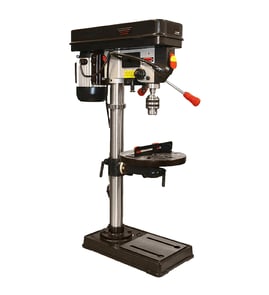
A Craftsman drill press such as model 33525926 is made up of a few core assemblies that support the work, hold the drive system, and guide the bit straight down. Knowing the names and functions of these parts helps you troubleshoot wobble, poor accuracy, and table alignment problems.
- Base: the heavy platform that stabilizes the drill press; it is typically bolted to a bench or stand.
- Column: the vertical post that supports the head and guides the table up and down.
- Head: the top housing that holds the motor and drive components.
- Table (and table support/clamp): supports the workpiece; usually raises/lowers on the column and may tilt.
- Quill: the sliding sleeve that moves up and down when you pull the feed handles.
- Spindle: the rotating shaft inside the quill.
- Chuck: mounts to the spindle and grips the drill bit.
- On/off switch (often with a removable safety key)
- Feed handles: lower and raise the quill
- Depth stop: limits drilling depth for repeatable holes
- Table lock/clamp: prevents the table from drifting or rotating
- Belt and pulley system (on many drill presses): changes spindle speed
| Symptom | Most likely area to check | What to do |
|---|---|---|
| Holes not square | Table tilt/lock, column alignment | Square the table; tighten locks |
| Excess vibration | Base mounting, belt tension | Bolt down; set belt tension |
| Chuck wobble | Chuck seating, spindle | Reseat chuck; inspect spindle |
| Quill sticks | Quill shaft, return spring | Clean/lube; adjust spring tension |
Most drill press problems trace back to setup (table squareness, clamping, speed selection) or wear (chuck, spindle, quill travel). Identifying the correct assembly speeds up troubleshooting and helps you choose the right replacement part.
For help confirming the exact model number before ordering parts, use how to find your appliance model number (and what it means for parts).
Last updated: February 2026
Where is the model number on a Craftsman drill press?
On the Craftsman drill press stand model 33525926, the model number is typically printed on a metal or foil ID plate (or sticker) attached to the base near the column. We use that model number to match the correct parts list and diagrams for your exact drill press.
Look for a plate or label in these spots (use a flashlight and wipe off dust or oil first):
- On the base casting, close to where the column bolts on
- Along the rear edge of the base (facing the wall)
- On the side of the column near the base
- Under the table support area (if the label wraps around the column)
- On the motor mount or head casting (less common)
Most Craftsman drill presses use a small identification label that includes the model number and sometimes electrical specs.
| What you might see | What it means | What to do with it |
|---|---|---|
| Model number (example: 33525926) | Identifies the exact drill press version | Use it when searching parts and diagrams |
| Serial number | Production identifier | Helpful for service history, not usually needed for parts |
| Voltage/amps | Electrical rating | Useful when checking switches, cords, or motors |
Craftsman drill presses often have similar-looking bases, columns, and tables across different versions. Using the exact model number helps us avoid mismatched parts (for example, a table crank, belt guard, or switch that will not fit).
- Check for two small rivet holes on the base near the column (a sign the plate fell off)
- Look for a faint imprint where a sticker used to be
- Record any other markings you can find (brand, size, chuck capacity) and use the model number search tips in how to find your appliance model number (and what it means for parts)
Last updated: February 2026