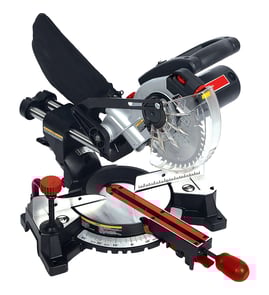

What should you never cut with a miter saw?
You should never use a miter saw (including the Delta 36-250) for rip cuts, freehand cuts, or for materials the saw is not designed to handle such as ferrous metal or masonry. Avoid cutting tiny, unsupported pieces near the blade; clamp the workpiece and keep hands out of the blade path.
- Ferrous metals (steel, iron): they can grab the blade and throw the workpiece.
- Masonry (brick, concrete, tile): abrasive dust and improper blade type can damage the saw.
- Unknown composites that can splinter or contain embedded fasteners.
- Wood with hidden nails/screws: can cause kickback and blade damage.
- Rip cuts (cutting with the grain): use a table saw or circular saw setup instead.
- Freehand cuts (no fence support, no clamp): the work can twist into the blade.
- Cuts on very small pieces that put fingers close to the blade: use a stop block, hold-down, or a different tool.
- Cuts on warped or bowed stock without securing it flat to the fence and table.
| Task or material | Use a miter saw? | Better approach |
|---|---|---|
| Crosscutting dimensional lumber | Yes | Clamp and cut against the fence |
| Cutting long boards to length | Yes | Add outfeed support, clamp |
| Rip cutting a board | No | Table saw or circular saw guide |
| Cutting steel/iron | No | Metal-cutting saw or grinder |
| Cutting brick/tile | No | Masonry saw or angle grinder |
Most miter saw injuries come from kickback, binding, or loss of control. Using the fence, a clamp, and the correct blade for the material keeps the workpiece stable and your hands away from the cutting zone.
For electrical safety checks if your saw won’t start or trips power, use how to use a multimeter to test electrical parts video.
Last updated: February 2026
Why is 31.6 on a miter saw?
The 31.6° mark on a miter saw (including the Delta 36-250) is a common preset used for compound crown molding cuts when you cut crown “nested” (against the fence) or use a standard compound-angle setup. It pairs with a 33.9° bevel on many saws to produce tight 90° corner joints for common crown spring angles.
On many miter saw scales, 31.6° miter is there to speed up crown molding work so you do not have to calculate angles every time.
Typical uses include:
- Cutting inside corners and outside corners for crown molding
- Making repeatable compound cuts with fewer test cuts
- Matching common crown “spring angles” (the angle crown sits between wall and ceiling)
- Reducing layout errors when you are doing multiple rooms
These presets are based on common crown molding geometry. Your exact settings depend on the crown’s spring angle and whether you are cutting an inside or outside corner.
| Crown spring angle (common) | Typical bevel setting | Typical miter setting |
|---|---|---|
| 38° | 33.9° | 31.6° |
| 45° | 30.0° | 35.3° |
Even with the 31.6° mark, accuracy depends on saw setup and material consistency.
- Confirm the saw is cutting true at 0° miter and 0° bevel (square cut)
- Make sure the fence is straight and the workpiece is fully supported
- Use the same “up” orientation for every piece (mark ceiling edge vs wall edge)
- Cut a short test piece and dry-fit the corner before cutting long lengths
- Use a sharp blade appropriate for trim (fine-tooth crosscut)
Crown molding corners are unforgiving; a small angle error creates visible gaps. The 31.6° preset exists to make a high-skill compound cut more repeatable, especially when you are producing multiple matching corners.
For more DIY safety and best practices before making compound cuts, use our guide: are diy appliance repairs safe.
Last updated: February 2026
How deep can a 254mm mitre saw cut?
A 254 mm (10-inch) miter saw’s maximum cut is usually described as cutting capacity (how wide and how thick a board it can crosscut), not just “depth.” For the Delta 36-250 miter saw, the commonly listed 90° crosscut capacity is up to about 11-1/2 inches wide.
People use “depth” in two different ways:
- Thickness (vertical depth): how thick a board can be cut in one pass
- Crosscut width (horizontal capacity): how wide a board can be cut across the fence
- Bevel angle: tilting the blade reduces usable capacity
- Miter angle: rotating the table can also reduce capacity
- Sliding vs. non-sliding: sliding increases crosscut width much more than thickness
These are practical ranges for many 10-inch miter saws; your exact numbers depend on the saw design and setup.
| Saw type (254 mm blade) | Typical max crosscut at 90° | Typical max thickness at 90° |
|---|---|---|
| Non-sliding compound miter saw | 5-1/2 to 6-1/2 in. | 2-3/4 to 3-1/2 in. |
| Sliding compound miter saw | 10 to 12 in. | 2-3/4 to 3-1/2 in. |
Use this quick check to match real-world capacity to your blade and fence setup:
- Unplug the saw and install a sharp, correct-size 254 mm blade
- Set miter = 0° and bevel = 0°
- Lower the head fully and note the maximum reach across the table (crosscut width)
- Test-cut scrap lumber to confirm clearance with the guard and fence
- Re-check at common angles (45° miter, 45° bevel) if you cut trim or crown
Using the correct capacity (width vs. thickness) helps you choose safe cuts, avoid binding and kickback, and decide when you need a different method (flip-cut, different saw, or different stock orientation).
For tool and electrical testing tips while troubleshooting a saw that bogs down or won’t start, use how to use a multimeter to test electrical parts video.
Last updated: February 2026