
Can you replace the velcro on a sander?
Yes. On the Craftsman 35122676 belt and disc sander, you can restore worn hook-and-loop (often called “Velcro”) on the disc sanding surface by replacing the hook-and-loop disc pad (if it’s a separate pad) or by resurfacing the disc with a new hook-and-loop layer so sanding discs grip correctly again.
This model is a belt and disc sander, so focus on the disc side when you’re talking about hook-and-loop.
- Confirm you’re working on the disc platen (not the 1 x 30 belt area)
- Verify your sanding discs are hook-and-loop, not PSA (peel-and-stick)
- Check whether the hook surface is a separate pad or bonded to the disc
- Inspect for wobble/runout; fix looseness before resurfacing
- Note any dust hole pattern your discs require
| Repair method | Use this when | Result |
|---|---|---|
| Replace the disc pad/face | The hook layer is a distinct pad or face you can remove | Like-new grip with the correct thickness and balance |
| Resurface the disc | The hook layer is bonded and not meant to separate cleanly | Restores grip if the disc face stays flat and true |
- Unplug the sander.
- Remove the sanding disc and inspect the disc face for smooth, melted, or missing hooks.
- If replacing a pad: remove fasteners or release the pad as designed, then install the new pad squarely.
- If resurfacing: strip loose hook material and adhesive, clean the face, then apply a new hook-and-loop layer carefully to avoid bubbles.
- Hand-spin the disc to confirm it runs true; then test-run briefly.
A worn hook-and-loop surface lets discs slip, chatter, or fly off. Restoring the disc face improves finish quality, reduces heat buildup, and helps the sander run smoother.
To make sure you’re matching the correct replacement to Craftsman model 35122676, use how to find your appliance model number (and what it means for parts).
Last updated: February 2026
Is a 4x36 belt sander good for knife making?
A 4x36 belt sander can work for knife making, especially for profiling, rough bevels, and handle shaping, but it is slower and less versatile than a 2x72 grinder. For a Craftsman 35122676 belt & disc sander, the biggest limits are belt speed, belt tracking, and platen support.
Good uses
- Rough shaping and profiling blanks before heat treat
- Flattening scales and shaping handles
- Cleaning forge scale and smoothing welds
- Basic bevel grinding with light pressure
Common limitations
- Slower stock removal than a typical 2x72 setup
- Shorter belt length runs hotter and loads faster
- Smaller contact area makes it easier to round edges unintentionally
- Tracking and platen flatness can limit how crisp your bevels look
- Use fresh, coarse belts (36 to 60 grit) for roughing; switch to 80 to 120 for refining
- Keep pressure light and let the abrasive cut; heavy pressure overheats the steel
- Quench often (water for rough shaping before heat treat); stop if the edge gets too hot to touch
- Dress or replace the platen backing if it is grooved; a flat platen helps keep bevels even
- Check belt tracking and tension before every session
| Task | Typical grit range | What to watch for |
|---|---|---|
| Profiling and heavy removal | 36 to 60 | Heat buildup, belt loading |
| Bevel shaping | 60 to 120 | Rounding the plunge line |
| Handle shaping | 80 to 220 | Burning wood/resin |
| Pre-finish (not mirror) | 220 to 400 | Belt glazing |
Knife grinding is mostly about controlling heat and keeping surfaces flat. A 4x36 can absolutely produce usable blades, but the shorter belt and typical lower belt speed mean you spend more time grinding and more time managing heat.
If you are troubleshooting power, switches, or wiring on your sander, use how to use a multimeter to test electrical parts video to safely check continuity and voltage-related issues.
Last updated: February 2026
What are the parts of a sander?
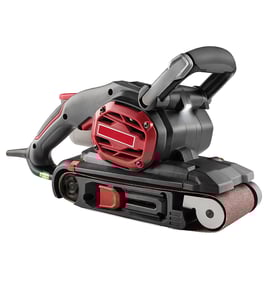
A Craftsman belt and disc sander like model 35122676 is built from a drive system (motor and shafts), sanding assemblies (belt and disc hardware), tracking/tension parts, guards, and electrical controls. The exact mix varies by design, but these are the core components you will see on most sanders.
- Motor (drives the belt and disc)
- Drive belt or direct-drive coupling (transfers power to the sanding assemblies)
- Sanding belt assembly (platen, rollers, tracking/tension mechanism)
- Sanding disc assembly (disc plate, hub, disc guard)
- Bearings and bushings (support rotating shafts and rollers)
- Switch and power cord (on/off control and power delivery)
- Dust collection parts (dust port, bag, or hose connection)
| Assembly | What it includes | What it affects when it fails |
|---|---|---|
| Drive system | Motor, shafts, bearings, drive belt | No start, weak power, squeal, overheating |
| Belt sanding system | Rollers, platen, tracking/tension parts | Belt won’t track, belt slips, uneven sanding |
| Disc sanding system | Disc plate/hub, guard, table alignment | Vibration, wobble, poor squareness |
| Electrical system | Switch, cord, internal wiring | Intermittent power, won’t turn on |
Knowing the major parts helps you troubleshoot faster. For example, a belt that walks off the rollers points to tracking/tension parts, while a burning smell or loss of torque points to the motor, bearings, or drive belt.
- Unplug the sander and spin the rollers/disc by hand; roughness usually indicates worn bearings.
- Check belt tracking and tension; a loose belt often slips and overheats.
- Inspect the power cord for cuts and the switch for a “mushy” feel.
- Clear dust buildup around vents and guards; packed dust can cause overheating.
- If you suspect an electrical issue, test safely with a meter using how to use a multimeter to test electrical parts video.
Last updated: February 2026