Installation guide
 Owner’s manual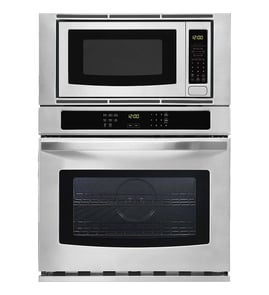



How to reset Jenn-Air wall oven?
To reset your Jenn-Air JMW3430IL02 wall oven/microwave combo, we recommend power-cycling the unit at the home breaker for 1 minute, then restoring power and starting a Bake cycle to confirm normal operation and that the error does not return.
- Turn OFF the circuit breaker(s) supplying the oven.
- Wait 1 full minute.
- Turn the breaker(s) ON.
- Set the clock/preferences if prompted.
- Start a Bake cycle and watch the display for about 1 minute.
The installation checks for this model focus on verifying power and basic operation.
- Confirm the breaker is fully reset (OFF then ON) and not tripped.
- Verify the electrical supply is connected.
- Start BROIL for a few minutes and check for heat.
- If an error message appears, press CANCEL OVEN, then retry a Bake cycle.
- If the display is dead or the unit keeps faulting, a control or power-protection issue is likely.
| Symptom after reset | Most likely area to check | What to do next |
|---|---|---|
| Display is blank | Power supply, fuse | Verify breaker, then consider checking the fuse mda 20a W11188752 |
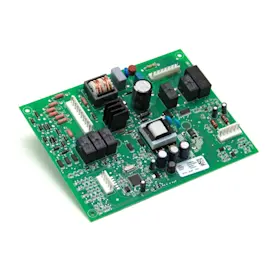
| Error code returns quickly | Control, wiring | Inspect connections; consider the electronic control board WPW10260060 or harness connections |
| Oven heats inconsistently | Heating circuit | Inspect the bake element; consider the range bake element W11545804 |
A reset clears many temporary control glitches after a power interruption or a canceled cycle. If the problem comes back immediately, it usually points to a power supply issue, a failing electronic control, or a heating component problem that the control is detecting.
For model-specific operating steps and troubleshooting, use the JMW3430IL02 owner's manual.
Last updated: February 2026
How long do Jenn-Air wall ovens last?
A Jenn-Air wall oven typically lasts 15 years with normal household use. For your JMW3430IL02 wall oven/microwave combo, consistent cleaning, proper airflow for cooling, and avoiding overheating events are the biggest factors that help it reach that lifespan. See the care and troubleshooting sections in the JMW3430IL02 owner's manual.
Most built-in wall ovens (including combo units with a microwave) land in this range:
| Use and care level | Typical service life | What usually ends it |
|---|---|---|
| Light to average use, good cleaning | 15 years | Control issues, heating performance decline |
| Heavy use (daily high-heat cooking) | 12 to 15 years | Fan wear, element wear, heat-related wiring issues |
| Poor ventilation or frequent overheating | 8 to 12 years | High-limit trips, control damage, harness damage |
These steps reduce heat stress on the electronic control board, cooling fan, and wiring harness:
- Keep the door and frame contact area clean so the door seals properly.
- Clean the control panel with a soft cloth; apply glass cleaner to the cloth, not directly to the panel.
- Avoid abrasive cleaners and scouring pads inside the microwave cavity.
- Do not cover the turntable or cooking grids with aluminum foil during microwave or convection use.
- Make sure cabinet vents and airflow paths are not blocked (especially during broil, when the cooling fan can run after the cycle).
Heat and grease buildup are the fastest way to shorten wall oven life. When airflow is restricted or surfaces are coated with residue, internal temperatures rise; that increases the chance of nuisance shutdowns and premature failures in components like the cooling fan and control electronics.
If performance drops before 15 years, it is often a single part rather than the whole appliance. Common examples include:
- No heat or uneven baking: check the range bake element W11545804
- Overheating or shutdown symptoms: check the range high-limit thermostat WP4449751
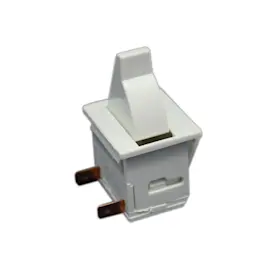
- Microwave not starting or acting like the door is open: check the microwave door switch W10211972
Last updated: February 2026
Is JennAir considered high end?
Yes. JennAir is considered a high-end (luxury) appliance brand, and the JennAir JMW3430IL02 wall oven/microwave combo is built and marketed in the premium category with design-forward styling and feature-focused performance.
High-end appliances typically emphasize premium materials, tighter fit and finish, and more advanced cooking features. For a built-in combo unit like JMW3430IL02, that usually shows up in areas like convection capability, integrated controls, and built-in installation requirements.
Common high-end expectations include:
- More cooking modes and precision controls (microwave plus oven features)
- Built-in design with specific cabinet cutout and electrical requirements
- Premium exterior finishes and matching trim/venting pieces
- Higher-cost replacement components (controls, door assemblies, electronics)
The fastest way to validate what your unit includes (modes, racks, turntable setup, cleaning guidance, and operating tips) is to match the features listed for your model.
Use these model-specific resources:
Premium built-in units often use specialized electronics and door safety systems. If you are troubleshooting performance or planning a repair, these are common part categories that can be more “high end” in both design and price:
| Part category | What it affects | Example part for this model |
|---|---|---|
| Door safety/interlock | Microwave operation and safety | Microwave door switch W10211972 |
| High-voltage heating | Microwave heating performance | Magnetron W11346197 |
| Power conversion | Microwave power delivery | Inverter W11325604 |
| Temperature safety | Overheat protection | Range high-limit thermostat WP4449751 |
Knowing JennAir is a high-end brand helps set expectations: repairs often involve higher-priced components, and correct installation and electrical setup are critical for reliable performance. Following the model’s documented operating and installation requirements also helps prevent avoidable service issues.
Last updated: February 2026
What are common problems with Jenn-Air stoves?
Common problems we see with Jenn-Air cooking appliances include no power, the oven not heating evenly, the microwave section not running because the door is not latching, and control or fan issues. On the Jenn-Air JMW3430IL02 wall oven/microwave combo, many symptoms trace back to power supply, door interlocks, or heating and airflow components.
- Reset the household circuit breaker or replace the fuse if nothing operates.
- Confirm the microwave door closes firmly; a door that is not fully closed can prevent operation.
- If the lower oven is in a self-clean cycle, expect the upper oven functions to be limited during that cycle.
- Watch for unusual cooling fan behavior; the fan can run after cooking, especially after broil.
- If cooking times seem too long, have a qualified electrician verify the home voltage meets requirements.
For JMW3430IL02, these parts are frequent suspects when symptoms match:
| Symptom | Common cause | Example part for this model |
|---|---|---|
| Microwave will not start (door shuts but no run) | Door interlock not switching correctly | Microwave door switch W10211972 |
| Microwave runs but does not heat | High-voltage system problem | Magnetron W11346197 or inverter W11325604 |
| Oven not heating properly | Failed bake circuit | Range bake element W11545804 |
| Overheating, shutdowns, or odd temperature behavior | Safety thermostat opening | Range high-limit thermostat WP4449751 |
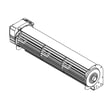
| Loud airflow noise or fan not running as expected | Cooling fan issue | Assembly, cooling fan W11344874 |
These problems affect safety, cooking performance, and reliability. For example, a weak door interlock can stop the microwave from operating at all, while a failing bake element can cause undercooking and longer preheat times.
We recommend using the owner's manual for JMW3430IL02 to match your exact symptom to the correct control setting and troubleshooting table before replacing parts.
Last updated: February 2026
Why is my Jenn-Air oven not working?
If your Jenn-Air JMW3430IL02 wall oven/microwave combo is not working, the most common causes are a tripped circuit breaker or blown household fuse, a missing power supply connection, or a control-related failure. Start by confirming power, then run the basic operation checks in the JMW3430IL02 owner's manual.
- Verify the household fuse is intact and tight, or reset the circuit breaker.
- Confirm the electrical supply is connected and the unit has power.
- Set the clock and preferences after restoring power (first-use setup can block normal operation).
- Try a simple lower-oven test: press BROIL, set a temperature, then press START.
- If an error message appears or you do not feel heat after about 5 minutes, press CANCEL OVEN and stop the test.
If power is good but the oven still will not heat or respond, these parts are common suspects on combo units like the JMW3430IL02:
| Symptom | Most likely area | Example part on this model |
|---|---|---|
| Display dead or controls unresponsive | Control electronics or power protection | Electronic control board WPW10260060, fuse mda 20a W11188752 |
| Oven overheats then shuts down | Safety thermostat opening | Range high-limit thermostat WP4449751 |
| Fan runs abnormally or unit trips during use | Cooling/airflow issue | Assembly, cooling fan (inspect for blockage and noise) |
An oven that is not operating is often a power-supply issue first, but repeated no-heat or shutdown symptoms can point to a protective device (like a fuse or high-limit thermostat) or a failing electronic control. Checking the basics first prevents unnecessary parts replacement.
- We do not recommend operating the microwave with door or interlock issues; the door must close properly and safety interlocks must not be defeated.
- For internal electrical testing (multimeter checks) or control replacement, use safe power-disconnect practices and follow the procedures in the installation guide.
Last updated: February 2026