 Installation guide
 Owner’s manual





What usually breaks in a microwave?
In a KitchenAid KMBD104GSS00 built-in microwave, the most common failures are door-interlock parts (switches and latches), the high-voltage heating system (magnetron and related components), and the electronic controls. Many “dead” or “won’t start” symptoms trace back to safety interlocks or power issues; use the owner's manual for model-specific checks and safe operating guidance.
Most common parts that fail (and what you’ll notice)
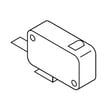
- Door interlock switch or latch: won’t start, stops when the drawer is moved, intermittent operation
- Internal fuse or thermal cutout: completely dead display, no response (often after a surge or overheating)
- Magnetron: runs but does not heat, loud buzzing, burning smell
- High-voltage diode or capacitor: no heat, unusual hum, may trip breaker
- Electronic control board or control panel: random beeping, unresponsive keys, “ERROR” messages, incorrect timing
- Fan motor or airflow issues: overheating, long cook times, hot exterior (some warmth is normal)
Quick checks you can do safely
Unplug power or switch off the breaker before any inspection.
- Confirm the outlet has power (try a small lamp).
- Make sure the drawer closes fully and nothing blocks the latch area.
- Clean the door sealing surfaces and keep the inlet cover clean to reduce arcing risk.
- If cooking times seem too long, verify the cooking power level is set correctly.
- If you see arcing (blue flashes), stop immediately and remove any metal or foil placed too close to surfaces.
Parts on this model that often relate to “won’t start” or door issues
| Symptom | Common suspect | Example part for KMBD104GSS00 |
|---|---|---|
| Won’t start, intermittent | Door interlock circuit | Switch W10278024 |
| Drawer won’t latch/close right | Latch mechanism | Microwave door latch W11610131 |
| Runs but no heat | High-voltage system | Magnetron W11596034 |
| Dead or erratic controls | Controls | Electronic control W11486781 |
Why it matters
Microwaves use high voltage internally, and door interlocks are a key safety system. If the drawer is not latching correctly or the unit is arcing, continuing to run it can damage components and create a safety hazard.
Last updated: February 2026
What to salvage from a microwave?
For a KitchenAid KMBD104GSS00 built-in microwave, we do not recommend salvaging internal electrical components; microwaves contain high-voltage parts that can store dangerous energy even when unplugged. If you are retiring the unit, the safest “salvage” is typically non-electrical, removable items and any reusable trim or hardware listed for this model in the owner's manual.
What you can safely remove (typical)
These items are commonly removable without opening high-voltage compartments:
- Cookware and accessories made for the microwave drawer (if included with your unit)
- The cook tray (if your unit uses one) such as tray-cook W11216070
- Cosmetic pieces like trim W11209950 (when replacing or reusing surrounding finish)
- Non-specialty mounting screws (match by size and type; do not substitute randomly)
- Documentation and model/serial information (useful for parts matching)
What not to salvage (high risk)
Microwaves include components that can cause severe shock or injury. Avoid removing or handling these:
- High-voltage capacitor
- High-voltage transformer
- Magnetron
- High-voltage wiring and interlocks inside the chassis
Why this matters
Our KMBD104GSS00 manual emphasizes basic electrical safety and that service should be performed by qualified personnel; it also highlights grounding requirements and safe operation practices. Treat internal repairs and disassembly the same way: high-voltage sections are not DIY-safe.
If you are troubleshooting instead of salvaging
If the microwave drawer is not operating correctly, focus on repairable, model-matched parts rather than harvesting components.
- Door not closing or not starting: inspect the latch area; consider microwave door latch W11610131
- Dead display or erratic operation: control issues can involve electronic control W11486781 or control panel W11486769
- No heat: heating circuit issues can involve magnetron W11596034 (professional service recommended)
Quick “salvage vs replace” guide
| Item | Typical value to keep | DIY-safe to remove? |
|---|---|---|
| Tray/trim/cosmetic parts | Medium | Yes |
| Switches/interlocks | Low | No |
| Magnetron/transformer/capacitor | Low for DIY | No |
| Control boards | Medium | Not recommended |
Last updated: February 2026
Where is the microwave filter on a built-in microwave on a KitchenAid?
On the KitchenAid built-in microwave model KMBD104GSS00, the filter is part of the venting system; you access it from the vent area, not from inside the cooking cavity. Use the location diagram and access steps in the KMBD104GSS00 owner's manual to identify the exact cover and fasteners for your installation.
How to find it on a built-in microwave drawer
Filter placement varies by venting configuration, but the access point is always tied to the air path.
- Look for the vent openings called out in the parts and features section
- Check the front/top vent area around the trim, depending on how the unit is installed
- Do not remove any panel labeled “DO NOT REMOVE”
- If a cover is held by screws, remove only the cover that the manual identifies for filter service
- Reinstall the cover securely before restoring power
The replacement part to match
If you are replacing the filter for this model, match it by part ID to avoid fit issues.
| Model | Part name | Part ID |
|---|---|---|
| KMBD104GSS00 | Filter | W11199545 |
Use this part reference when ordering: filter W11199545.
Why it matters
A dirty or missing filter restricts airflow through the vent system. That can increase heat and odors and may make the fan run louder. Keeping the correct filter installed helps the microwave vent as designed.
Last updated: February 2026
Is it worth repairing a built-in microwave?
Yes; repairing a KitchenAid built-in microwave like model KMBD104GSS00 is worth it when the failure is limited to one part (switch, latch, lamp, or control) and the cabinet cutout and trim are already in place. Built-in replacements typically cost more and add installation work.
Quick way to decide
Use this checklist before buying parts:
- Reset the house breaker or replace a blown fuse, then retest.
- Run a heat test: warm 1 cup (250 mL) of cold water for 2 minutes at 100% power.
- Turn off Control Lock and Demo Mode (steps vary by model; see the owner's manual).
- Match the symptom to one likely component (latch, switch, lamp, or control).
- Compare total parts cost to the value of keeping your built-in setup.
Repairs that are commonly cost-effective
These fixes often make sense on a microwave drawer:
- Drawer will not start because it is not latching: inspect the interlock area; replace the microwave door latch W11610131 if it is broken or not engaging.
- Starts then stops, or will not start: door interlock problems are common; test and replace the switch W10278024 if it is faulty.
- Light is out: replace the lamp W10278184.
Cost and effort comparison
| Scenario | Typical outcome | What it means |
|---|---|---|
| One failed wear part (latch, switch, lamp) | Lower cost repair | Keeps your existing cutout and trim |
| Control or high-voltage issue | Higher cost repair | Consider parts plus service labor |
| Multiple symptoms or physical damage | Diminishing returns | Replacement becomes the practical choice |
Why it matters for built-in models
Built-in units are tied to cabinetry and electrical setup; repairing a single failed component often avoids the extra time and expense of removing the unit and reworking installation details (see the installation guide).
Last updated: February 2026


