- Kenmore refrigerator water filters
- Whirlpool refrigerator water filters
- Samsung refrigerator water filters
- GE refrigerator water filters
- LG refrigerator water filters
- Frigidaire refrigerator water filters
- KitchenAid refrigerator water filters
- Maytag refrigerator water filters
- Kenmore Elite refrigerator water filters
- Estate refrigerator water filters
- GE Profile refrigerator water filters
- Amana refrigerator water filters
- Bosch refrigerator water filters
- Dacor refrigerator water filters
- Electrolux refrigerator water filters
Top DIY repair help
View All Repair Categories
Appliances
Lawn & Garden
Power Tools
Home Improvement
Sports & Leisure
Heating & Cooling
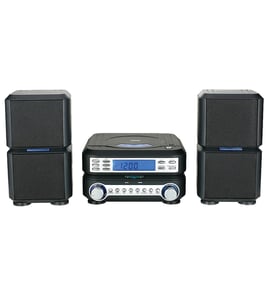
JC Penny Compact stereo system Parts — Browse All Models
JC Penny compact stereo systems provide you with awesome sound reproduction with the convenience of their compact size. You'll get the audio playback performance that you expect from a full-size stereo when using your JC Penny compact stereo system. When your JC Penny compact stereo needs repair, find the replacement parts you need at Sears PartsDirect.


Frequently bought JC Penny parts

Magnavox Home Electronics Service Manual
In Stock
$82.99

Qty

Jc Penny Cba Crt
In Stock
$75.96
Qty
Jc Penny Home Electronics Service Manual
In Stock
$86.49
Qty
Philips Door
Part #483543237084
This item is not returnable
In Stock
$4.98
Qty
Jc Penny Service Manual
In Stock
$81.99
Qty
Jc Penny Owner's Manual
Part #IB6964E001
This item is not returnable
In Stock
$4.99
Qty
Popular maintenance items for Compact Stereo Systems
Screw
Part #336309901
This item is not returnable
In Stock
$3.08
Qty
Tray (dud)
In Stock
$18.55
Qty
Service Manual
In Stock
$109.99
Qty
Service Manual
In Stock
$76.99
Qty
Flywheel
In Stock
$16.50
Qty
Antenna
In Stock
$34.74
Qty
Handling and care tips for compact discs used in your JC Penny compact stereo system
- Handle the compact disc by grasping it on the outer edge and inner hole when removing the disc from its case or the CD player disc tray. Don't touch the media side of the compact disc with your fingers because oil and dirt from your fingers can interfere with compact disc playback.
- Don't expose compact discs to direct sunlight or extreme heat sources such as heater air ducts or a car parked in direct sunlight.
- Insert and remove compact discs in the CD player disc tray carefully to avoid scratching the media side of the compact disc. Make sure the compact disc is properly inserted in the disc tray before pressing the button to insert the disc tray into the player to avoid marring the compact disc.
- After removing the compact disc from the CD player, store the disc in its storage case.
- Don't use tape or labels on the top of compact discs. Use a non-solvent-based felt-tip marker to label the top side of the disc.
Types of loudspeaker drivers used in JC Penny compact stereo systems
- Sub-woofer. The sub-woofer reproduces sound in the lowest frequency ranges typically from 20Hz – 200Hz.
- Woofer. The woofer reproduces sound from low ranges around 50Hz – 1kHz.
- Midrange driver. The midrange driver reproduces sound in the middle range of the audible sound spectrum from around 300Hz to about 5kHz.
- Tweeters. Tweeters reproduce the clear, crisp high frequency sounds above 2kHz up to around 20kHz.
Parts & More
Bottom-Mount Refrigerator
Built-In Microwave
Dishwasher
Electric Wall Oven
Gas Snowblower
Microwave
Parts
Plumbing
Riding Mowers & Tractors
Stepper
Wall Oven/Microwave Combo