- Kenmore refrigerator water filters
- Whirlpool refrigerator water filters
- Samsung refrigerator water filters
- GE refrigerator water filters
- LG refrigerator water filters
- Frigidaire refrigerator water filters
- KitchenAid refrigerator water filters
- Maytag refrigerator water filters
- Kenmore Elite refrigerator water filters
- Estate refrigerator water filters
- GE Profile refrigerator water filters
- Amana refrigerator water filters
- Bosch refrigerator water filters
- Dacor refrigerator water filters
- Electrolux refrigerator water filters
Top DIY repair help
View All Repair Categories
Appliances
Lawn & Garden
Power Tools
Home Improvement
Sports & Leisure
Heating & Cooling
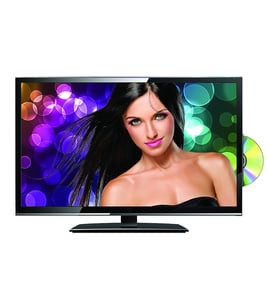
Sony Lcd television Parts — Browse All Models
Sears PartsDirect is a leading supplier of replacement parts for Sony LCD televisions. Sony LCD televisions use active matrix display grids to deliver sharp, clear images across thin film transistor displays. When your Sony LCD television quits working properly, get the repair parts you need to fix the television at Sears PartsDirect.
Browse by Category
LCD Televisions

 Owner’s manual
Frequently bought Sony parts

Dd-280 Pcb
In Stock
$130.96

Qty

Sony Cabinet Assembly
In Stock
$83.31
Qty
Sony Cushion B
Part #309800901
This item is not returnable
In Stock
$2.30
Qty
Sheet,cm R
In Stock
$10.31
Qty
Bt 10 1.7x
Part #329996101
This item is not returnable
In Stock
$3.15
Qty
Sony Shoulder Cover
In Stock
$39.87
Qty
Popular maintenance items for LCD Televisions
Filter
In Stock
$21.77
Qty
Ic Sdram
In Stock
$63.65
Qty
Ic
In Stock
$10.31
Qty
Ic Control
In Stock
$31.79
Qty
Cn507,jack
In Stock
$42.89
Qty
Ic
Part #670773901
This item is not returnable
In Stock
$6.03
Qty
Connecting your Sony LCD television to a Wi-Fi network
To connect your television to the Wi-Fi network using Wi-Fi Protected Setup (WPS) button, go to the Network Setup menu and select Wireless Setup. Select the WPS method of Wi-Fi connection from the Wireless Setup menu. Start the WPS wireless setup method on your television then pus the WPS button on your Wi-Fi router to connection your television to the Wi-Fi network.To connect your television to the Wi-Fi network using the router password, follow the same steps as described above to reach the Wireless Setup menu on your television. Select the Scan for available Wi-Fi networks option. Select your Wi-Fi network from the list of available Wi-Fi networks and enter the router password to connect the television to your Wi-Fi router.
Troubleshooting your Sony LCD television when it won't power up
- Unplug the television and check the power cord connection on the back of the cabinet. Reconnect the power cord if it's disconnected. Replace the power cord if you see that it's damaged.
- Next, check the electrical outlet for power. Reset the house breaker for the electrical outlet if the outlet is dead. Plug the television into a different outlet if possible.
- If these troubleshooting tips don't help, then you may need to replace the power control board in the television.
Parts & More
Bottom-Mount Refrigerator
Dryer
Front-Engine Lawn Tractor
Furnace
Garage Door Opener
Lawn Sweeper
Miter Saw
Rear-Engine Riding Mower
Refrigerator
Side-By-Side Refrigerator
Snowblower Attachment
Speaker