 Owner’s manual



How do you reset a microwave?
To reset your Whirlpool MH1160XSS0 microwave/hood combo, do a power reset: unplug it (or switch the dedicated breaker off) for 2 to 5 minutes, then restore power and set the clock. This clears most control glitches and “:” display messages after a power interruption.
Quick reset options (start here)
- Unplug reset: Unplug for 2 to 5 minutes, then plug back in.
- Breaker reset: Turn the microwave circuit breaker off for 2 to 5 minutes, then back on.
- Stop a cycle: Touch CANCEL OFF (or open the door) to stop cooking and clear the display.
- Clear “:” on the display: Set the clock after power is restored (steps are in the MH1160XSS0 owner's manual).
What you should expect after a reset
After power is restored, the display may show ":". On this model, that indicates the clock time was cleared by a power failure or the clock display was turned off; setting the clock returns the display to normal.
| Symptom after reset | What it means | What to do next |
|---|---|---|
| Display shows ":" | Clock needs to be set | Set the clock, then test with 1 cup of water |
| Microwave stops when door opens | Normal safety behavior | Close door and touch START to resume (if applicable) |
| Letter + number code appears | A fault was detected | Power reset once; if it returns, check door closure and latches |
If the microwave still will not run
- Confirm the door closes firmly and latches smoothly (avoid slamming).
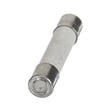
- If the unit is completely dead after a reset, check the internal fuse; the model uses a replaceable microwave fuse W11707984.
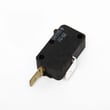
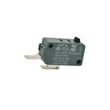
- If it starts then stops, inspect the door interlock area; a common related part is the microwave/hood micro-switch W10269458.
Why it matters
A reset clears temporary control logic errors and restores normal display behavior after a power interruption. If symptoms return immediately, the cause is usually a door interlock, fuse, thermostat, or high-voltage component.
Last updated: February 2026
What are common problems with whirlpool microwaves?
Common problems we see with Whirlpool microwaves like model MH1160XSS0 include no heat, no power, not starting (door won’t “latch” electrically), turntable issues, vent fan or light problems, and arcing or sparking. Many start with power, door-interlock, or airflow issues; use the MH1160XSS0 owner's manual for model-specific checks and safe operation guidance.
Most common symptoms and what usually causes them
- Microwave runs but does not heat: often a high-voltage component issue (do not service high-voltage parts without proper training).
- Dead display or no power: blown fuse, loose power connection, or a door-interlock problem.
- Starts then stops, or won’t start: door not closing properly, worn door-interlock parts, or a misaligned latch.
- Turntable not rotating: failed motor or support/roller issues.
- Cooktop light or vent fan problems: bulb failure, lens damage, or airflow restriction from dirty filters.
Quick checks we recommend first (safe, no disassembly)
- Confirm the unit is plugged into a grounded 3-prong outlet and avoid adapters or extension cords (per the safety guidance in the manual).
- Open and close the door firmly; check for food buildup on the sealing surfaces and make sure the door closes squarely.
- If the control panel seems unresponsive, check for control lock or settings that prevent starting.
- Clean or replace hood filters if airflow is weak or the unit seems to overheat.
- If you see sparking, stop using the microwave and inspect for metal, damaged waveguide cover area, or burn marks.
Parts that commonly fix these issues on MH1160XSS0
| Symptom | Common part to check | Example part on this model |
|---|---|---|
| No power / intermittent power | Fuse | Microwave fuse W11707984 |
| Won’t start / door error behavior | Door interlock switch | Microwave/hood micro-switch W10269458 |
| Turntable not turning | Turntable motor | Turntable motor W10642989 |
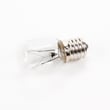
| Dim or out cooktop light | Light bulb | Microwave/hood light bulb 8206232A |
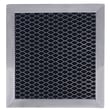
| Poor venting / greasy airflow | Grease filter | Microwave/hood filter 8206229A |
Why it matters
Microwaves rely on door safety interlocks and high-voltage circuits. Door, fuse, and airflow problems can look like “major” failures, but they are often the real root cause. Also, operating with a damaged door or defeated interlocks is unsafe, so door-closing issues should be addressed immediately.
For heating failures, we recommend reading why is my microwave not heating to understand the most common causes and the safest next steps.
Last updated: February 2026
What are the disadvantages of an inbuilt microwave?
Built-in microwaves (including over-the-range microwave/hood combos like Whirlpool MH1160XSS0) cost more to buy and install, are harder to replace because the opening and mounting must match, and can be more complex to service. They also require proper ventilation and safe electrical installation; our owner's manual covers key safety and placement requirements.
Common disadvantages to plan for
- Higher total cost: purchase price plus installation materials and labor.
- Replacement constraints: you often need the same cutout size, mounting points, and venting style.
- More involved repairs: built-in units can require removal from the cabinet or wall bracket to access parts.
- Ventilation limitations: over-the-range models must be installed correctly and the hood and filters need regular cleaning to prevent grease buildup.
- Accessibility: over-the-range placement can be awkward for shorter users or for lifting hot liquids.
- Electrical requirements: these units must be grounded and plugged into a proper outlet (no adapters or extension cords).
Built-in vs countertop: quick comparison
| Feature | Built-in / over-the-range | Countertop |
|---|---|---|
| Installation | Permanent mounting, venting considerations | Plug-in, minimal setup |
| Flexibility | Low (opening and venting must match) | High (easy to swap) |
| Service access | Often requires removal | Usually easier to access |
| Space use | Saves counter space | Uses counter space |
Why it matters for MH1160XSS0 owners
Because the MH1160XSS0 is designed for use above a range (up to 36 inches wide) and relies on a hood and filters, installation and ongoing cleaning directly affect performance, safety, and long-term reliability.
Practical tips before you commit
- Confirm your cabinet opening and mounting location match the microwave/hood combo style.
- Decide whether you need outside venting or recirculating airflow.
- Keep the hood filters clean and do not let grease accumulate.
- Avoid overheating liquids; use safe containers and allow standing time after heating.
- If the unit must come down for service, plan for two-person handling.
Last updated: February 2026
What is the average lifespan of a whirlpool microwave?
Most Whirlpool microwaves, including the Whirlpool MH1160XSS0 microwave/hood combo, last 7 to 10 years with normal household use. Heavy daily use, poor ventilation, and power surges shorten life; keeping the cavity clean and the venting system maintained helps it reach the full expected lifespan.
What affects lifespan the most
- Daily run time (multiple long cook cycles per day wears components faster)
- Ventilation and grease buildup (restricted airflow raises internal temperatures)
- Door use and slamming (stresses the door interlock switches and mounts)
- Electrical quality (surges and loose outlets can damage the control and fuse)
- Maintenance (regular filter cleaning and safe cleaning habits reduce failures)
Common “end of life” symptoms (and what they usually point to)
| Symptom | What it often means | Parts that are commonly involved on MH1160XSS0 |
|---|---|---|
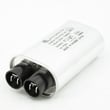
| Runs but does not heat | High-voltage system issue or safety cutout | High-voltage capacitor, thermostat |
| Completely dead (no display) | Blown fuse or power issue | Microwave fuse W11707984, power cord |
| Starts then stops when door moves | Door interlock alignment or switch problem | Microwave/hood micro-switch W10269458, interlock support |
| Loud humming or burning smell | Stop using; internal electrical component overheating | Thermostat, high-voltage components |
Maintenance that extends life
- Wash or replace the grease filter regularly; a clogged filter traps heat and grease.
- Keep the vent grille and intake areas clear of dust and cooking residue.
- Use only microwave-safe cookware; avoid metal and foil contact.
- Wipe spills quickly so food residue does not carbonize and cause arcing.
- Follow the cleaning and operating guidance in the MH1160XSS0 owner's manual.
Why it matters
A microwave/hood combo like the MH1160XSS0 does double duty (cooking plus ventilation). When airflow is restricted or the door interlock system is stressed, internal temperatures rise and safety components (like the fuse or thermostat) can trip, which shortens overall service life.
Last updated: February 2026





