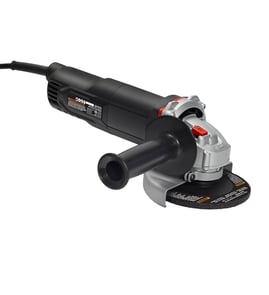

Why is my grinder suddenly not working?
If your Craftsman 39719590 1/2-hp grinder suddenly won’t run, the most common causes are a lost power supply, a failed switch, worn motor brushes, or a broken/loose wire connection. Start with the outlet and cord checks, then move to the switch and motor.
Quick checks first (no disassembly)
- Confirm the outlet works by plugging in a lamp or another tool.
- Reset any tripped breaker or GFCI outlet.
- Inspect the power cord for cuts, crushed spots, or a loose plug.
- Make sure the grinder isn’t jammed (wheel guard rubbing, wheel seized, debris packed in).
- Let the motor cool 20 to 30 minutes if it stopped after heavy grinding (overload/heat can stop operation).
Electrical troubleshooting (basic DIY)
Unplug the grinder before opening any covers.
- Test the outlet voltage (if you have a meter).
- Check the cord continuity from plug to internal connections.
- Test the ON/OFF switch for continuity in the ON position.
- Inspect internal wiring for a pulled-off spade connector, pinched wire, or burned terminal.
Helpful DIY references:
Motor brush and motor clues
Many grinders use carbon brushes that wear down and can stop the motor abruptly.
- If you see sparking, burning smell, or intermittent running, check brushes first.
- If the motor hums but won’t spin, the wheel may be seized or the motor may be failing.
- If it’s completely dead (no sound), focus on power, cord, switch, and wiring.
Symptom-to-cause guide
| What you notice | Most likely cause | What to do next |
|---|---|---|
| No sound at all | Outlet, cord, switch, broken wire | Verify power, then test cord and switch |
| Runs only when cord is moved | Broken conductor in cord | Replace cord or repair wiring connection |
| Hums but won’t turn | Jammed wheel, seized bearings | Unplug, try spinning wheel by hand (guard clear) |
| Stops after a few minutes | Overload/overheating, brush issue | Reduce load, cool down, inspect brushes |
Why it matters
A grinder that “suddenly” stops is often a simple electrical interruption (cord, switch, connection). Catching a failing cord, worn brushes, or overheated motor early helps prevent repeated trips, arcing, and further motor damage.
Last updated: February 2026
How to restore a bench grinder?
To restore a bench grinder like the Craftsman 39719590 1/2-hp grinder, we focus on safety first, then a full teardown, cleaning, inspection, and careful reassembly. Most restorations come down to replacing worn bearings, fixing wiring, and truing or replacing grinding wheels.
Safety first (before you touch anything)
- Unplug the grinder and remove the wheels before deep disassembly.
- Wear eye protection and a dust mask when stripping paint or cleaning rust.
- Treat old cords and switches as suspect; cracked insulation is a no-go.
- Never reuse a wheel that’s cracked, oil-soaked, or has been dropped.
- Plan to do a final test run from a safe position (off to the side).
Step-by-step restoration checklist
- Document it: Take photos of wiring, spacers, wheel flanges, and guard positions.
- Disassemble: Remove guards, tool rests, spark shields, wheels, and wheel flanges.
- Clean and de-rust: Degrease the housing; remove rust from hardware and shafts.
- Inspect key wear items: Bearings, shaft surfaces, wheel flanges, cord, switch, and guards.
- Electrical refresh: Repair or replace damaged wires and terminals; confirm solid grounding.
- Repaint (optional): Strip loose paint, prime bare metal, then paint.
- Reassemble and align: Set tool rests close to the wheel (typically about 1/16 inch).
- Test and tune: Check vibration, wheel tracking, and guard clearance.
What to inspect and what “good” looks like
| Area | What to check | What to do if it’s not OK |
|---|---|---|
| Bearings | Roughness, play, noise | Replace bearings before running |
| Power cord | Cracks, stiffness, cuts | Replace cord or repair wiring |
| Switch | Intermittent operation | Replace switch or clean contacts |
| Wheel flanges | Bent, uneven faces | Replace or correct to reduce wobble |
| Guards/rests | Missing, bent, loose | Repair or replace for safe use |
Why it matters
A restored grinder that still has worn bearings, damaged wiring, or a questionable wheel can vibrate badly, grind poorly, and create a real safety hazard. Doing the inspection and electrical checks is what turns a “paint job” into a reliable tool.
Helpful DIY reference for the electrical portion
If your restoration includes fixing the cord, switch leads, or internal connections, follow the same best practices we use for safe wire repairs: how to repair broken or damaged wires video.
Last updated: February 2026
What are the parts of a grinder?
A grinder like the Craftsman 39719590 1/2-hp grinder is built from a drive system (motor and spindle), controls (switch and lock), and the grinding end (wheel and guards). Knowing these parts helps you troubleshoot vibration, power issues, and unsafe operation.
Main parts you will see on most grinders
- Power switch/trigger (on/off control)
- Lock button (helps hold the spindle for wheel changes)
- Motor (drives the wheel; includes internal windings and bearings)
- Spindle/arbor (shaft the wheel mounts to)
- Wheel flanges/nut (clamp the grinding wheel in place)
- Grinding wheel (abrasive wheel for grinding)
- Wheel guard (shields you from sparks and fragments)
- Handles (main handle and, on many grinders, a side handle for control)
Internal parts that commonly wear
These are the components we most often see involved when a grinder loses power, runs rough, or overheats:
- Brushes (on brushed motors; worn brushes cause intermittent running)
- Armature/field (motor electrical components)
- Bearings (worn bearings cause growling noise and vibration)
- Power cord and strain relief (damage can cause no-power or arcing)
- Switch contacts (can fail and prevent the tool from starting)
Quick troubleshooting: symptom to likely area
| Symptom | Most likely parts to check | What to look for |
|---|---|---|
| Won’t start | Cord, switch, brushes | Cuts, loose connections, worn brushes |
| Runs but lacks power | Brushes, armature/field | Heavy sparking, burning smell |
| Excess vibration | Wheel, flanges, bearings | Cracked wheel, wobble, rough bearing feel |
| Overheats quickly | Bearings, ventilation, load | Binding spindle, clogged vents, pushing too hard |
Why it matters
Grinders spin at high speed; a damaged wheel, loose flange, or missing guard turns a simple repair into a safety hazard. Identifying the correct component first also prevents replacing good parts and speeds up the fix.
Parts lookup tip for this model
When you shop for replacement parts, match by model number 39719590 and compare the part description to your grinder’s configuration (switch style, wheel size, guard type). If you need help finding the right diagram or part, start your search on Sears PartsDirect.
Last updated: February 2026