


How to change string on electric trimmer?
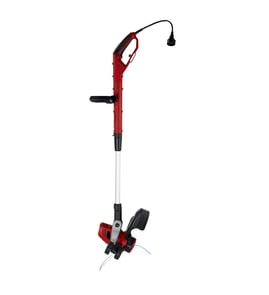
To change the string on your Weed Eater XT114 electric line trimmer, remove the spool cap, take out the spool, wind on new trimmer line in the correct direction, then reinstall the spool and secure the cap so it locks in place. If the cap will not stay on, replace the retainer.
Quick steps (spool-style head)
- Unplug the trimmer (or remove the battery if applicable) and let the head stop completely.
- Press the spool cap tabs (or release the cap) and lift the cap off.
- Pull the spool out and remove any old line pieces.
- Cut two equal lengths of line (most electric trimmers use about 0.065 inch line; use the size your head accepts).
- Wind the line onto the spool evenly in the direction of the arrow on the spool.
- Feed the line ends through the eyelets/notches, seat the spool, then snap the cap back on.
Getting the line length and winding right
Winding direction and line size are the two most common reasons line will not feed.
| What you see | Most likely cause | What to do |
|---|---|---|
| Line jams or will not advance | Line crossed or wound unevenly | Rewind with tight, even wraps |
| Line feeds too fast | Too little tension or wrong routing | Use the notches/eyelets correctly |
| Cap pops off | Cap not fully locked or retainer worn | Re-seat cap; replace retainer clip |
Parts that commonly affect restringing
If the spool cap will not snap on securely or keeps coming loose, the retaining hardware is usually the issue.
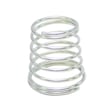
- Check the line trimmer spool retainer clip 530401957 for cracks, wear, or a weak grip.
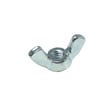
- If your head uses a wing nut style fastener, inspect the wing nut 530091373 for stripped threads or damage.
- Replace worn fasteners before running the trimmer; a loose spool can damage the head.
Why it matters
Correct line size and even winding help the XT114 cut cleanly, reduce motor strain, and prevent constant line jams or broken line during trimming.
Last updated: February 2026
What are the common problems with weed eaters?
Common problems with the Weed Eater XT114 line trimmer fall into a few buckets: power and electrical issues (won’t start, stops under load), cutting head and line-feed problems (line won’t advance, line breaks), and vibration or noise from worn or loose hardware. Most fixes start with cleaning, tightening, and correcting the line setup.
Most common symptoms and what they usually mean
- Won’t start or runs intermittently: damaged power cord, bad switch, loose internal connection, or a tripped GFCI/outlet issue
- Starts but stops when you trim: extension cord too light-gauge, overheating, or a failing switch
- Line won’t feed or keeps jamming: incorrect line size, line wound the wrong direction, debris in the head, or a missing/loose retainer
- Line breaks too fast: line too small, trimming against hard edges, or line wound too tight
- Excessive vibration/noise: loose fasteners, damaged spool/head components, or debris wrapped around the shaft area
Quick checks we recommend first (fast, no parts)
- Unplug the trimmer; inspect the cord and plug for cuts, melted spots, or loose prongs.
- Try a different outlet (preferably a GFCI); reset the outlet if it tripped.
- Use a heavier extension cord (most electric trimmers run best on a short, heavy-gauge cord).
- Remove the spool; clean grass/dirt from the head and confirm the line is wound evenly.
- Reinstall the spool and make sure the retaining hardware is snug (not overtightened).
Parts that commonly solve line-feed and head issues
If the cutting head will not stay together or the spool feels loose, these model-page parts are common fixes:
Symptom-to-part guide
| Symptom | What to inspect | Part that often helps |
|---|---|---|
| Spool won’t stay secured | Retainer clip seated and not cracked | Line trimmer spool retainer clip 530401957 |
| Head hardware loosens | Threads, missing/stripped nut | Wing nut 530091373 |
| Line won’t advance | Line size, winding direction, debris | Clean and re-spool (no part) |
Why it matters
A trimmer that bogs down, overheats, or won’t feed line usually gets worse quickly; running it while the spool is loose can damage the head and increase vibration, which shortens the life of the trimmer.
Last updated: February 2026
Which is better, .080 or .095 trimmer line?
For the Weed Eater XT114 electric line trimmer, neither .080 nor .095 is the better choice because this model uses 0.065-inch trimmer line. Using thicker line can overload the motor, reduce cutting speed, and cause feeding problems.
What to use on the XT114
Use 0.065-inch line (often sold as 0.065 trimmer line) and keep the spool loaded correctly.
- Stick with 0.065-inch diameter line for normal trimming and edging
- Avoid .080 and .095 line; thicker line increases load and heat on an electric trimmer
- Use the correct line length on the spool; overfilling causes jams and poor feed
- If line breaks often, switch to a tougher 0.065 line shape (twisted or serrated) instead of going thicker
- Replace worn spool hardware so the spool stays locked and feeds smoothly
Quick comparison (for XT114 fit)
| Line diameter | XT114 compatible | What happens if you use it |
|---|---|---|
| 0.065 in | Yes | Proper feed and normal motor load |
| 0.080 in | No | Can bog down, overheat, and feed poorly |
| 0.095 in | No | High overload risk; frequent jams and strain |
Parts that affect line feeding
If the spool feels loose, won’t stay seated, or the head won’t feed consistently, check the retaining hardware. A common wear item is the line trimmer spool retainer clip 530401957.
Why it matters
Line diameter directly controls how hard the motor has to work. On an electric trimmer like the XT114, the correct 0.065 line keeps RPM up, reduces heat, and helps the head feed reliably.
Last updated: February 2026
Why do landscapers take the guard off string trimmers?
Landscapers sometimes remove the debris guard on a string trimmer to improve visibility and reach while edging and trimming, and to reduce snagging in tight areas. On a Weed Eater XT114 line trimmer, we still recommend keeping the guard installed because it controls debris throw and helps keep line length in check.
What they’re trying to gain (and what actually changes)
Removing the guard can change how the trimmer behaves in a few common ways:
- More visibility of the cutting area for cleaner edging lines
- Easier access under fences, shrubs, and along hardscape edges
- Less interference from the guard catching on tall weeds
- Different line behavior (line can run longer if nothing is limiting it)
- More debris throw toward the operator and bystanders
Safety and performance tradeoffs
The guard is a safety and control part, not just a cover. With the guard off, we see these real-world downsides:
- More rocks, sticks, and grit launched at higher speed
- Higher chance of line striking the housing or wrapping around the head
- Faster line consumption and more frequent re-feeding
- Greater risk of damaging the trimmer head area if you bump hard surfaces
Quick comparison
| Setup | Visibility | Debris control | Line control | Best use |
|---|---|---|---|---|
| Guard on | Good | Best | Best | General trimming and edging |
| Guard off | Best | Worst | Varies | Not recommended for routine use |
What to check on your XT114 if the guard feels “in the way”
Instead of removing it, we recommend addressing the usual causes of poor cutting or awkward edging:
- Replace missing or damaged head hardware such as the line trimmer spool retainer clip 530401957
- Make sure the head is secured properly (a loose fastener can make the guard feel misaligned); check the wing nut 530091373 if your unit uses it in the head/guard assembly
- Use the correct line diameter for your trimmer head (too thick binds, too thin breaks)
- Keep the head clean so line feeds smoothly
- Adjust your technique: edge with the head slightly tilted, and keep the line just off the concrete
Why it matters
The guard is the main barrier between you and flying debris, and it also helps the trimmer run more consistently by limiting uncontrolled line length. Keeping it installed reduces injury risk and helps protect the trimmer head components.
Last updated: February 2026