 Owner’s manual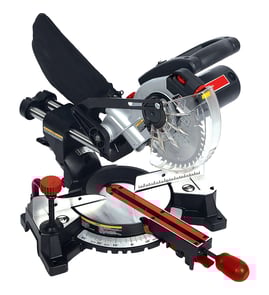

How thick wood can a mitre saw cut?
On the Craftsman 32021180 miter saw, the maximum cutting thickness is 2 inches for standard crosscuts and miter cuts; for bevel and compound cuts, the maximum thickness is 1 1/2 inches (dimensions are approximate). See the cutting capacity chart in the owner's manual.
Cutting thickness and width (model 32021180)
These are the typical maximums listed for this saw; actual results vary with blade type and the true size of the lumber.
- Crosscut (miter 0°, bevel 0°): 2 in. thick, 4 1/4 in. wide
- Miter cut (miter 45°, bevel 0°): 2 in. thick, 4 1/4 in. wide
- Bevel cut (miter 0°, bevel 45°): 1 1/2 in. thick, 4 in. wide
- Compound cut (miter 45°, bevel 45°): 1 1/2 in. thick, 3 1/2 in. wide
Quick reference table
| Cut type | Miter setting | Bevel setting | Max thickness | Max width |
|---|---|---|---|---|
| Crosscut | 0° | 0° | 2 in. | 4 1/4 in. |
| Miter cut | 45° | 0° | 2 in. | 4 1/4 in. |
| Bevel cut | 0° | 45° | 1 1/2 in. | 4 in. |
| Compound cut | 45° | 45° | 1 1/2 in. | 3 1/2 in. |
Why it matters
Cut capacity changes when you add a bevel or compound angle because the blade meets the workpiece differently. Staying within the listed thickness helps prevent stalling, binding, and kickback, and it helps you get a cleaner, more accurate cut.
Tips to get the full cut capacity safely
- Clamp the workpiece; do not cut freehand.
- Keep hands out of the blade path and the “no hands” zone.
- Use a sharp, correct-size blade; this saw is designed for a 7 1/4-inch blade.
- Support long boards with a roller stand or a level support surface.
- If you install a new blade, check blade clearance and depth stop settings before cutting.
Last updated: February 2026
How to tune a miter saw?
To tune your Craftsman 32021180 miter saw, square the blade to the fence and table, then verify the miter and bevel scales using test cuts and a reliable square. Always lock the miter table and bevel before cutting; fine adjustments are confirmed with scrap cuts.
Safety first (before any tuning)
- Unplug the saw before adjusting the miter table, bevel, fence, or making alignment checks.
- Clamp or bolt the saw to a stable bench at a comfortable working height.
- Tighten the miter table locking lever before every cut.
- Tighten the bevel lock knob before every cut.
- Use the hold down clamp whenever possible to keep the workpiece from shifting.
Step-by-step: tune for square and accurate angles
- Set a baseline: Set miter to 0° using the positive stop; set bevel to 0° (90° straight cut).
- Check fence-to-blade squareness: With the saw unplugged and the blade lowered, place a square against the fence and alongside the blade (avoid touching teeth). Adjust the fence if your manual’s procedure allows.
- Verify miter accuracy with a test cut:
- Cut a straight crosscut on scrap.
- Flip one piece and bring cut edges together; gaps indicate the miter needs correction.
- Verify bevel accuracy with a 45° test:
- Set bevel to 45° left and make a test cut.
- Pair two 45° cuts to form a 90° corner; check with a square.
- Re-check after changes: Adjusting bevel can affect miter results (and vice versa), so confirm both again.
Quick reference: what to lock and what it controls
| Adjustment | What it changes | What to lock | Common symptom if off |
|---|---|---|---|
| Miter angle (0° to 45° L/R) | Left/right angle across the fence | Miter table locking lever | Miters do not close, crosscuts not square |
| Bevel angle (0° to 45° left) | Tilt of the blade | Bevel lock knob | Bevel joints show gaps, corners not 90° |
Why it matters
A tuned miter saw gives repeatable, tight-fitting joints. On the Craftsman 32021180, the positive miter stops (0°, 15°, 22.5°, 30°, 45°) help you return to common angles quickly, but test cuts confirm real-world accuracy.
For model-specific adjustment points and any fence or pointer calibration steps, follow the owner's manual.
Last updated: February 2026
What are the parts of a miter saw?
On the Craftsman 32021180 miter saw, the main parts include the motor and blade assembly, upper and lower blade guards, the miter table with its lock lever and angle stops, the fence and base, and the ON/OFF trigger switch. See the owner's manual for the labeled “Know your miter saw” diagram.
Core parts you will use most
- Miter table: rotates left/right to set the miter angle
- Miter lock lever: locks the table so the angle cannot shift during a cut
- Saw arm: pivots down through the cut; also tilts for bevel cuts
- Bevel lock knob: locks the saw arm at the bevel angle
- Fence and base: support the workpiece and keep it square
- Upper and lower blade guards: help shield the blade; the lower guard moves during cutting
- ON/OFF trigger switch: starts and stops the saw
Other common parts and features on this model
The 32021180 manual also calls out several features that are part of the saw’s design and safe operation.
| Part or feature | What it does | When it matters most |
|---|---|---|
| Saw arm locking pin | Locks the arm in the down position | Carrying, storage, setup |
| Arbor lock button | Stops the arbor for easier blade changes | Blade replacement |
| Sawdust ejection port and dust bag | Directs sawdust into the bag or a vacuum adapter | Cleaner cuts, better visibility |
| Laser cutting line | Helps align the cut line on the workpiece | Trim work, repeat cuts |
Why it matters
Knowing the names and functions of the miter table, miter lock lever, bevel lock knob, and blade guards helps you set angles correctly and keep adjustments locked before cutting. That reduces the chance of the workpiece shifting and improves cut accuracy.
Quick safety checks before you cut
- Unplug the saw before changing the blade or making adjustments
- Clamp or bolt the saw to a stable bench or table
- Lock the miter table before cutting (tighten the miter lock lever securely)
- Lock the saw arm bevel setting before cutting (tighten the bevel lock knob)
- Replace missing or damaged parts before operating
Last updated: February 2026
What should you never cut with a miter saw?
For the Craftsman 32021180 miter saw, never cut metals or masonry products; this saw is designed for wood and wood-like materials. Also avoid unsafe setups such as freehand cuts or holding tiny pieces by hand near the blade. See the safety rules in the owner's manual.
Materials you should never cut
- Ferrous metals (iron, steel, stainless steel, and similar alloys)
- Masonry products (stone, brick, concrete)
- Any material that requires removing or defeating the blade guard
- Anything that exceeds the saw’s cutting capacity (too thick or too wide)
Cuts and situations to avoid (even with wood)
- Freehand cuts (not held firmly against the fence)
- Very small workpieces that are too small to clamp
- Cutting warped or unstable stock without securing it flat to the table and fence
- Reaching into the blade path or under the workpiece while the blade is moving
- Operating with dull, bent, or damaged blades (binding and kickback risk)
What this saw is intended to cut
The manual lists these as typical applications:
| Material or task | Recommended on a miter saw? | Notes |
|---|---|---|
| Crosscuts in wood and wood base materials | Yes | Use the fence as a backstop and clamp when needed |
| Crosscuts in plastics (PVC, CPVC, similar) | Yes | Use a suitable blade and secure the workpiece |
| Ferrous metals | No | Not recommended for this tool |
| Stone/brick/concrete | No | Never cut masonry products |
Why it matters
Cutting the wrong material or making unsupported cuts can cause the blade to bind, stall, or kick back. That can pull the workpiece, damage the blade, or put your hands in the cutting path.
Safer alternatives and best practices
- Use the correct tool for metal or masonry (not a wood miter saw)
- Clamp the workpiece and keep hands outside the marked “no hands zone”
- Support long boards with a roller stand or a level support surface
- Let the blade reach full speed before cutting, and let it stop fully before raising the saw
Last updated: February 2026