Get free shipping on your order, with any water filter subscription. Find my filter

Open Hamburger Menu
Sears Parts Direct
Tips to find your model number

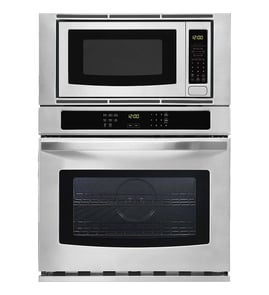
Jenn-Air JMW2430IL03 microwave/wall oven combo Parts

Here are the diagrams and repair parts for Jenn-Air JMW2430IL03 microwave/wall oven combo, as well as links to manuals and error code tables, if available.

Jenn-Air JMW2430IL03 microwave/wall oven combo
By Schematic
By Part
SELECT DIAGRAM
?

This is the number corresponding to the part on the diagram / schematic

Browse Parts for JMW2430IL03 MICROWAVE/WALL OVEN COMBO

  • Nut for Jenn-Air JMW2430IL03 - Part W10794042

    Internal oven parts diagram

    Acorn Nut

    Part #W10631504

    Replaced by #W10794042

    Info Icon
    Manufacturer substitution
    This part replaces W10631504. Substitute parts can look different from the original.
    In Stock
    $32.10
    Minus Item
    Qty
    Plus Item
  • Appliance Spray Paint (black) for Jenn-Air JMW2430IL03 - Part 285006

    Optional parts (not included) diagram

    Spray Bl

    Part #830864

    Replaced by #285006

    Info Icon
    Manufacturer substitution
    This part replaces 830864. Substitute parts can look different from the original.
    This item is not returnable
    In Stock
    $45.09
    12% OFF Phone Price : $51.09Info Icon
    Minus Item
    Qty
    Plus Item
  • Appliance Touch-up Paint, 0.6-oz (black) for Jenn-Air JMW2430IL03 - Part 72032

    Optional parts (not included) diagram

    Touch-up Paint (black)

    Part #72032

    Replaced by #72032

    Info Icon
    Manufacturer substitution
    This part replaces 72032. Substitute parts can look different from the original.
    This item is not returnable
    In Stock
    $11.08
    15% OFF Phone Price : $13.08Info Icon
    Minus Item
    Qty
    Plus Item
  • Locknut for Jenn-Air JMW2430IL03 - Part W11231343

    Internal oven parts diagram

    1/4-32 X .09

    Part #W11033111

    Replaced by #W11231343

    Info Icon
    Manufacturer substitution
    This part replaces W11033111. Substitute parts can look different from the original.
    In Stock
    $38.25
    Minus Item
    Qty
    Plus Item
  • Holder for Jenn-Air JMW2430IL03 - Part WPW10490593

    Cabinet and stirrer parts diagram

    Lamp Holder

    Part #W10490593

    Replaced by #WPW10490593

    Info Icon
    Manufacturer substitution
    This part replaces W10490593. Substitute parts can look different from the original.
    In Stock
    $42.99
    12% OFF Phone Price : $48.99Info Icon
    Minus Item
    Qty
    Plus Item
  • Microwave Sliding Arm Bracket Assembly for Jenn-Air JMW2430IL03 - Part WPW10128850

    Cabinet and stirrer parts diagram

    Flange Bushing

    Part #461967510191

    Replaced by #WPW10128850

    Info Icon
    Manufacturer substitution
    This part replaces 461967510191. Substitute parts can look different from the original.
    In Stock
    $64.04
    9% OFF Phone Price : $70.04Info Icon
    Minus Item
    Qty
    Plus Item
  • Insulation for Jenn-Air JMW2430IL03 - Part W11688731

    Oven parts diagram

    Insulation

    Part #W10520715

    Replaced by #W11688731

    Info Icon
    Manufacturer substitution
    This part replaces W10520715. Substitute parts can look different from the original.
    In Stock
    $109.28
    Minus Item
    Qty
    Plus Item
  • Wall Oven Bottom Liner for Jenn-Air JMW2430IL03 - Part WPW10283008

    Oven parts diagram

    Access Cover

    Part #W10283008

    Replaced by #WPW10283008

    Info Icon
    Manufacturer substitution
    This part replaces W10283008. Substitute parts can look different from the original.
    In Stock
    $105.13
    10% OFF Phone Price : $117.13Info Icon
    Minus Item
    Qty
    Plus Item
  • Cooking Appliance Screw, #8-18 X 1/2-in for Jenn-Air JMW2430IL03 - Part W11690596

    Oven door parts diagram

    Cooking Appliance Screw, #8-18 X 1/2-in

    Part #W10284411

    Replaced by #W11690596

    Info Icon
    Manufacturer substitution
    This part replaces W10284411. Substitute parts can look different from the original.
    In Stock
    $42.69
    Minus Item
    Qty
    Plus Item
  • Guide, Use & Care (oven) for Jenn-Air JMW2430IL03 - Part W11235342

    Control panel parts diagram

    Guide, Use & Care (oven)

    Part #W11235342

    The manufacturer no longer makes this part, and there's no substitute part

Jenn-Air MICROWAVE/WALL OVEN COMBO JMW2430IL03 FAQs

A Jenn-Air wall oven typically lasts 15 years with normal use and basic maintenance. For the Jenn-Air JMW2430IL03 wall oven/microwave combo, consistent cleaning, proper ventilation, and avoiding overheating are the biggest factors in reaching that lifespan; see the care and cleaning guidance in the owner's manual.

Typical lifespan and what affects it

Most premium wall ovens land in a similar range, but real-world life depends on heat stress and how often the oven runs at high temperatures.

  • Typical lifespan: about 15 years
  • Heavy use (daily high-heat cooking): often shorter
  • Light to moderate use: often longer
  • Power quality and wiring condition: can impact control boards and sensors
  • Cleaning habits: reduce corrosion, odors, and door seal issues

Maintenance that helps you reach 15 years

The microwave and oven sections share the same built-in cabinet environment, so keeping surfaces clean and airflow unobstructed matters.

  • Clean the control panel/display with gentle pressure and nonabrasive cleaners
  • Keep the door and frame contact area clean so the door closes properly
  • For odors, heat water with lemon juice or vinegar in the microwave cavity (per manual guidance)
  • Avoid abrasive pads that can damage stainless and interior surfaces
  • If baking performance becomes inconsistent, check for symptoms of a failing temperature sensor or heating circuit

Common “end-of-life” parts and symptoms

If the unit is otherwise in good shape, replacing a failed component can extend service life.

Symptom Likely area Example part for JMW2430IL03
Oven temp swings, underbakes Sensing Temperature sensor W11233913
No heat in microwave, runs but doesn’t warm High-voltage system Magnetron W11346197
Microwave won’t start when door is shut Door safety circuit Switch W10211972

Why it matters

Knowing the expected lifespan helps you decide whether to troubleshoot and replace a part (often cost-effective) or plan for a full replacement when multiple major components start failing.

Last updated: February 2026

A Jenn-Air microwave/wall oven combo like model JMW2430IL03 saves space, but the tradeoffs are higher purchase and repair costs, more complex installation, and less flexibility if one section fails. Review clearances, electrical needs, and operating limits in the owner's manual before committing.

Common disadvantages to plan for

  • Higher upfront cost than buying a separate wall oven and countertop or built-in microwave.
  • More complex installation: cabinet fit, venting, and securing the unit matter; the installation guide covers steps like fastening the bottom vent and confirming the door opens freely.
  • Electrical requirements can be stricter: these combos typically use a 208/240 V circuit with 120 V sides feeding the microwave section.
  • Repair complexity and downtime: if the microwave section has a key failure (for example a door interlock issue), you may lose microwave use until the repair is completed.
  • Less layout flexibility: you cannot relocate or upgrade the microwave independently without changing the whole built-in configuration.

What this means for real-world ownership

Here are the most common “pain points” we see with combo units and what they usually involve:

Disadvantage What you notice Typical next step
Installation sensitivity Door rubs, trim gaps, airflow concerns Recheck cabinet opening, vent mounting, and fasteners per the installation instructions
Microwave stops running No heat, won’t start, intermittent operation Verify door closes fully; then troubleshoot interlocks and controls
Higher repair cost Fewer “quick swaps” than standalone units Diagnose carefully before ordering parts

Why it matters

A combo unit concentrates cooking functions into one built-in appliance. That is great for a clean look and saving space, but it also means installation accuracy and electrical supply quality have a bigger impact on performance and reliability.

If you are comparing repair scenarios

For the microwave section, common service items can include door interlock components such as the switch W10211972 or heating components such as the magnetron W11346197. We recommend confirming symptoms with the troubleshooting section in the manual before replacing parts.

Last updated: February 2026

On the Jenn-Air JMW2430IL03 wall oven and microwave combo, the model and serial number plate is located on the center vent under the control panel. It is easiest to spot by opening the upper (microwave) door and looking at the vent area directly beneath the controls; the plate is mounted there (see the diagram in the JMW2430IL03 owner's manual).

Quick steps to find it

  • Open the upper microwave door fully.
  • Look at the center vent directly under the control panel.
  • Find the plate that lists Model and Serial (sometimes called the rating plate).
  • Use a flashlight; glare on stainless surfaces can hide the print.
  • Write down the full model number and serial number before ordering parts.

What the plate includes

Plate item What it helps with
Model number Ensures you match the correct parts diagrams for your exact unit
Serial number Helps identify production variations when parts change by revision

If you still cannot locate it

  • Check the right-side trim area; some single microwave oven configurations place the plate there.
  • Clean the vent surface lightly so the printing is readable.
  • Confirm your cabinet cutout and installation details using the installation guide if you are verifying fit or planning a reinstall.

Why it matters

Jenn-Air wall oven and microwave combo parts (controls, door components, heating parts, and wiring) vary by exact model and revision. Using the model and serial number plate prevents ordering the wrong replacement part.

Last updated: February 2026

Symptoms for gas walk-behind mowers

Choose a symptom to see related walk-behind mower repairs.

Main causes: engine needs tune up, dirty or clogged carburetor, damaged flywheel key…

Main causes: stale gas, engine needs tune up, bad spark plug, dead battery, bad recoil starter, faulty safety switch, ba…

Main causes: damaged cutting blade, loose cutting blade, damaged flywheel key, engine needs tune up…

Main causes: uneven wheel height settings, damaged wheel, dull or damaged cutting blade…

Main causes: dirty carburetor, bad spark plug, clogged air filter, engine choke problems, clogged gas cap vent…

Main causes: drive control cable failure, worn or broken drive belt, bad transmission, broken drive wheel…

Repair guides for gas walk-behind mowers

These step-by-step repair guides will help you safely fix what’s broken on your walk-behind lawn mower.

How to replace a lawn mower front deck tray

How to replace a lawn mower front deck tray

Learn how to replace the front deck tray on your lawn mower if it's cracked or damaged.…

Repair time and Difficulty

 60 minutes or less
How to replace a lawn mower transmission

How to replace a lawn mower transmission

Learn how to replace the transmission on your lawn mower if it's locked up or won't drive the wheels.…

Repair time and Difficulty

 60 minutes or less
How to replace a lawn mower flywheel key on a flathead engine

How to replace a lawn mower flywheel key on a flathead engine

When you hit a hard object with your mower, the flywheel can shear to protect more expensive components. Learn how to re…

Repair time and Difficulty

 45 minutes or less

Articles and videos for gas walk-behind mowers

Use the advice and tips in these articles and videos to get the most out of your walk-behind lawn mower.

How to fix a pull cord stuck after tipping mower

How to fix a pull cord stuck after tipping mower

Pull cord stuck after tipping your mower? You might’ve locked the engine. This video shows how to fix a lawn mower pull …

Tapping into a new feature in the Search Bar on Sears PartsDirect

Tapping into a new feature in the Search Bar on Sears PartsDirect

Learn about a new feature added to the Search Bar on Sears PartsDirect…

How to winterize a lawn mower

How to winterize a lawn mower

Your lawn mower will last longer and run better if you take these steps before storing it for winter.…

Parts & More

Bottom-Mount Refrigerator
Canister Vacuum
Dishwasher
Dryer
Electric Wall Oven
Front-Engine Lawn Tractor
Gas Chainsaw
Laundry Center
Parts
Side-By-Side Refrigerator
Washer
Wine & Beverage Cooler