 Installation guide
 Owner’s manual



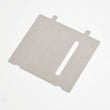
Do all GE microwaves use the same mounting bracket?
No. GE microwaves do not all use the same mounting bracket; bracket hole patterns, support points, and cabinet cutout requirements vary by model and installation type. For the GE ZSC1201J1SS, we recommend following the exact bracket and fastener requirements in the ZSC1201J1SS installation guide to ensure a secure fit.
What to do when replacing a GE built-in microwave
If you are swapping units, treat the bracket as model-specific hardware.
- Match the replacement microwave’s full model number, not just the brand (GE).
- Use the bracket and screws specified for the new unit’s installation instructions.
- Do not drill new holes in a bracket to “make it fit”; alignment and support can be compromised.
- Confirm the cabinet opening and mounting surface are solid and level.
- If your unit is a built-in or speedcook style, follow the approved mounting method for that design.
Quick compatibility checklist
Use this to decide whether an existing bracket is a safe candidate to reuse.
| Check | If it matches | If it does not match |
|---|---|---|
| Exact model family and installation type | Reuse is sometimes possible | Replace bracket and hardware |
| Hole pattern lines up without forcing | Proceed to next checks | Do not reuse |
| Unit sits square and fully supported | Proceed | Do not reuse |
| Installation instructions allow it | Proceed | Replace bracket |
Why it matters
The mounting bracket carries the appliance load and keeps the microwave aligned so the door closes correctly and the unit stays properly supported. Using the correct bracket also helps ensure the microwave is installed according to the manufacturer’s grounding and installation requirements described in the ZSC1201J1SS owner’s manual.
Last updated: February 2026
What's the average lifespan of a GE microwave?
Most GE microwaves last about 8 years. In real-world use, many units fall in the 5 to 10 year range depending on daily run time, ventilation, and how clean the cavity and door seals are. For your GE ZSC1201J1SS, following the care and operating guidance in the ZSC1201J1SS owner’s manual helps you get the full expected life.
Typical lifespan and what affects it
- Usage frequency: multiple long cook cycles per day shortens life faster than light use.
- Heat and airflow: built-in units need proper airflow; heat buildup stresses electronics.
- Door system wear: repeated slamming can wear interlock parts and latches.
- Cleaning habits: grease and food debris can cause odors, arcing, and premature component wear.
- Power quality: frequent breaker trips or power surges can damage control boards.
Quick care checklist (best ROI)
- Wipe the cavity after splatters; keep the waveguide area clean.
- Never run the microwave empty.
- Use microwave-safe cookware; avoid metal unless the cooking mode specifically calls for it.
- Close the door gently; confirm it latches fully before starting.
- Keep vents and surrounding trim areas clear of grease and dust.
Common “end-of-life” symptoms and likely areas
| Symptom | What it often points to | Example part on this model |
|---|---|---|
| Runs but does not heat | High-voltage system or controls | GE microwave power control board WB27X10858 |
| Won’t start, acts dead | Power supply issue, fuse, noise filter, controls | Noise filter WB02X35865 |
| Starts only when door is held/pressed | Door interlock or latch alignment | Microwave door interlock switch WB24X25397 |
| Turntable not rotating | Turntable drive issue | Microwave turntable motor WB26X10193 |
Why it matters
A microwave that is near the end of its typical lifespan is more likely to show intermittent heating, door-interlock problems, or control issues. Catching symptoms early can prevent repeat failures and helps you decide whether a repair (switch, motor, board) makes sense.
Last updated: February 2026
Is it worth repairing a GE microwave?
Yes, repairing a GE microwave is usually worth it when the fix is a common, lower-cost part (especially door-interlock related) or when the unit is a built-in model like GE ZSC1201J1SS, where replacement often adds installation and fitment work. Major electrical failures can shift the value toward replacement.
Quick way to decide (cost vs. benefit)
Use this checklist first; it matches the most common real-world repair outcomes for built-in microwaves.
- Repair is usually worth it when the problem is intermittent starting, door not latching, or random shutoff (often interlock or latch related).
- Repair is usually not worth it when multiple major symptoms stack up (no heat plus burning smell plus repeated tripping).
- Age matters: if the microwave is within the typical service life window, repairs tend to pay off.
- Built-in installation matters: replacing a built-in unit can require trim, cabinet fit, and electrical checks.
- Safety matters: if the door, hinges, latches, or sealing surfaces are damaged, stop using it and have it serviced.
Common “good bet” repairs on ZSC1201J1SS
Door-interlock issues are among the most cost-effective repairs because they are discrete parts and symptoms are clear.
- Primary switch WB24X10047 (primary interlock switch)
- Microwave door interlock switch WB24X25397 (door interlock switch)
- Latch board WB10X32577 or latch board WB10X32573 (latch alignment and switch mounting)
Repairs that change the math
These repairs can be higher cost and are more sensitive to overall condition and how many symptoms you have.
| Repair type | Typical symptom | Value call |
|---|---|---|
| Control/electronics | Dead display, erratic keypad, won’t start | Consider repair if otherwise in great shape |
| High-voltage/heating circuit | Runs but does not heat | Often higher cost; compare to replacement |
| Turntable drive | Tray not turning, noisy rotation | Usually worth it if heating is normal |
Why it matters
Your ZSC1201J1SS manual notes that the oven should not be adjusted or repaired by anyone except properly qualified service personnel, and it highlights checking door condition (hinges, latches, seals) for safe operation. Use the ZSC1201J1SS owner’s manual to confirm operating symptoms and safety guidance before deciding.
If it “runs but won’t heat”
Follow a structured diagnosis path before buying major parts; start with the basics and symptom checks.
- Verify power supply (breaker/fuse) and that a cook time was entered
- Confirm the door closes firmly and latches consistently
- Stop use immediately if you see arcing or sparks
- Use our guide: why is my microwave not heating
Last updated: February 2026


