 Owner’s manual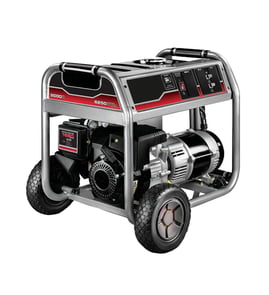

What is the 20 20 20 rule for generators?
The 20-20-20 rule is a generator safety reminder: run your All Power APGG7500 at least 20 feet from doors, windows, and vents; shut it off and let it cool for 20 minutes before refueling; and use a battery-operated carbon monoxide (CO) alarm.
How to follow the 20-20-20 rule
- 20 feet away: Operate outdoors only; aim the exhaust away from the home and any openings.
- 20-minute cooldown: Turn the engine off, then wait 20 minutes before adding fuel.
- CO alarm: Use a battery-operated CO alarm in the home; test it regularly and replace batteries as needed.
- Reduce shock risk: Keep connections dry, use properly rated cords, and avoid touching grounded metal surfaces.
- Operate safely: Keep children away, stay alert, and do not operate the generator while tired or impaired.
Quick reference table
| “20” step | What to do | Why it matters |
|---|---|---|
| 20 feet | Place the generator 20 feet from openings | Limits CO from entering living spaces |
| 20 minutes | Cool down 20 minutes before refueling | Prevents fuel ignition on hot parts |
| CO alarm | Use a battery-operated CO alarm | Provides early warning of CO buildup |
Why it matters
A portable generator produces exhaust, heat, and fuel vapors. Distance and ventilation reduce carbon monoxide exposure, and a cooldown period reduces fire risk during refueling. For additional APGG7500 operating and safety precautions (including electrical safety and maintenance guidance), follow the APGG7500 owner's manual.
Last updated: February 2026
What is the downside of an inverter generator?
The downside of an inverter generator is the tradeoff you make for cleaner, quieter power: higher upfront cost and, on many models, less surge capability than a similar-size conventional generator. Your All POWER APGG7500 is a conventional generator; use the APGG7500 owner's manual to manage loads and protect electronics.
Main disadvantages of inverter generators
- Higher purchase price for the same running watts
- Lower surge (starting) output on many units, which can struggle with pumps and compressors
- More electronic components, which increases diagnostic and repair complexity
- Some models require parallel kits (and a second unit) to reach higher wattage
- Repairs often cost more when control boards or inverter modules fail
Inverter vs. conventional: quick comparison
| Feature | Inverter generator | Conventional generator (like APGG7500) |
|---|---|---|
| Power quality | Very stable, low distortion | Varies more with load changes |
| Noise | Typically quieter | Typically louder |
| Fuel use at light load | Often better | Often worse |
| Motor-starting loads | Often weaker surge | Often stronger surge |
| Best fit | Electronics, RV, light to medium loads | Jobsite tools, larger starting loads |
What to do on the APGG7500 (since it is not an inverter)
The APGG7500 manual focuses on safe operation and staying within capacity. It also calls out protecting sensitive electronics.
- Add up running watts and starting watts before plugging anything in
- If an overload occurs, disconnect loads; the AC thermal protector/breaker can trip
- Use an approved line conditioner for sensitive electronic equipment when needed
- Plug loads in only after the generator is running steadily
Why it matters
If you choose an inverter generator for a heavy starting-load application, you get hard starts and nuisance shutdowns. If you use a conventional generator for electronics without protection, you risk unstable power under changing loads.
Last updated: February 2026
Will a APGG7500 generator run a whole house?
A 7,500-watt All Power APGG7500 generator can usually run a home’s essentials (refrigerator, some lights, TV, small appliances), but it typically will not run an entire whole house load at once, especially central air conditioning, electric water heaters, or an electric dryer. Use the wattage planning guidance in the owner's manual.
What “whole house” means for a 7,500W generator
Most homes have a mix of running watts (steady power) and starting watts (extra surge power for motors). With a 7.5 kW generator, we plan for essentials and manage what runs at the same time.
Common loads that often fit (one at a time, as needed):
- Refrigerator or freezer
- Lights (LED/CFL)
- TV, internet equipment, phone chargers
- Sump pump (depends on size and starting surge)
- Microwave or coffee maker (not usually at the same time as other big loads)
Common loads that often push you over the limit:
- Central A/C or heat pump
- Electric water heater
- Electric range/oven
- Electric clothes dryer
Quick load-planning checklist
Use this approach before you connect anything:
- Add up the running watts of everything you want on at once.
- Identify motor loads (pump, fridge, blower) and account for starting surge.
- Prioritize “must-run” circuits first, then add convenience loads.
- Start the largest motor load first, then add smaller loads.
- If the generator bogs down or breakers trip, reduce load immediately.
Example: essentials vs. whole-house loads
| Goal | Typical result with 7,500W | What you do |
|---|---|---|
| Keep food cold + basic lighting | Usually achievable | Run fridge, a few lights, small electronics |
| Run a sump pump reliably | Often achievable | Avoid running other high-watt items during pump starts |
| Run central A/C | Often not achievable | Consider a smaller window unit or staged loads |
| Power “everything like normal” | Not typical | Use load management and prioritize circuits |
Safety and installation notes that matter
The APGG7500 is a powerful machine; safe placement and connection are just as important as wattage.
- Run the generator outdoors in a protected, weatherproofed location as described in the owner's manual.
- Keep the unit on a level surface and allow safe clearance for exhaust and cooling.
- Use the correct cords and connections for 120V and 240V loads.
Why it matters
Overloading a generator can trip circuit breakers, cause voltage drop that damages electronics, and create unsafe operating conditions. Planning your loads helps you get reliable backup power without stressing the alternator, control panel, or connected appliances.
Last updated: February 2026