 Installation guide
 Owner’s manual
 Error Codes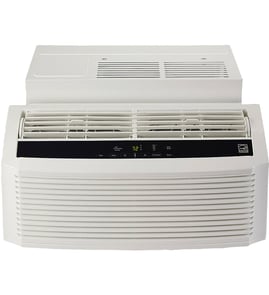



How to reset a Kenmore AC unit?
To reset your Kenmore Elite room air conditioner model 25376150314, use the reset feature on the power plug: press TEST and then press RESET so the unit can restore power through the cord’s safety device. See the installation guide for electrical and plug requirements.
Reset steps (plug with TEST/RESET buttons)
- Turn the air conditioner OFF.
- Press TEST on the plug head; the RESET button should pop out.
- Press RESET to restore power.
- Plug the cord firmly into a properly grounded 3-prong outlet.
- Turn the unit back ON and select a cooling mode.
If it still will not run after resetting
These checks match common setup and airflow issues for room air conditioners:
- Confirm the outlet power matches the unit’s serial nameplate requirements.
- Do not use an adapter plug; use a matching grounded outlet.
- Make sure nothing blocks airflow: shrubs/awnings outside, or drapes/furniture inside.
- If the unit was recently installed, verify all shipping packaging and plastic ties were removed (some heavy duty models require this).
- If the plug will not reset or immediately trips again, stop using the unit and contact Sears PartsDirect support.
Quick reference: what the buttons mean
| Button | What it does | What you should see |
|---|---|---|
| TEST | Trips the safety device on the cord | RESET button pops out; power cuts |
| RESET | Restores power through the cord | Button stays in; unit can power on |
Why it matters
The TEST/RESET plug is a built-in safety device. Resetting it correctly restores power safely and helps you avoid nuisance shutdowns caused by improper grounding, mismatched outlets, or blocked airflow.
Last updated: February 2026
Where is the air filter on a Kenmore 25376150314 Elite?
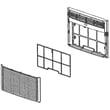
On the Kenmore Elite room air conditioner model 25376150314, the air filter sits directly behind the front grille on the front of the unit. You access it by pulling down on the upper edge of the front grille, then removing the filter from the tabs.
How to access and remove the filter
We recommend turning the unit off before handling the grille or filter.
- Pull down on the front grille from the upper edge, then lift it up and set it aside.
- Grasp the filter near the middle on each side.
- Bow the filter slightly outward to detach the top edge from the tabs.
- Lift the filter up and out.
- Reinstall by seating the filter back into the tabs, then snap the grille back on.
For the exact grille and filter removal steps and diagrams, use the installation guide.
Quick location guide
| What you’re looking for | Where it is | What it does |
|---|---|---|
| Front grille | Front of the air conditioner | Covers the filter and front panel |
| Air filter | Behind the front grille | Traps dust and lint to protect airflow |
| Tabs/slots | Along the filter’s top edge area | Holds the filter in place |
Why it matters
A clogged filter restricts airflow, which reduces cooling performance and can make the unit run longer than necessary. Keeping the filter clean also helps prevent dust buildup on the evaporator coil and improves overall efficiency.
Helpful tips while you’re there
- Check that furniture, drapes, or blinds are not blocking the unit’s airflow.
- Make sure the front grille snaps fully back into place so it does not rattle.
- If the filter is damaged or won’t stay seated in the tabs, replace it rather than forcing it.
- After reinstalling, confirm the unit is firmly seated and the front is aligned.
Last updated: February 2026
Why is my Kenmore air conditioner not blowing cold air?
If your Kenmore Elite room air conditioner model 25376150314 runs but won’t blow cold air, the most common causes are restricted airflow (dirty filter, blocked vents) or an installation/clearance issue that prevents the unit from rejecting heat outdoors. Start with filter and airflow checks before moving to electrical or sealed-system issues.
Quick checks that fix most “not cold” complaints
- Clean the air filter: A clogged filter reduces airflow across the evaporator and can make cooling weak.
- Confirm nothing blocks airflow: Keep indoor airflow clear (furniture, drapes, blinds) and keep the outdoor side clear (shrubs, trees, awnings). See the airflow guidance in the installation guide.
- Verify the unit is seated correctly in the cabinet: During install, the unit should be firmly seated toward the rear of the cabinet; avoid pushing on the finned coils.
- Make sure the front grille and front panel are installed correctly: Misalignment can restrict return air.
- Check mode and settings: Set to Cool, lower the set temperature, and use a higher fan speed for faster pull-down.
If it cools a little, then stops (or blows warm after a while)
Restricted airflow is still the top suspect, but also check these common patterns:
| Symptom | Most likely cause | What to do first |
|---|---|---|
| Weak airflow, musty smell | Dirty filter or blocked grille | Clean filter, clear vents |
| Cools briefly, then airflow drops | Coil icing from low airflow | Clean filter; run Fan-only to thaw |
| Runs constantly, room never cools | Undersized unit or heat gain | Close blinds, seal gaps, reduce heat sources |
| Fan runs, compressor seems off | Control or power issue | Confirm proper outlet and plug (3-prong) |
Electrical and installation items to confirm
The installation instructions call out power and safety basics that affect performance:
- Use a properly grounded 3-prong outlet; do not use an adapter.
- Make sure the power supply matches the unit nameplate.
- Keep the rear and side outdoor airflow unblocked so heat can leave the unit.
Why it matters
A room air conditioner can only cool when it has strong indoor airflow and clear outdoor ventilation. When airflow is restricted, the evaporator can ice up and the unit may run without delivering cold air.
Last updated: February 2026
What are the spare parts of AC?
For the Kenmore Elite room air conditioner model 25376150314, the most common “spare parts” customers replace are airflow parts (filter, fan), electrical start/run parts (capacitor, controls), and installation-related pieces (seals, brackets). Your installation guide also lists the accessory kit items included for mounting.
Common spare parts you may need
These are the parts most often serviced on a room air conditioner like model 25376150314:
- Air filter: helps keep airflow strong; a clogged filter reduces cooling
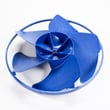
- Fan motor and blower/fan blade: moves air across the coils and into the room
- Capacitor: helps the compressor and/or fan motor start and run
- Control board or selector controls: manages modes, fan speeds, and temperature settings
- Thermostat/temperature sensor: tells the unit when to cycle on and off
- Power cord and plug: supplies power; must remain properly grounded
- Drainage components (pan, channels): manages condensate water
Installation and mounting “spares” (often lost or damaged)
Your unit’s mounting hardware and seals matter for safety, noise, and efficiency. The installation materials commonly replaced include:
- Foam gasket and window sash seal
- Window support brackets and side retainers
- Window filler panels
- Bottom rail seal and top angle rail
- Screws, locknuts, and safety lock hardware
Quick troubleshooting guide: which part is most likely?
| Symptom | Most likely area | What to check first |
|---|---|---|
| Weak airflow | Filter, fan, airflow blockage | Clean/replace filter; clear drapes/blinds and outdoor obstructions |
| Won’t power on | Electrical supply, cord/plug, controls | Confirm correct outlet and grounded plug; avoid adapters/extension cords |
| Runs but doesn’t cool | Airflow, coils, compressor circuit | Check airflow restrictions; verify fan is running |
| Water dripping inside | Drainage path, unit level | Confirm unit is installed correctly and draining to the outside |
Why it matters
Using the right replacement parts keeps your Kenmore 25376150314 cooling safely and efficiently. The installation guide also highlights key safety points: the unit is heavy (two-person lift), coil fins are sharp, airflow must not be blocked, and the 3-prong grounded plug must not be altered.
Last updated: February 2026
What does CH-34 mean on a Kenmore 25376150314 Elite air conditioner?
CH-34 on the Kenmore Elite 25376150314 indicates the air conditioner has detected an abnormal operating condition and is protecting itself by limiting or stopping cooling. The fastest fix is to restore proper airflow and power-cycle the unit, then retest.
What to do first (safe, fast checks)
- Turn the unit OFF, then unplug it for 5 minutes.
- Plug it back in and run Cool for 10 minutes.
- Clean the air filter and reinstall it fully seated.
- Make sure the front intake and rear exhaust are not blocked.
- Confirm the side louvers are not blocked; the installation instructions state they must never be blocked.
Airflow and installation checks that commonly clear CH codes
Restricted airflow is the most common reason a room air conditioner protects itself. Use these checks:
| Check | What “good” looks like | What to fix |
|---|---|---|
| Filter | Clean, dry, not bowed | Wash and dry, or replace if damaged |
| Rear coil area | Open space, no debris | Move the unit, clear leaves or lint |
| Side louvers | Fully open to room air | Remove obstructions, correct wall sleeve fit |
| Cabinet fit | Unit slides in without pinching | Re-seat unit in cabinet, correct opening |
If CH-34 returns after cleaning and reset
CH-34 repeating after airflow and reset points to a condition that needs deeper diagnosis.
- Fan not moving enough air (motor, blade, or obstruction)
- Dirty coils that need more thorough cleaning
- Electrical issue (wiring, sensor, control)
- Sealed-system performance problem (cooling weak even with clear airflow)
For model-specific installation clearances, “side louvers must never be blocked,” and safe panel removal steps, follow the installation guide.
Why it matters
When the unit cannot move enough air across the coils, temperatures and pressures rise quickly. The control system responds by shutting down or limiting operation to protect the compressor and electronics.
Last updated: February 2026


