 Owner’s manual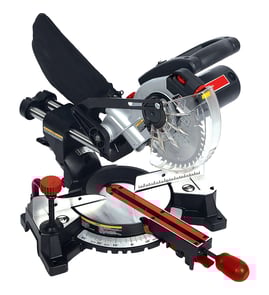

Can I cut a 4x4 with a 10-inch miter saw?
Yes, you can cut a 4x4 with many 10-inch compound miter saws, but it depends on the saw’s maximum cut capacity. With a Craftsman 137212170 compound saw, we recommend confirming the max cut depth in the 137212170 owner's manual and doing a test fit with the saw OFF to verify the blade path before you cut.
What to check before you try the cut
A “4x4” is typically about 3-1/2 in. x 3-1/2 in., so the key is whether your 10-inch blade can reach that depth at 90°.
- Lower the head (power OFF) to see if the blade clears the full thickness.
- Keep your hands at least 8-3/4 in. from the blade path (the manual’s no-hands zone).
- Hold the workpiece firmly against the fence to prevent shifting.
- Support long or heavy stock on both sides of the saw table.
- Wait for the blade to stop completely before lifting the saw back up.
If it won’t cut through in one pass
If your saw’s cut depth is slightly short, you can still get a clean result using a safe, controlled approach.
- Cut as deep as the saw allows.
- Turn the saw OFF and wait for a complete stop.
- Rotate or flip the 4x4 and finish the cut from the other side.
- Keep the workpiece tight to the fence for both cuts.
- Do not force the saw; let the blade cut at its designed rate.
Quick capability guide (typical)
These are common ranges for 10-inch miter saws; your exact capacity is in the manual.
| Saw type | Typical max cut depth at 90° | 4x4 in one pass? |
|---|---|---|
| 10-inch compound (non-sliding) | ~2-1/2 to 3-1/4 in. | Often no |
| 10-inch sliding compound | ~3 to 3-1/2+ in. | Often yes |
| 12-inch compound/sliding | ~3-1/2+ in. | Usually yes |
Why it matters
Trying to cut beyond the saw’s capacity increases the chance of binding, shifting, and rough cuts. Verifying the blade path with the saw OFF and supporting the workpiece helps you cut safely and accurately.
For replacement parts and diagrams for your Craftsman 137212170, start with the model parts list or search by model on Sears PartsDirect.
Last updated: February 2026
How to unlock an old Craftsman miter saw?
On the Craftsman 137212170 compound saw, “unlocking” usually means releasing the miter table lock so the table can rotate, or releasing the hold down latch so the saw head can rise. Use the miter handle, positive-stop locking lever, and hold down latch as shown in the 137212170 owner's manual.
Unlock the miter table (to change the angle)
Use the controls at the front of the saw:
- Turn the miter handle counterclockwise to unlock the table.
- Press and hold the positive-stop locking lever down to bypass the preset stops.
- Rotate the table left or right to the desired angle.
- Release the lever (it snaps into a stop when aligned with a preset).
- Tighten the miter handle firmly before cutting.
| Control | What it unlocks | What to do |
|---|---|---|
| Miter handle | Table rotation lock | Turn counterclockwise to loosen; clockwise to lock |
| Positive-stop locking lever | Preset stop detent | Hold down while rotating to move off a stop |
Unlock the saw head (if it is latched down)
If the saw is stored in the lowered position, release the hold down latch so the head can return upright.
- Keep one hand on the handle to control the spring-loaded rise
- Release the hold down latch
- Let the head rise slowly to the upright position
If it still will not move
These quick checks solve most “stuck” situations on older miter saws:
- Miter handle is still tight; loosen more, then re-tighten after setting the angle
- Positive stop is still engaged; hold the locking lever down while rotating
- Sawdust packed under the table or around the fence; brush and vacuum it out
- Sticky resin (gum) on pivots; clean and lightly lubricate moving points
Why it matters
Unlocking the correct control prevents forcing parts, protects alignment, and keeps the miter scale accurate for repeatable cuts.
For diagrams and replacement parts for model 137212170, use the model parts list or search by model number on Sears PartsDirect.
Last updated: February 2026
What should you never cut with a miter saw?
On the Craftsman 137212170 compound saw, we never cut masonry products or ferrous metals (iron or steel), and we never cut any workpiece so small that our hands would be within 8-3/4 inches of the blade. We also avoid any cut that cannot be clamped and fully supported; that is where injuries and kickback start.
Materials and cuts to avoid
- Masonry products (brick, tile, concrete, stone): this saw is designed for wood and wood-like products.
- Ferrous metals (steel, iron): never cut these on this saw.
- Small pieces that put fingers inside the 8-3/4 inch no-hands zone.
- Hand-held metal: if it cannot be clamped securely, do not cut it.
- Unsecured round stock (dowels, tubing): it can roll and let the blade “bite.”
What about aluminum or other non-ferrous metals?
Some miter saw setups can cut non-ferrous metals (like aluminum) only when the workpiece is clamped and the correct blade is used. For this model, follow the safety and setup rules in the owner's manual before attempting any non-ferrous metal cut.
| Material | Cut on this saw? | Safer approach |
|---|---|---|
| Wood, trim, molding | Yes | Clamp long stock; support both sides |
| Masonry (tile, brick) | No | Use a masonry-rated saw/tool |
| Ferrous metal (steel, iron) | No | Use a metal-cutting saw/tool |
| Non-ferrous metal (aluminum) | Only with correct blade and clamping | Use a non-ferrous blade; clamp; remove dust bag if directed |
Why it matters
Miter saw blades and guards are designed around wood cutting. Cutting the wrong material or cutting too close to the blade increases the chance of binding, flying debris, and loss of control.
Quick safety checks before any cut
- Keep hands at least 8-3/4 inches from the blade path.
- Clamp the workpiece to prevent shifting.
- Confirm the blade is not contacting the workpiece before switching ON.
- Let the blade stop completely before lifting the saw or moving the workpiece.
- If the saw vibrates or makes an unfamiliar noise, shut it off and unplug it.
For replacement parts and diagrams for the Craftsman 137212170, start with the parts list for your model, or search by model number on Sears PartsDirect.
Last updated: February 2026
Why is 31.6 on a miter saw?
The 31.6° mark on the Craftsman 137212170 compound saw is a built-in positive stop that helps you set a common miter angle quickly and accurately. On this saw, 31.6° is specifically used for standard compound cuts such as crown molding laid flat on the table.
What 31.6° is used for on this model
Your 137212170 miter scale includes positive stops at 0°, 15°, 22.5°, 31.6°, and 45°, so you can repeat common cuts without “hunting” for the angle.
Common uses include:
- Crown molding (lying flat) compound cuts
- Fast setup for repeatable trim work
- Reducing angle-setting errors when you are making multiple matching pieces
- Pairing with a bevel setting for compound miters
Crown molding: the typical companion angle
In the 137212170 owner's manual, the crown molding chart shows 31.6° miter used with 33.9° bevel for “standard crown molding lying flat” when the corner is a true 90°.
Here is the basic idea:
| Task | Miter setting | Bevel setting | Notes |
|---|---|---|---|
| Crown molding, compound cut (lying flat) | 31.6° left or right | 33.9° | Chart assumes walls meet at 90° |
| General miter cut (trim, framing) | Any angle needed | 0° | Lock the miter table before cutting |
How to set 31.6° correctly
- Unlock the miter table using the miter handle.
- Press and hold the positive-stop locking lever to move past stops.
- Rotate the table until it clicks into the 31.6° stop.
- Tighten the miter handle before cutting.
- For bevel cuts, extend the sliding fence as directed in the manual to prevent blade-to-fence contact.
Why it matters
31.6° is there to make high-frequency finish cuts faster and more consistent. When you are cutting crown molding or doing repeat trim cuts, a positive stop saves time and helps keep joints tight.
Parts and diagrams
If you need replacement parts (such as miter handle components, fence hardware, or table parts), start with the parts list for model 137212170; you can also search by model number on Sears PartsDirect.
Last updated: February 2026