 Owner’s manual



How do I reset a Kenmore microwave?
To reset your Kenmore Elite microwave model 40574223310, unplug it (or switch off the breaker) for about 1 minute, then restore power and reset the clock. If the control panel is locked, press and hold the lock pad for 3 seconds until “LOC” disappears (see the owner's manual).
Quick reset options (most common)
- Power reset: Unplug for 60 seconds, then plug back in.
- Clear a stuck program: Open the door, then press Stop/Cancel (if your keypad has it).
- Unlock controls: Press and hold the lock pad for 3 seconds until “LOC” clears.
- Reset after a door opening: Close the door and press Start to resume cooking if needed.
What “reset” fixes (and what it does not)
| Symptom | Reset helps? | What to do next |
|---|---|---|
| Display frozen or keypad not responding | Yes | Do a 60-second power reset |
| “LOC” on the display | Yes | Hold lock pad 3 seconds |
| Microwave runs but does not heat | No | Use why is my microwave not heating troubleshooting |
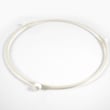
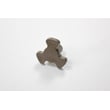
| Turntable not rotating smoothly | Sometimes | Check tray seating; inspect the tray for damage |
Why it matters
A reset clears minor control glitches and restores normal operation after a power surge or an accidental keypad sequence. Unlocking “LOC” is especially important because the microwave will appear “dead” even though it has power.
If you suspect a part issue
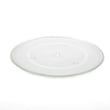
If the glass tray is chipped, wobbles, or no longer sits flat, replace it with the correct part for this model: midea microwave glass turntable tray F06014M00AP. Using the right tray helps prevent uneven cooking and reduces the chance of arcing from improper cookware contact.
Last updated: February 2026
How many cubic feet is a Kenmore Model 40574223310 microwave?
The Kenmore Elite microwave model 40574223310 has an oven capacity of 2.2 cubic feet (about 62 L). This is the usable cooking space inside the cavity, and it helps you judge what size dishes and containers will fit comfortably.
Where to confirm the capacity (and other key specs)
We list the capacity in the specifications section of the owner's manual. That same section also includes the microwave’s rated output power and physical dimensions.
- Oven capacity: 2.2 cu. ft. (62 L)
- Rated output power: 1200 W
- Turntable diameter: 16.5 in.
- External dimensions (W x D x H): 24.05 x 19.65 x 13.63 in.
- Electrical rating: 120 V, 60 Hz
Why capacity matters when you are using the microwave
Capacity is mainly about fit and airflow, not just “bigger is better.” It affects what you can heat evenly and how easily the turntable can rotate without hitting the walls.
| What you are deciding | Why capacity helps | What to check before cooking |
|---|---|---|
| Large dinner plates | More room for wider dishes | Plate clears the cavity walls and door frame |
| Tall containers | More vertical clearance | Lid does not touch the ceiling or stirrer cover |
| Multi-item reheating | More usable floor space | Items can sit with space between them |
Quick tips to avoid fit problems
- Center dishes on the turntable so they rotate smoothly.
- Use microwave-safe containers that do not flare outward too much.
- Leave a little space around the container for steam to vent.
- If the tray is missing or chipped, replace it so cookware sits level.
If you need a replacement tray for this model, we offer the midea microwave glass turntable tray F06014M00AP.
Last updated: February 2026
Where can I find my Kenmore microwave model number?
For your Kenmore Elite microwave model 40574223310, the model number is printed on the rating label. On most countertop microwaves, that label is easiest to spot when you open the door and look around the door frame area. For confirmation and label details, use the owner's manual.
Common places to check on a countertop microwave
Look for a sticker or metal tag in one of these spots:
- Along the door frame (around the opening when the door is open)
- On the inside edge of the control panel area (visible with the door open)
- On the back panel of the microwave
- On a side panel (sometimes near the rear)
- Inside the cooking cavity near the opening (less common)
What the model number looks like (and why it matters)
Kenmore model numbers are typically a long number string. For this unit, the manual lists 405.74229310/405.74223310; using the exact model number helps match the correct microwave parts and specifications.
| What you see on the label | What to do with it |
|---|---|
| 40574223310 | Use this exact number to look up parts for your microwave |
| 405.74223310 | Same model family formatting; match digits carefully |
| A similar number with one digit different | Treat it as a different model; parts may not fit |
Quick tips to read the label correctly
- Write the number down exactly as shown (including any dots)
- Take a clear photo before ordering parts
- If the label is worn, check the back panel next
Why it matters
The model number ties your microwave to the correct parts list and the correct specs (for example, this model family is listed as 120V, 60Hz with 1200W rated output power in the manual). Using the wrong model number is the most common reason for ordering the wrong turntable, door parts, or internal components.
Last updated: February 2026
Why is my Kenmore 40574223310 Elite microwave not working?
If your Kenmore 40574223310 Elite microwave is not working at all (no start, no heat, or it stops mid-cycle), the most common causes are a power supply issue, the door not fully latching, or an incorrect setting. Start with the basic checks in the owner's manual.
Quick checks (most common fixes)
- Make sure the power cord is fully plugged into the outlet.
- Confirm the door closes completely and latches; try opening and closing it firmly.
- Try a simple cook test: place 1 cup of water in a microwave-safe cup and run 1 minute.
- If the display is on but it will not run, re-enter the cook time and press Start again.
- If it stopped during cooking, let it cool for a few minutes and try again (restricted ventilation can trigger shutdown).
What the symptoms usually mean
| What you notice | Likely cause | What to do next |
|---|---|---|
| No lights, no display | No power to the microwave | Check outlet power; reset the kitchen circuit if needed; plug into a known-good outlet |
| Display works but will not start | Door not fully closed or wrong operation set | Close door firmly; reprogram cook time per the manual |
| Runs but does not heat | Heating circuit problem (common microwave failure area) | Stop using it for cooking; follow the diagnostic guidance in why is my microwave not heating |
| Stops mid-cycle or seems weak | Ventilation blocked or incorrect cookware | Clear space around vents; use microwave-safe cookware only |
Turntable and cookware checks
This model uses a 16.5-inch turntable. If the tray is missing, damaged, or wobbling, cooking can be uneven and the unit can be noisier than normal.
- Inspect the tray for chips or cracks.
- Clean the cavity floor and roller area so the tray can rotate smoothly.
- Replace a damaged tray with the correct part for this model: midea microwave glass turntable tray F06014M00AP.
Why it matters
A microwave that will not start is often a door-latch or power issue you can correct quickly. A microwave that runs but does not heat points to a higher-voltage heating problem; addressing it early prevents repeat failures and unsafe operation.
Last updated: February 2026


