 Installation guide
 Owner’s manual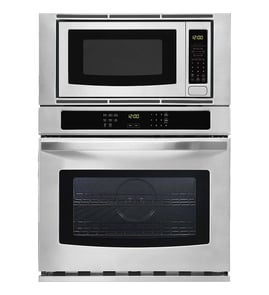



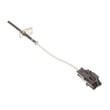
What is the average life of a Frigidaire microwave?
Most Frigidaire microwaves average 7 to 10 years of service life with normal household use; the microwave in your Frigidaire GCWM3067AFA wall oven/microwave combo typically falls in that same range. Avoiding “empty” operation and keeping the door sealing surfaces clean are two of the biggest life-extenders.
Typical lifespan and what changes it
In real homes, lifespan usually depends more on usage and heat stress than the brand badge.
- Light use (reheat only): often closer to 10 years
- Daily cooking/long run times: often closer to 7 years
- Heavy use (multiple long cycles per day): can drop to 4 to 6 years
- Poor ventilation or frequent overheating: shortens magnetron and control life
- Slamming the door or damaged seals: can cause early failures and uneven heating
Habits that extend microwave life (GCWM3067AFA)
Your use and care guide specifically warns that running the microwave with no food inside can damage the unit and shorten magnetron life. Use these habits to keep performance steady:
- Never run the microwave empty for more than a minute or two (even “just testing”)
- Wipe the cavity and door edges regularly so the door closes squarely
- Use microwave-safe cookware; avoid metal and foil unless the manual allows it
- Cover foods to reduce splatter and keep the waveguide area cleaner
- Let steam escape carefully when opening hot pouches and containers
For model-specific operating and care guidance, follow the GCWM3067AFA owner’s manual.
When it is time to repair vs replace
A quick way to decide is to compare the symptom to the likely repair category.
| Symptom | Common cause area | Typical next step |
|---|---|---|
| Dead/no display | Power supply, fuse circuit | Check house breaker; test fuse circuit |
| Runs but no heat | High-voltage system | Service-level diagnosis recommended |
| Door won’t start unit | Door switches/latch alignment | Inspect door closure and switch operation |
| Intermittent shutoff | Overheating/airflow, controls | Clean vents; verify cooling airflow |
If you suspect a blown microwave fuse circuit on this combo unit, the wall oven microwave fuse and holder 318647300 is a common related part.
Why it matters
Microwave life is driven by heat and electrical stress. Avoiding empty operation and keeping airflow and door sealing surfaces in good shape helps protect high-cost components like the magnetron and control electronics.
Last updated: February 2026
Can I look up Frigidaire parts by model number?
Yes. Looking up parts by model number is the most accurate way to get compatible replacement parts for your Frigidaire GCWM3067AFA electric oven/microwave combo because it filters results to the exact configuration, diagrams, and part lists used on your unit.
How to find the model number on your appliance
For GCWM3067AFA, use the model and serial number information shown in the GCWM3067AFA owner's manual. The model/serial tag is typically on the oven frame area you can see when the door is open.
Common places to check on wall oven or combo units:
- Along the oven frame behind the door (left or right side)
- On the lower trim area near the door opening
- On a label visible after sliding out the unit slightly (some installations)
- In the paperwork packet that came with the appliance
How to search parts by model number (what works best)
When you search by model number, we recommend using the full model exactly as printed (letters and numbers).
Best practices:
- Enter GCWM3067AFA exactly; do not add spaces or extra characters
- Match the appliance type (wall oven/microwave combo) before selecting parts
- Use the exploded-view diagrams to confirm shape, mounting, and wire connections
- Compare your original part markings to the listing (part name and manufacturer number)
- If multiple versions appear, match by your serial number range (when shown)
Examples of parts you can match by model number
Model-based lookup helps you land on the correct electrical and door components for this combo unit, such as:
| Example part | What it helps with | When you might replace it |
|---|---|---|
| Wall oven microwave fuse and holder 318647300 | Microwave power protection | Unit dead, no display, microwave won’t start (after confirming power) |
| Terminal block | Main power connection point | Burnt wires, loose connection, intermittent power |
| Controller | Control and user interface functions | Erratic operation, unresponsive keys (after basic resets) |
Why it matters
Frigidaire model numbers often have small revisions that change wiring, mounting brackets, or control boards. Using GCWM3067AFA ensures you are selecting parts designed to fit and function correctly in your specific wall oven/microwave combo.
Last updated: February 2026
What causes a Frigidaire microwave to stop working?
A Frigidaire microwave in the GCWM3067AFA wall oven/microwave combo usually stops working because it is not getting power, the door interlock system is not closing properly, or an internal safety fuse has opened. If the unit is completely dead or stops mid-cycle, start with the power supply checks first.
Quick checks we recommend first
- Confirm the display is on; if it is blank, check the house breaker and any wall switch feeding the unit.
- Unplug (or switch off the breaker) for 1 minute, then restore power to reset the control.
- Make sure the door closes firmly and nothing is pinched in the latch area.
- Do not run the microwave empty; running with no food can overheat components.
- Verify the vents are not blocked; restricted airflow can cause overheating and shutdowns.
Most common causes (and what the symptom looks like)
| Symptom | Most likely cause | What to do next |
|---|---|---|
| Completely dead (no lights, no display) | No power supply, open fuse, wiring issue | Check breaker, then have the internal fuse circuit tested |
| Runs but does not heat | High-voltage component failure (magnetron circuit) | Stop using microwave heating and schedule service |
| Starts, then stops when door is moved | Door switch or latch alignment issue | Inspect door closure; have switches tested |
| Shuts off during cooking | Overheating from blocked ventilation or failing component | Clear vents; if it repeats, schedule service |
Parts that commonly fail in this model
These parts are commonly involved when a microwave is dead, intermittent, or not heating:
- Wall oven microwave fuse and holder 318647300 (protects the microwave circuit if a fault occurs)
- Magnetron 555030400 (creates microwave energy for heating)
- Capacitor 315795903 and diode 555042802 (high-voltage components used in the heating circuit)
Why it matters
Microwaves contain high-voltage components that can store a dangerous electrical charge even when unplugged. For GCWM3067AFA, we use the GCWM3067AFA owner’s manual for operating and safety guidance, and we recommend a qualified technician for internal electrical testing and part replacement.
Last updated: February 2026
Can you replace the microwave on a wall oven microwave combo?
On the Frigidaire GCWM3067AFA wall oven/microwave combo, the microwave is built into the combination appliance, so you typically do not replace it as a separate “drop-in” unit. In most repairs, you service the microwave section by replacing failed components rather than swapping the entire microwave module; confirm the approved service approach in the GCWM3067AFA owner’s manual.
What you can do instead (common repair paths)
If the microwave side is dead, not heating, or intermittently shutting off, we usually troubleshoot and replace the failed part in the microwave circuit.
- Check for a blown microwave fuse or heat-damaged fuse holder
- Inspect wiring connections for looseness or overheating
- Test high-voltage components (only with power disconnected)
- Verify the door is closing and interlocks are engaging
- Confirm the unit has correct power supply and breaker size
Helpful parts that are commonly involved in microwave-side failures include:
- Wall oven microwave fuse and holder 318647300
- Magnetron 555030400
- Capacitor 315795903
- Diode 555042802
Safety and when to use a technician
Microwave high-voltage components can retain a dangerous charge even after the power is off. For heating problems (magnetron, capacitor, diode, transformer) we recommend professional service unless you are trained for microwave HV diagnostics.
Quick decision guide
| Situation | Most likely next step | Typical outcome |
|---|---|---|
| Microwave has no power | Check fuse/holder, wiring, control | Component repair is common |
| Runs but does not heat | Test HV parts (magnetron, diode, capacitor) | Component repair is common |
| Physical damage to cavity/door | Inspect door and sealing surfaces | Repair may be limited; replace assemblies as needed |
| Multiple sections failing | Verify supply, controls, harness | Repair vs. full unit replacement decision |
Why it matters
Combo units share cabinetry fit, electrical supply, and controls. Repairing the microwave section with the correct Frigidaire parts often restores operation without replacing the entire wall oven/microwave combo; the GCWM3067AFA installation guide also helps confirm electrical and installation requirements that can affect performance.
Last updated: February 2026