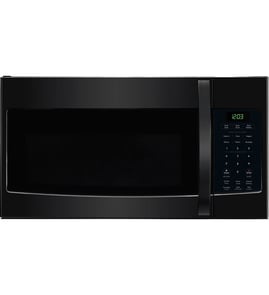






What is the most expensive part of a microwave?
In most microwaves (including the microwave section of a GE JKP76G combination oven/microwave), the magnetron is typically the most expensive single component because it generates the microwave energy. Other high-cost items can include the high-voltage transformer and the electronic control board.
Most expensive microwave parts (typical)
These are the parts that usually drive repair cost the most:
- Magnetron (microwave energy generator)
- High-voltage transformer (powers the high-voltage circuit)
- Control board (manages cooking functions and timing)
- High-voltage capacitor and diode (part of the high-voltage circuit)
- Door switch assembly and latch components (safety interlocks)
Quick cost-and-impact comparison
Actual prices vary by model and availability, but this is the usual “what hurts most” ranking.
| Part | Why it’s expensive | Common symptom when failing |
|---|---|---|
| Magnetron | Core microwave generator; specialized component | No heat, loud hum, burning smell |
| High-voltage transformer | Heavy electrical component | No heat, buzzing, blown fuse |
| Control board | Electronics and relays | Dead display, erratic operation |
| Door interlock switches | Safety system; multiple switches | Runs only with door held, won’t start |
Before you replace an expensive microwave part
Because high-voltage components can be dangerous, we recommend these practical checks first:
- Confirm the outlet and breaker are good (a weak supply can mimic failures).
- If the unit is dead, check for a blown fuse or failed door interlock switches.
- If it runs but does not heat, suspect the magnetron or high-voltage circuit.
- If the display is blank or buttons do not respond, suspect the control board.
- Use safe electrical testing practices; a microwave can store high voltage even when unplugged.
For general electrical testing basics, our how to use a multimeter to test electrical parts video is a good starting point.
Why it matters
The magnetron and high-voltage system often cost enough (parts plus labor) that many owners compare repair cost to replacement value. Doing a quick symptom-based diagnosis first helps avoid buying the wrong high-cost part.
Last updated: February 2026
What usually fails on a microwave?
The most common microwave failures are in the door safety circuit (interlock switches), high-voltage heating components (diode, capacitor, magnetron), and the control system (keypad/control board). On a GE JKP76G combination oven/microwave, symptoms like “runs but won’t heat” or “won’t start” usually point to these areas.
Most common microwave failures (and what you’ll notice)
- Door interlock switches: won’t start, starts then stops, or blows a fuse when the door is moved.
- Magnetron or high-voltage parts (diode/capacitor): runs but does not heat, loud hum, burning smell.
- Thermal cutout/thermostat: dead unit or stops mid-cycle, often after overheating.
- Control board or keypad: random beeping, unresponsive buttons, incorrect time/cook behavior.
- Turntable motor or coupler: plate not turning, uneven heating.
- Cooling fan: overheating, shuts down, or heat damage over time.
Quick checks we recommend before replacing parts
- Confirm power: check the breaker; a microwave can look “on” but still have a supply issue.
- Test the door action: if it only fails with slight door pressure, interlocks are likely.
- Listen during a heat cycle:
- Normal fan sound but no heat often indicates high-voltage trouble.
- Immediate stop can indicate door switch or overheating protection.
- Inspect for heat damage: warped door area, scorched wiring, or a failing fan.
- Use safe testing practices: unplug before any inspection; high-voltage components can retain a charge.
What’s different on a combo unit like the GE JKP76G
A combo unit shares space and airflow with the oven section, so heat management matters. If the cooling fan or vents are restricted, the microwave can trip thermal protection more often.
| Symptom | Most likely area | Typical next step |
|---|---|---|
| Runs but won’t heat | Magnetron/high-voltage circuit | Electrical diagnosis by a technician |
| Won’t start, door feels “touchy” | Door interlock switches | Check door alignment and switch operation |
| Shuts off mid-cycle | Overheat protection/fan/airflow | Clean vents; verify fan operation |
| Oven light out (oven section) | Light bulb | Replace range oven light bulb 40A15 |
Why it matters
Microwave “no heat” problems often involve high voltage, and door-switch problems can create intermittent failures that get worse quickly. Correct diagnosis prevents repeat breakdowns and avoids replacing the wrong component.
Last updated: February 2026
What's the average lifespan of a GE microwave?
Most GE microwaves average 7 to 10 years of service life with normal household use. For a GE combination oven/microwave like JKP76G, lifespan depends most on daily run time, ventilation, and keeping the cavity and door seals clean so the unit does not overheat or leak heat.
Typical lifespan ranges (what we see most often)
- Light use (reheat/defrost only): 9 to 12 years
- Moderate use (multiple cycles daily): 7 to 10 years
- Heavy use (long cook times, frequent high power): 5 to 8 years
- Commercial-style use at home: 4 to 7 years
What shortens microwave life fastest
- Running the microwave empty (can damage internal components)
- Blocked airflow or heat buildup in a built-in cabinet
- Slamming the door or operating with a misaligned latch
- Grease and food buildup around the door area
- Power surges or repeated breaker trips
Quick maintenance that helps it last longer
- Wipe the cavity and door edges weekly; keep the latch area clean
- Use microwave-safe covers to reduce splatter and moisture
- Never use metal or foil unless your cookware is specifically labeled microwave-safe
- Make sure vents are not blocked by cookware, towels, or cabinet liners
- If performance drops, test power and electrical connections safely (a multimeter helps); see how to use a multimeter to test electrical parts video
Repair vs. replace: a simple decision guide
| Symptom | Common cause | Usually worth repairing? |
|---|---|---|
| Interior light out | Bulb failed | Yes |
| Oven side not heating evenly | Heating element issue | Often |
| Dead display/no power | Power supply or wiring issue | Depends |
| Loud buzzing, burning smell | High-voltage component issue | Usually no (service recommended) |
If the oven cavity light is out on your combo unit, a common fix is replacing the range oven light bulb 40A15.
Why it matters
A microwave that is overheating, arcing, or struggling to heat food can stress electrical components and shorten overall lifespan. Basic cleaning and airflow checks prevent many early failures and help keep cooking performance consistent.
Last updated: February 2026


