

How do I find the right MTD part?
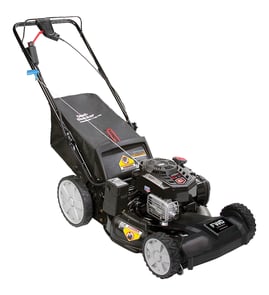
For your MTD walk-behind mower model 12BBP2R3793, the most reliable way to get the right part is to match the exact model number from the product ID label, then use the parts diagrams for that model to confirm the part name and identifier before ordering. For engine items, you may also need the engine’s separate model/type numbers.
Where to find the model and engine numbers
- Look for the product identification label on the mower deck, rear of the deck, or near the handle mounting area.
- Write down the full model number exactly as shown: 12BBP2R3793.
- If you are shopping for engine parts (air filter, carburetor, spark plug), locate the engine label on the engine shroud.
- Record the engine’s model and type numbers separately from the mower model.
Use the diagrams to confirm the exact part
We recommend matching by diagram callout and description, not by appearance alone.
- Match the diagram section (deck, drive, wheels, handle, bagger).
- Confirm the part description matches your mower’s feature set (self-propelled vs push, bagger vs mulch).
- Compare mounting points and connections (bolt pattern, hose size, linkage style).
- If you are replacing a maintenance item, confirm it matches the engine model/type.
Common examples for this model page
| What you are replacing | What to match | Example part on this model page |
|---|---|---|
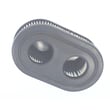
| Engine air filter | Engine model/type + filter shape | Air filter 593260 |
| Fuel cap | Cap style and venting | Lawn & garden equipment engine fuel tank cap 84004416 |
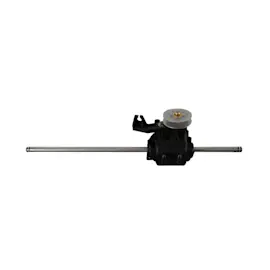
| Drive system issue | Transmission style and axle fit | Transmission 618P08774 |
Why it matters
MTD model families can look similar across years, but small changes in deck design, drive components, or engine versions can make a “close” part the wrong fit. Matching by model 12BBP2R3793 plus diagram callout helps prevent returns and repeat repairs.
Last updated: January 2026
How do I tell what year my MTD mower is?
For your MTD walk-behind mower model 12BBP2R3793, we identify the build year from the serial number, not the model number. On many MTD products, the 5th character of an 11-character serial number indicates the last digit of the year it was manufactured (for example, a “1” can indicate a year ending in 1). See how to find your appliance model number (and what it means for parts).
Where to find the serial number on an MTD walk-behind mower
We typically see the serial number on a product label or tag attached to the mower deck or rear housing.
- Check the top of the mower deck near the engine
- Check the rear of the deck behind the bagger area
- Look near the height adjuster brackets on the deck
- Wipe dirt and grass off the label so all characters are readable
- Write down the full serial number exactly as shown
How to decode the year (and avoid common mix-ups)
Because the serial number often uses only the last digit of the year, you match that digit to the most likely decade based on the mower’s design and purchase timeframe.
| What you have | What it tells you | Example outcome |
|---|---|---|
| Model number (12BBP2R3793) | Identifies the model family and parts fit | Does not directly confirm build year |
| Serial number (often 11 characters) | Encodes manufacturing details | 5th character may be the year’s last digit |
Quick tips
- If the 5th character is “1”, it can mean 2011 or 2021; use purchase date and features to choose the correct decade.
- If the label is damaged, copy what you can and compare it to the mower’s other markings.
- If you are decoding the year to buy maintenance items, confirm fit by model number first.
Why it matters
Knowing the manufacturing year helps when you are matching the correct parts and maintenance schedule for your mower’s engine and drive system. For example, routine service items like an air filter 593260 are often selected by engine and model details.
Last updated: January 2026
What are the most common lawn mower repairs?
For the MTD 12BBP2R3793 (2021) gas walk-behind mower, the most common repairs we see are basic fuel and ignition tune-up items (old fuel, dirty air filter, worn spark plug), plus drive and bagging issues like a slipping self-propel system or a damaged grass bag.
Most common fixes (in order)
- Fuel problems: old gas, water in fuel, clogged cap vent, or varnish in the carburetor.
- Airflow restriction: a dirty or oil-soaked air filter can cause hard starting, surging, or stalling; inspect and replace the air filter 593260.
- Ignition wear: a fouled or worn spark plug can cause no-start or misfire.
- Drive issues (self-propel): slipping, no pull, or grinding can point to a worn drive system; on this model, the transmission 618P08774 is a key component to inspect when the wheels will not drive.
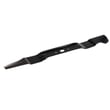
- Cut quality problems: dull/bent blade, clogged deck, or incorrect cutting height.
- Bagging problems: poor pickup or tearing can be caused by a damaged bag or clogged chute; check the MTD lawn mower grass bag 664P05324.
Quick symptom-to-check table
| Symptom | Most likely checks | Typical next step |
|---|---|---|
| Won’t start | Fresh fuel, spark plug, air filter | Replace air filter; service ignition/fuel as needed |
| Starts then stalls | Air filter, fuel cap venting, carburetor | Clean/replace filter; verify cap venting |
| Surges at idle | Air filter, fuel quality, carburetor | Replace filter; drain old fuel |
| Won’t self-propel | Belt/cable adjustment, transmission | Inspect drive system; consider transmission diagnosis |
| Poor bagging | Bag condition, chute/deck buildup | Clean deck; replace bag if torn |
Why it matters
Catching simple maintenance items early (fuel quality, filtration, and basic drive wear) prevents repeat no-starts, reduces engine strain, and helps your MTD mower keep consistent power and cut quality.
Last updated: January 2026