 Owner’s manual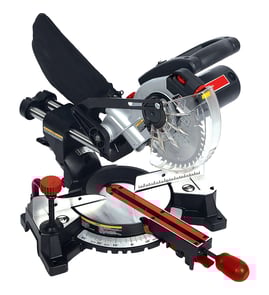

What should you never cut with a miter saw?
You should never cut ferrous metals (steel or iron) with the Craftsman 113235140 12" compound miter saw, and you should never cut any workpiece that cannot be held in a solidly braced, fixed position. These situations can cause binding, thrown workpieces, sparks, and serious injury; follow the owner's manual.
- Ferrous metals: steel, iron, and iron-based metals (the saw is not designed for these).
- Hand-held metal pieces: even non-ferrous metal should be clamped, not held by hand.
- Small or unstable workpieces that cannot be secured against the fence and table.
- Any cut that “confines” the cutoff (do not clamp, hold, or use a stop against the cutoff while the blade is spinning).
- Cuts when the saw is vibrating or making unfamiliar noise; stop, unplug, and correct the issue first.
The manual guidance for model 113235140 is:
| Material type | OK to cut? | Notes |
|---|---|---|
| Wood and wood-like products | Yes | Use the right blade and secure the workpiece. |
| Non-ferrous metals (example: aluminum) | Yes, with precautions | Use a blade recommended for non-ferrous metal; clamp the workpiece; expect sparks and hot fragments. |
| Ferrous metals (steel/iron) | No | Not designed for this; higher risk of binding and other hazards. |
- Keep the workpiece flat on the table and tight to the fence.
- Let the blade reach full speed before contacting the material.
- Feed the blade at a steady rate; do not force the cut.
- Keep bystanders back and keep hands out of the blade path.
- After the cut, keep the head down briefly, release the trigger, and wait for the blade to stop.
A miter saw can grab material and throw it unexpectedly, especially when the cutoff is trapped or when cutting metal without the right blade and clamping. Avoiding the “never cut” situations above is the fastest way to reduce binding, kickback, and fire risk from sparks.
Last updated: February 2026
How to unlock an old Craftsman miter saw?
On the Craftsman 113235140 12-inch compound miter saw, “unlocking” usually means releasing the lock pin that holds the power head down for storage, then loosening the miter lock knob (and the bevel lock knob if you need bevel movement) so the saw can pivot freely. For the exact control locations, use the owner's manual.
- Unplug the saw before you move any locks or reach near the blade area.
- If the head is locked down, support the handle, then pull the lock pin out to release the power head.
- Loosen the miter lock knob to rotate the table to your desired miter angle.
- If you need to tilt the head, loosen the bevel lock knob to set the bevel angle.
- After setting the angle, tighten the miter lock knob (and bevel lock knob) to lock the position.
| Lock/control | What it unlocks | What it’s for |
|---|---|---|
| Lock pin | Power head up/down | Compact storage and safer carrying |
| Miter lock knob | Miter table rotation | Setting left/right miter angles |
| Bevel lock knob | Bevel tilt | Setting bevel cuts |
| Switch interlock button | Trigger operation | Helps prevent accidental starts |
- Confirm the miter lock knob is fully loosened before forcing the table.
- Check for sawdust buildup around the miter table and pivot points; clean it out.
- Make sure the saw is on a firm, level surface so the base is not twisted.
- If bevel movement is tight, loosen the bevel lock knob and recheck movement (the manual describes bevel pivot adjustment if needed).
Unlocking the correct control prevents binding, protects the miter and bevel mechanisms, and reduces the chance of unexpected saw movement when positioning the blade for a cut.
Last updated: February 2026
Why is 31.6 on a miter saw?
On the Craftsman 113235140 12-inch compound miter saw, 31.6° is a preset miter setting used for common crown molding cuts when the molding is laid flat on the saw table. It pairs with a 33.8° bevel to create the standard compound angle for typical 90° inside and outside corners (see the owner's manual).
When you cut standard crown molding lying flat, the saw uses a compound setup:
- Miter: 31.6° (left or right, depending on the corner and which side is the finished piece)
- Bevel: 33.8°
- Purpose: repeatable crown molding corner cuts without trial-and-error math
This is why many saws include 31.6° as a marked setting or detent.
Use this as a starting point for standard crown molding (typical construction assumes a 90° wall corner).
| Application | Bevel setting | Miter setting |
|---|---|---|
| Crown molding lying flat (standard) | 33.8° | 31.6° left or right |
| Crown molding standing up (nested) | 0° | 45° |
For clean, consistent cuts, we recommend these basics:
- Keep the molding’s broad back surface flat on the table.
- Hold the molding firmly against the fence and table so it cannot shift.
- Set bevel to 33.8° first, then set miter to 31.6° left or right.
- Make a test cut on scrap before cutting your finished molding.
- Do a dry run with the saw lowered (power off) to confirm clearance and capacity.
Crown molding is unforgiving; a small angle error shows up as an open corner. The 31.6° mark exists to speed setup and improve repeatability for the most common crown molding geometry, especially when corners are close to 90°.
Last updated: February 2026
Can a 10inch miter saw cut a 4x4?
Yes, many 10-inch miter saws can cut a 4x4 (actual size about 3-1/2 in. x 3-1/2 in.) at 90°, but it depends on the saw’s max cut capacity and whether it is a sliding design. For your Craftsman 113235140 12-inch compound miter saw, capacity is still limited by blade diameter and the motor mechanism, so we recommend a dry-run to confirm the cut clears safely. See the owner's manual for safe setup and work support guidance.
A 4x4 cut is mainly about vertical cut capacity at 90° and how the fence and guard geometry limit the blade path.
- Blade size and guard design: larger blades usually increase depth capacity.
- Sliding vs. non-sliding: sliders increase crosscut width more than depth.
- How the 4x4 is positioned: flat vs. standing changes what dimension you are cutting through.
- Fence and clamp clearance: tall stock can interfere with the fence or guard.
- Workpiece support: long stock must be supported so it stays flat and stable.
Use a quick “no-power” check first, then make the cut with the workpiece fully controlled.
- Unplug the saw.
- Place the 4x4 in the intended position (most often flat on the table for a 90° cut).
- Lower the head slowly to confirm the blade path clears the wood, fence, and guard.
- If it does not clear, plan a two-pass cut (flip or rotate the workpiece) rather than forcing it.
- Clamp the workpiece when possible; keep hands at least 4 inches from the blade path.
- Support long pieces so they do not sag; the manual notes a finished 4x4 can be used as a support extension.
- Let the blade reach full speed before cutting; feed steadily without bogging.
- Never confine the cutoff piece; it must be free to move.
| Scenario | Typical result | What we recommend |
|---|---|---|
| 10-inch non-sliding saw | Often short of full depth on a 4x4 | Two-pass cut (flip/rotate) |
| 10-inch sliding saw | Often completes a 4x4 at 90° | Dry-run first; clamp and support |
| Craftsman 113235140 (12-inch compound) | Strong capacity, but still geometry-limited | Dry-run first; do not force |
Forcing a cut that exceeds capacity increases binding, vibration, and the chance of a thrown workpiece. A quick dry-run and proper support protect accuracy and reduce kickback risk.
Last updated: February 2026
Which Mitre saw is the most accurate?
The most accurate miter saw is the one that holds its settings and is tuned correctly; for your Craftsman 113235140 12" compound miter saw, accuracy comes from squaring the blade to the fence, verifying the guard action, and using the vernier miter scale for repeatable angle settings. Use the owner's manual to dial in alignment.
Accuracy is a mix of calibration (how square the saw is) and repeatability (whether it stays that way after many cuts).
- Blade is square to the fence at 0° miter
- Miter detents and scale read true (or you know the offset)
- Bevel stops hit the same angle every time
- Workpiece stays tight to the fence and table during the cut
- Blade and arbor are tight, with no wobble
The manual’s alignment procedure is the fastest path to true cuts.
- Unplug the saw before any adjustment.
- Lock the head down and check blade-to-fence squareness with a combination square (avoid touching the tooth set).
- If it is out of square, follow the manual’s steps to adjust the miter arm and re-check.
- Confirm the lower blade guard closes fully and moves freely; a dragging guard can deflect the cut.
This model includes a vernier miter scale that helps you set angles in 1/4° increments, which is a big advantage for trim, picture frames, and compound miters.
| Task | What to prioritize | Typical check |
|---|---|---|
| Baseboard and casing | Repeatable 45° miters | Test-cut two pieces and close the joint |
| Crown molding | Consistent miter and bevel pairing | Make scrap test cuts before final stock |
| Framing lumber | Speed plus “close enough” | Verify 0° and 45° stops periodically |
Even a premium saw will cut inaccurately if the fence, miter scale, or bevel stops are out of adjustment. A properly tuned Craftsman 113235140 produces clean, square, repeatable cuts, especially when you use the vernier scale and make scrap test cuts for compound angles.
Last updated: February 2026