




Why is the display not working on my KitchenAid microwave oven combo?
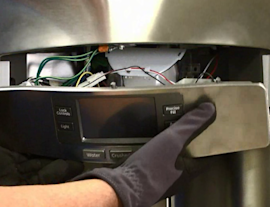
If the display on your KitchenAid KOEC527PSS01 wall oven/microwave combo is blank, the most common causes are a loss of power (tripped breaker, blown fuse, loose connection) or a control that locked up after a power surge. Restoring power and doing a full power reset often brings the display back.
Quick checks to restore the display
- Confirm the unit has power: check the kitchen breaker and reset it fully (OFF, then ON).
- If the unit is hardwired, turn the breaker OFF for 3 to 5 minutes, then turn it back ON.
- If the microwave has any interior light or fan response when you open the door, note it (it helps narrow the failure).
- If the display comes back but goes out again, avoid running the microwave until the cause is found.
If the unit is getting power but the display stays dark
A dark display with normal power to the home usually points to a failed safety device, control, or door-interlock related issue on the microwave side.
Common model-relevant parts to check for KOEC527PSS01 include:
- Fuse mda 20a W11188752 (a blown fuse can kill the display and all microwave functions)
- Switch W10211972 (a failed door interlock switch can prevent operation)
- Interlock W11033422 (interlock mechanism issues can stop the microwave from running)
Safe troubleshooting steps (what we recommend)
- Shut off power at the breaker before removing any panels.
- Inspect the door for proper closing and latch alignment.
- If you have a multimeter, test the fuse for continuity and replace it if open.
- If the fuse is good, test door interlock switches for proper open/close operation.
- If fuse and interlocks test good, the issue often moves to the control or power electronics.
What the symptoms usually mean
| Symptom | Most likely area | Typical next step |
|---|---|---|
| Completely dead (no display, no interior light) | Power supply, fuse | Check breaker, then test fuse mda 20a W11188752 |
| Display dead but interior light works | Control or interlock circuit | Check switch W10211972 and interlock W11033422 |
| Display returns after reset, then fails again | Power quality or failing control | Recheck connections; consider control diagnosis |
Why it matters
A blank display is often the first sign that the microwave safety circuit opened (fuse or interlock). Fixing the root cause prevents repeat fuse failures and helps protect the control electronics.
You can order KOEC527PSS01 replacement parts from the parts list for this model, or search by model number on Sears PartsDirect.
Last updated: February 2026
Can you replace the microwave on a wall oven microwave combo?
In a KitchenAid KOEC527PSS01 wall oven/microwave combo, the microwave is built into the combo frame and shares mounting, wiring, and controls with the oven section. In practice, you repair the microwave side with replacement parts, or you replace the entire combo unit rather than swapping in a standalone microwave.
What you can do instead (most common options)
- Repair the microwave section by replacing failed components (door interlocks, fuses, turntable drive parts, control components).
- Diagnose the symptom first (no heat, no power, door won’t start, turntable not turning) so you replace the right part.
- Replace the full combo unit if the cabinet, chassis, or integrated controls are damaged beyond practical repair.
Parts that commonly fix “microwave side” problems
These KOEC527PSS01 parts are often involved when the microwave will not run, stops when the door moves, or loses power:
- Switch W10211972 (microwave door interlock switch)
- Interlock W11033422 (interlock mechanism components)
- Fuse mda 20a W11188752 (blown fuse symptoms: dead display, no response)
- Microwave turntable motor W10911403 (turntable not rotating)
- Microwave turntable motor coupler W11179756 (tray turns intermittently or slips)
Quick troubleshooting checklist (before ordering parts)
- Turn off power at the breaker for 1 minute, then restore power (rules out a control lockup).
- Confirm the door closes firmly and the latch area is not loose or misaligned.
- If the unit is completely dead, test the fuse and basic power path.
- If the unit runs but does not heat, stop using it and focus on professional-level diagnosis (high-voltage components).
Repair vs replace: what usually makes sense
| Situation | Best path | Why |
|---|---|---|
| Door-related starting issues | Replace interlock parts | Most common, straightforward repair |
| No power at all | Check fuse and wiring | Often a single-point failure |
| Turntable not turning | Replace motor or coupler | Isolated mechanical/electrical issue |
| Major control or chassis damage | Replace combo unit | Integrated design limits “microwave-only” replacement |
Why it matters
Combo units like the KOEC527PSS01 are engineered as a single built-in appliance. The microwave section is not a drop-in module like a countertop unit, so targeted part replacement is the practical way to restore function without changing the whole wall oven/microwave combo.
You can order KOEC527PSS01 replacement parts from the parts list for this model, or search by model number on Sears PartsDirect.
Last updated: February 2026
How to replace KitchenAid oven temperature sensor?
On the KitchenAid KOEC527PSS01 wall oven/microwave combo, replacing the oven temperature sensor is usually a straightforward swap: disconnect power, remove the sensor from inside the oven cavity, unplug the sensor connector, then install the new sensor and reassemble. Order model-matched parts from this page or search by model at Sears PartsDirect.
Safety first (do this before touching anything)
- Turn off the breaker for the wall oven (double-pole breaker); confirm the display is off.
- Let the oven cool completely.
- Use cut-resistant gloves; sheet metal edges can be sharp.
- Avoid pulling on wires; pull on the connector body.
- If you smell burning insulation or see melted wiring, stop and have the wiring repaired before installing a new sensor.
Typical replacement steps
- Kill power at the breaker.
- Remove oven racks for access.
- Locate the sensor (commonly on the rear wall inside the oven cavity).
- Remove mounting screws holding the sensor to the liner.
- Gently pull the sensor forward a few inches to expose the connector.
- Disconnect the plug (some models use a locking tab).
- Connect the new sensor, tuck the connector and extra wire back through the opening, and remount the sensor.
- Restore power and test bake temperature.
What to check if the oven still heats wrong
- Run a simple bake test and compare to an oven thermometer after 20 to 30 minutes.
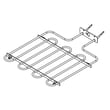
- Inspect the bake circuit; a weak bake element can mimic a bad sensor (the KOEC527PSS01 uses a bake element such as range bake element W11545804).
- If the oven overheats and then shuts down, check for an over-temperature protection issue (a common suspect is range high-limit thermostat WP4449751).
- If the control is unresponsive or throws errors after the repair, power-cycle at the breaker for 2 minutes.
Quick troubleshooting guide
| Symptom | Most common cause | What we recommend |
|---|---|---|
| Underheats or overheats by 25°F+ | Sensor out of range or poor connection | Reseat connector; replace sensor if needed |
| No heat in bake | Failed bake element or control issue | Inspect element; test continuity |
| Shuts off during heat-up | High-limit opening due to overheating | Check airflow, fan operation, and thermostat |
Why it matters
A drifting temperature sensor can cause uneven baking, longer cook times, and repeated preheat cycling. Replacing it restores accurate temperature feedback to the control so the bake element and convection system can regulate heat correctly.
Last updated: February 2026
What are the parts of a microwave oven?
A microwave oven (including the microwave section of your KitchenAid KOEC527PSS01 wall oven/microwave combo) is built around a high-voltage system that powers the magnetron, plus door safety interlocks, a control system, and a turntable drive that moves food for even heating. You can order many KOEC527PSS01 microwave-related replacement parts from the parts list for this model or search by model on Sears PartsDirect.
Main microwave components (what they do)
- Magnetron: creates the microwave energy that heats food.
- High-voltage power components: supply and control power to the magnetron (varies by design).
- Door and interlock system: prevents the microwave from running with the door open.
- Control panel and electronic control: sets time, power level, and cooking modes.
- Cooling fan and airflow path: removes heat from internal components.
- Cooking cavity: the metal chamber where food sits.
- Turntable system: tray, support, coupler, and motor that rotate the food.
KOEC527PSS01 parts on this page that relate to those systems
| System | What you may replace | Example part on this model page |
|---|---|---|
| Door safety | Door interlock switch | Switch W10211972 |
| Door safety | Interlock assembly | Interlock W11033422 |
| Turntable drive | Turntable motor | Microwave turntable motor W10911403 |
| Turntable support | Tray support ring | Microwave turntable tray support W11110134 |
| Turntable drive | Motor coupler | Tt drive ht W11179756 |
| Electrical protection | Fuse | Fuse mda 20a W11188752 |
Common symptoms and the part area to check
- Microwave will not start with door closed: interlock switch or interlock assembly
- Turntable does not rotate: turntable motor or coupler
- No power or dead display: fuse (and related wiring)
- Runs but stops randomly: door interlock system, cooling airflow, or electrical connections
Why it matters
Knowing the major microwave parts helps you troubleshoot faster and order the correct replacement the first time, especially for safety-critical items like door interlocks and electrical fuses.
Last updated: February 2026
Is the KOEC527PSS01 worth the money?
For many households, the KitchenAid KOEC527PSS01 is worth the money because it combines a built-in microwave with an electric wall oven in one unit, saves cabinet space, and typically delivers quieter, more even cooking than older combos when it is installed and vented correctly.
What “worth it” usually means for this model
Value comes down to whether you will use both cavities often and whether the features reduce daily annoyances (heat management, noise, door feel, and consistent baking).
- You cook in the oven several times per week and also use the microwave daily
- You want a built-in look without giving up a full-size wall oven
- You care about even baking and convection performance
- You prefer a quieter cooling system during and after cooking
- You plan to keep the unit long enough to justify the higher upfront cost
Quick value checklist (use this before you buy parts or schedule service)
| If this is your priority | KOEC527PSS01 tends to be a good fit | Consider a different setup if… |
|---|---|---|
| Space efficiency | One cutout for microwave + oven | You have room for separate units |
| Even baking | Convection designs typically improve heat circulation | You rarely bake/roast |
| Comfort and noise | Cooling fans and door design can feel more refined | Fan noise bothers you in open kitchens |
| Long-term ownership | Repairable with replaceable components | You plan to move soon |
Costs to plan for (ownership reality)
Combo units can be a great value, but repairs are more specialized than a countertop microwave or a basic wall oven. If you are budgeting, plan for occasional wear items and electrical components.
Common parts that can affect performance and cost over time include:
- Microwave door safety switching: switch W10211972
- Oven heating performance: range bake element W11545804
- Overheat protection: range high-limit thermostat WP4449751
- Microwave rotation system: microwave turntable motor W10911403
If you are still shopping, we recommend pricing out likely parts for KOEC527PSS01 on the parts list for this model first, then using Sears PartsDirect to compare availability across related models.
Why it matters
“Worth it” is usually decided by daily convenience: a combo that heats evenly, cools down predictably, and runs quietly feels like an upgrade every time you cook. If you will use both the oven and microwave frequently, the space savings and built-in performance typically justify the price.
Last updated: February 2026