







What is the lifespan of a whirlpool microwave?
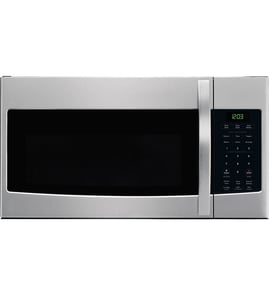
A Whirlpool microwave, including the Whirlpool WML55011HS1 microwave/hood combo, typically lasts 7 to 10 years. With normal day-to-day use and basic care (cleaning, proper ventilation, and avoiding arcing), many units reach the upper end of that range before major parts wear out.
Typical lifespan and what affects it
Most microwave failures come down to heat stress, door-switch wear, or high-voltage component fatigue. These factors have the biggest impact on service life:
- Usage frequency: multiple long cook cycles daily shortens lifespan
- Ventilation and grease: clogged filters trap heat and strain the hood fan
- Door use: slamming the door can damage interlock switches and latch parts
- Arcing events: metal in the cavity or damaged waveguide cover can cause burn marks
- Power quality: frequent surges can stress the electronic control board
Quick “repair vs. replace” guide
If your WML55011HS1 is within the typical lifespan window, replacing a failed part is often worthwhile, especially for common wear items.
| Symptom | Common cause | Example part on this model page |
|---|---|---|
| Runs but does not heat | High-voltage component issue | Microwave high-voltage diode W11256462 |
| Dead display or random behavior | Control problem | Microwave electronic control board W11129648 |
| Starts only with door pressure, or won’t start | Door interlock/latch issue | Microwave door latch housing and interlock switch assembly W11449274 |
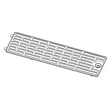
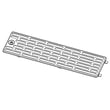
| Excess heat or poor venting | Grease buildup restricting airflow | Grease filter W11213913 |
Why it matters
Knowing the typical 7 to 10 year lifespan helps you decide whether to invest in parts like a control board, interlock switch assembly, or high-voltage components, or focus on maintenance that prevents heat damage and early failures.
Maintenance that helps your microwave last longer
- Clean the cavity regularly to prevent baked-on residue and odors
- Keep the hood intake and vent area clear so heat can escape
- Wash or replace the grease filter on a routine schedule
- Avoid running the microwave empty (it can damage internal components)
- Stop using it if you see arcing or burn marks and address the cause first
For more troubleshooting steps when the unit runs but won’t heat, use our guide: why is my microwave not heating.
Last updated: February 2026
What are common problems with whirlpool microwaves?
Common problems we see with Whirlpool microwaves (including the Whirlpool WML55011HS1 microwave/hood combo) are no heat, won’t start, dead display, turntable not rotating, keypad issues, and sparking or arcing. Many symptoms trace back to door-interlock parts, the high-voltage heating circuit, or airflow and grease buildup.
Most common symptoms and what they usually mean
- Runs but doesn’t heat: high-voltage component issue (diode, magnetron, transformer) or a safety interlock problem.
- Won’t start (but has power): door latch or interlock switch not proving the door is closed.
- Completely dead: power supply issue, internal fuse, or control board failure.
- Buttons don’t respond: user interface or control board problem.
- Turntable not spinning: tray or drive system issue (sometimes the tray is simply mis-seated).
- Sparking/arcing: food splatter, damaged waveguide cover area, or metal contact inside the cavity.
Quick checks you can do first (no tools)
- Confirm the microwave is on a dedicated outlet and the breaker is not tripped.
- Open and close the door firmly; listen for a solid latch “click.”
- Remove the glass tray, clean the roller area, then reseat the tray flat.
- Clean grease buildup on the hood intake and filters; restricted airflow can cause overheating behavior.
- If you see arcing, stop using it until the cavity is cleaned and the source is identified.
Parts that commonly fix these issues on model WML55011HS1
The parts list for this model includes several frequent repair items:
| Symptom | Common suspect part | Example part on this model |
|---|---|---|
| No heat | High-voltage diode | Microwave high-voltage diode W11256462 |
| No heat | Magnetron | Magnetron W11402082 |
| No heat / loud hum | High-voltage transformer | High-voltage transformer W11024976 |
| Won’t start / intermittent | Door latch and interlock switches | Microwave door latch housing and interlock switch assembly W11449274 |
| Dead display / erratic operation | Control board | Microwave electronic control board W11129648 |
| Arcing near side wall | Waveguide cover area | Jenn-air microwave waveguide cover W11193296 |
Why it matters
Microwaves use door-interlock safety circuits and a high-voltage heating system. When a latch, switch, or high-voltage part fails, the unit may run without heating or refuse to start to prevent unsafe operation.
Helpful DIY guidance
For deeper troubleshooting steps, we recommend: why is my microwave not heating.
Last updated: February 2026
Is there a reset button on my Whirlpool microwave?
Most Whirlpool microwaves (including model WML55011HS1) do not have a single physical “reset button.” You typically reset the unit by using a settings menu option (if available) or by power-cycling the microwave at the breaker or by unplugging it.
Quick ways to reset a Whirlpool WML55011HS1
- Power reset (most common): unplug the microwave (or switch the circuit breaker off) for 1 to 2 minutes, then restore power.
- Control lock check: if the keypad seems “dead,” turn off Control Lock (often a 3-second press on a specific key).
- Settings reset (if your control offers it): look for a “Reset” or “Factory reset” option under Settings.
- Clear a stuck key condition: wipe the control panel dry and press each key once to confirm none are physically stuck.
- After a power event: reset the clock; some functions will not run until time is set.
When a reset helps (and when it will not)
A reset is useful for temporary control glitches, display oddities, or after a power outage. It will not fix a heating failure caused by a failed high-voltage component.
| Symptom | Reset likely helps? | What to check next |
|---|---|---|
| Display frozen or random characters | Yes | Power reset; then test keypad response |
| Microwave runs but does not heat | No | High-voltage system diagnosis |
| Fan or light behaves oddly | Sometimes | Hood control and sensor inputs |
| Door must be slammed to start | No | Door latch and interlock system |
Parts that commonly relate to “won’t start” or “won’t heat”
If resetting does not change anything, these model-matched parts are common suspects:
- Door won’t start or stops when door moves: microwave door latch housing and interlock switch assembly W11449274
- Runs but does not heat: microwave high-voltage diode W11256462
- Runs but does not heat (advanced repair): magnetron W11402082
- Random behavior, dead display, or no response: microwave electronic control board W11129648
Why it matters
Microwaves use door interlocks and electronic controls to prevent unsafe operation. A “reset” can clear a control glitch, but repeated failures usually point to a door-switch issue, control board problem, or a high-voltage heating component.
For heating problems, we recommend following our troubleshooting steps in why is my microwave not heating.
Last updated: February 2026