 Owner’s manual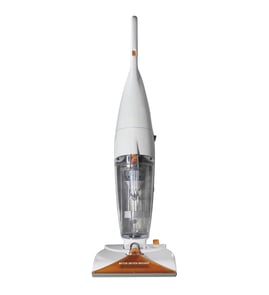

Are Hoover steam cleaners good?
Yes; Hoover cleaners like the Hoover F7458-900 are a solid choice when you want a versatile machine that applies, scrubs, and removes hot tap water and cleaning solution from carpet fibers and hard floors. They perform best when you use the correct detergents, keep tanks maintained, and follow the operating steps in the owner's manual.
What “good” looks like for the Hoover F7458-900
We consider this model “good” when it matches your cleaning needs and you use it as designed.
- Cleans both carpet and hard floors using a wash and extraction process
- Includes a rinse option (water-only) to help reduce detergent residue
- Can pick up small liquid spills when used with the right nozzle/mode
- Works best with proper tank filling and regular recovery-tank emptying
- Requires basic safety habits (grounded outlet, no damaged cord, tanks installed)
Performance tips that make the biggest difference
Following these basics typically improves cleaning results and helps prevent avoidable issues.
- Fill with hot tap water but keep water temperature at or below 140°F (60°C)
- Use only Hoover detergents intended for machine application; avoid waxes
- Use the RINSE setting if you want to reduce leftover detergent on floors
- Empty the recovery tank when suction drops or the motor sound gets higher pitched
- Unplug the cleaner before post-cleaning steps (like rinsing the squeegee)
Detergent and water rules (quick reference)
| Item | What to do | Why it matters |
|---|---|---|
| Water temperature | Max 140°F (60°C) | Helps protect internal components and tanks |
| Detergent type | Use Hoover formulas | Prevents container damage and performance problems |
| Hard floor solution | Use on hard floors only | Avoids misuse on carpet/upholstery |
| Oxygenated cleaners | Avoid non-approved types | Some can damage tanks/containers |
Why it matters
A steam cleaner or carpet/hard-floor extractor is only as “good” as its setup and maintenance. Using the right solution, keeping the recovery tank from overfilling, and rinsing when needed directly affects suction, residue, and overall cleaning results.
Last updated: February 2026
What solution do you use in a Hoover steam vac?
For the Hoover SteamVac model F7458-900, we use hot tap water in the clean water tank and only Hoover brand detergent in the detergent container. Fill the tank with 1 gallon of hot tap water (max 140°F), then fill the 16 oz detergent container with the correct Hoover formula for your surface (carpet or hard floor). See the F7458-900 owner's manual for the exact fill lines and tank steps.
What to put in each tank
- Clean water tank (upper tank): hot tap water, up to the fill line (about 1 gallon)
- Detergent container: Hoover Carpet/Upholstery Detergent or Hoover Hard Floor Cleaning Solution
- Recovery tank (lower tank): nothing added; it collects dirty solution
Quick fill guide (recommended)
| Tank / container | What to use | Key limit | Where it goes |
|---|---|---|---|
| Clean water tank | Hot tap water | Do not exceed 140°F (60°C) | Upper tank |
| Detergent container | Hoover detergent | 16 oz container | Built into the tank (do not remove) |
| Recovery tank | Empty only | Empty when full | Lower tank |
Important do's and don'ts
- Use only Hoover detergents; they are formulated for SteamVac performance.
- Do not use Hard Floor Cleaning Solution on carpet or upholstery.
- Do not use any type of wax in the machine.
- Avoid oxygenated cleaners (for example, OxiClean-type products); they can damage the detergent container and tanks.
- If the recovery tank is full, the automatic shutoff reduces suction; empty the recovery tank before continuing.
Why it matters
Using the correct Hoover solution protects the detergent container and tanks, keeps suction and pickup strong, and helps prevent residue that can attract dirt back to carpet fibers.
Last updated: February 2026
Why is my steam cleaner not picking up water?
On the Hoover F7458-900 steam cleaner, loss of water pickup is usually caused by the recovery tank being full and triggering the automatic shutoff float, a tank not seated correctly, or reduced suction from a blockage. Empty the recovery tank and re-seat both tanks before continuing.
Quick checks that fix most pickup problems
- Turn the cleaner off and unplug it.
- Empty the recovery tank (lower tank) and reinstall it firmly.
- Look for the yellow float disk in the recovery tank lid; if it is up, the tank is full and suction shuts off.
- Refill the clean water tank (upper tank) as needed and tighten the cap.
- Make sure the recovery tank lid and seals are seated evenly so suction can build.
What the automatic shutoff is telling you
When the recovery tank fills, the automatic shutoff reduces suction; you will notice a higher-pitched motor sound and the cleaner stops picking up dirty solution. The fix is to turn the unit off, empty the recovery tank, and continue cleaning. Details and diagrams are in the owner's manual.
Settings and technique that affect pickup
Using the right mode helps the nozzle seal and suction work correctly.
| What you are doing | Recommended setting | What to do with the trigger |
|---|---|---|
| Picking up liquid after spraying | Normal cleaning mode | Release trigger and make slow passes to suction |
| Picking up a small spill | SPILL PICK-UP (brushes off) | Start with suction-only, then repeat with spray and suction |
| Rinsing | RINSE | Slow forward and reverse strokes |
- For pickup after spraying, release the trigger and slowly move the cleaner over the wet area using forward and reverse strokes.
- For bare floors, use the floor nozzle with the squeegee attachment in place.
Why it matters
When the recovery tank is full or the lid is not sealed, the cleaner cannot maintain airflow through the nozzle. That airflow is what lifts water off carpet or hard floors, so even a small sealing or float issue can look like a “no pickup” failure.
Last updated: February 2026
Why is my Hoover steam mop not steaming?
If your Hoover F7458-900 steam cleaner is not producing steam or spray, the most common causes are an empty or incorrectly installed tank, a setting issue (such as needing a rinse pass), or a clog at the nozzle or fluid path. Use the steps below to restore flow.
Quick checks that fix most “no steam/spray” problems
- Confirm the cleaner is plugged into a working outlet and powered on.
- Make sure the tanks are installed; this model is not designed to run without tanks in place.
- Reinstall the clean water tank so it sits fully in position and seals at the connection points.
- If you used detergent recently, switch to a water-only rinse pass to clear residue.
- Empty the recovery tank if performance changes during use; a full tank can affect pickup and overall operation.
Step-by-step: restore flow (safe, model-appropriate)
- Unplug the cleaner.
- Remove both tanks; check the tank ports and the base connection points for debris or buildup.
- Rinse the tank openings and the connection areas with clear water; wipe away residue.
- Reinstall the tanks firmly.
- Run a water-only pass using slow forward and reverse strokes.
For the exact tank removal, installation, and cleaning steps for the F7458-900, follow the owner's manual.
Clog and residue cleanup (what to focus on)
Buildup commonly restricts flow where solution exits near the nozzle and where the tank mates to the base.
- Rinse the squeegee/nozzle area with clear water after unplugging.
- Check for visible deposits at the tank-to-base seals.
- Do a water-only rinse pass to flush detergent residue from internal passages.
Symptom-to-cause guide
| Symptom | Most likely cause | What to do |
|---|---|---|
| No output at all | Tank not seated, poor seal, or blockage at connection | Reinstall tanks; clean connection points |
| Weak output | Residue in nozzle or fluid path | Rinse nozzle area; run water-only pass |
| Output drops during use | Recovery tank getting full | Empty recovery tank; resume cleaning |
Why it matters
When tanks are not fully seated or residue builds up, the cleaner cannot move water through the nozzle consistently. Keeping the nozzle area and tank connection points clean prevents repeat “no steam/spray” complaints.
Last updated: February 2026