 Owner’s manual



How to hard reset a Samsung microwave?
A “hard reset” for your Samsung ME21K7010DS microwave/hood combo is a full power reset: disconnect power for 1 to 2 minutes, then restore power and re-set the clock. This clears many control glitches without replacing parts; use the ME21K7010DS owner's manual for model-specific key sequences.
Hard reset steps (power cycle)
- Press Stop/Clear to end any cooking cycle.
- Unplug the microwave (or switch the dedicated breaker OFF).
- Wait 1 to 2 minutes (this lets the control board fully discharge).
- Restore power.
- Set the clock and test a simple heat cycle (1 cup of water for 60 seconds).
Quick resets that are not a full hard reset
These are useful when the microwave works but an indicator or setting is stuck.
- Stop/Clear: clears an active program and many keypad errors.
- Filter reminder reset: many over-the-range models reset the filter light by holding a keypad (often 0 or a dedicated Filter Reset key, if present).
- Demo mode: if the unit runs but does not heat, check for demo mode settings in the control options.
If it still will not heat after a hard reset
Microwaves can “run” (light, fan, turntable) but not heat when a high-voltage component fails. For this model, common heat-related parts include:
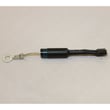
- Microwave high-voltage diode DE91-70063D
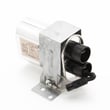
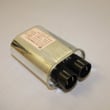
- High-voltage capacitor (model-specific match matters; compare your original part to DE96-00269A or 2501-001011)
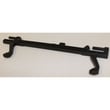
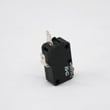
- Door interlock switch or support (if the unit stops when starting)
Symptom-to-likely-cause guide
| What you notice | What it usually points to |
|---|---|
| Runs but no heat | High-voltage diode/capacitor/transformer issue |
| Starts then stops or blows fuse | Door interlock switch/support problem |
| Dead display after power restore | House power, cord, noise filter, or internal fuse issue |
Why it matters
A true hard reset rules out a temporary control-board lockup before you spend time troubleshooting the door interlock system or high-voltage heating circuit.
Last updated: January 2026
What are the most common issues with ME21K7010DS?
For the Samsung ME21K7010DS microwave/hood combo, the most common problems are no heat, runs but won’t start cooking, turntable not rotating, loud or unusual noises, and weak or no venting. These issues usually trace to door interlocks, high-voltage components, airflow parts, or the turntable drive.
Common symptoms and what they usually point to
- No heat or weak heating: high-voltage circuit issues (diode, capacitor, transformer) or a thermal cut-off opening
- Runs but won’t start when the door closes: door interlock switch or interlock support alignment problems
- Turntable not turning: turntable motor or coupler wear
- Loud humming, buzzing, or rattling: cooling fan motor, turntable drive, or a failing high-voltage component
- Poor venting or greasy airflow: clogged grease filter, saturated charcoal filter (recirculating setups), or a blocked vent grille
Quick checks we recommend first
- Confirm power: reset the breaker and verify the outlet is working.
- Check the door: close it firmly; look for a loose handle or door that sits uneven.
- Inspect filters: clean the grease filter and replace the charcoal filter if airflow is weak.
- Listen for the fan: a dead or noisy fan can cause overheating and shutdowns.
- Test with a cup of water: if it runs but doesn’t heat, focus on heating circuit diagnostics.
Parts commonly involved (examples for this model)
| Symptom | Likely part area | Example part for ME21K7010DS |
|---|---|---|
| No heat | High-voltage circuit | Microwave high-voltage diode DE91-70063D |
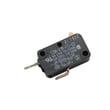
| Won’t start with door closed | Door interlock | Microwave door interlock switch 3405-001034 |
| Turntable not rotating | Turntable drive | Microwave turntable motor DE31-10172C |
| Weak venting | Vent filtration | Microwave grease filter DE63-00196A |
Why it matters
Microwave/hood combos rely on door interlocks and airflow safety devices to prevent unsafe operation. Addressing door, venting, and overheating symptoms early helps prevent repeat shutdowns and protects key components.
For model-specific operating tips, cleaning intervals, and feature use, follow the ME21K7010DS owner's manual.
Last updated: March 2026
What is the error code E21 on a Samsung microwave?
On a Samsung ME21K7010DS microwave/hood combo, an E21 error typically points to an overheating or temperature-sensing problem (often tied to a sensor/thermostat circuit, airflow, or control detection). We use the ME21K7010DS owner's manual to confirm the model’s specific error-code meanings and the recommended reset steps.
What to check first (safe, no-tools steps)
- Cancel the cycle and let the microwave cool for 20 to 30 minutes.
- Verify airflow: make sure the vent grille is not blocked and the fan can move air.
- Clean or replace the grease filter if it is coated with grease; restricted airflow can trigger over-temp conditions.
- Try a power reset: unplug for 1 minute (or switch the breaker off/on), then test.
- Avoid running empty and avoid long cook times with poor ventilation.
Likely causes and related parts
E21 is most often triggered when the unit senses abnormal heat or a temperature circuit issue.
| What’s happening | Common cause | What usually fixes it |
|---|---|---|
| Microwave stops and shows E21 | Overheating from restricted airflow | Clean vent path, replace clogged filter |
| E21 returns quickly after cooling | Temperature device opening/closing incorrectly | Test/replace thermostat |
| E21 appears with door or latch issues | Interlock alignment or switch problem | Inspect latch support/switches |
Model-relevant parts that can be involved:
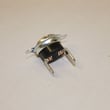
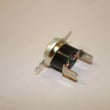
- Microwave thermostat DE47-20007B (temperature safety device)
- Microwave grease filter DE63-00196A (airflow through the hood intake)
- Microwave vent grille DE64-02774A (air intake/exhaust path)
Why it matters
An E21 condition is the microwave protecting itself from unsafe temperatures. Fixing airflow issues and any faulty thermostat or interlock-related problems helps prevent repeat shutdowns and protects the control board and wiring.
When to stop and schedule service
- The microwave smells hot, trips the breaker, or the error returns immediately after cooling.
- You suspect an internal electrical issue. High-voltage microwave components can retain dangerous energy even when unplugged.
Last updated: January 2026





