 Owner’s manual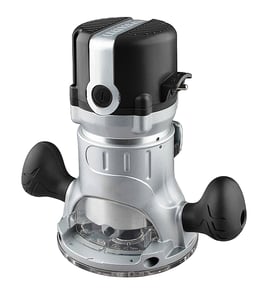

What size shank bit will fit in a Craftsman router?
Most Craftsman handheld routers, including model 3202767, are designed to accept 1/4-inch shank router bits; some routers also accept 1/2-inch shank bits if they include a 1/2-inch collet. For the exact collet sizes included with your router, check the owner's manual.
Quick way to confirm the shank size your router takes
- Unplug the router before checking the collet.
- Remove the base (if needed) so you can clearly see the collet and collet nut.
- Look for markings on the collet or nut (often 1/4 or 1/2).
- Measure the inside diameter of the collet with a ruler or caliper.
- If you have two collets, keep them labeled so you do not mix them up.
Common Craftsman router bit shank sizes
| Shank size | Typical use | What to know |
|---|---|---|
| 1/4 inch | Most common for light to medium routing | Widest bit selection; best for smaller profiles |
| 1/2 inch | Heavier cuts, larger bits | More rigidity; requires a 1/2-inch collet |
Why it matters
Using the correct shank size lets the collet clamp the bit properly. A bit that is too small for the collet can slip, and a bit that is too large will not seat correctly; both can cause poor cut quality and unsafe operation.
Fit and setup tips we recommend
- Insert the bit shank fully, then pull it back out about 1/16 inch before tightening.
- Tighten the collet nut firmly (do not overtighten).
- Keep the collet clean; pitch buildup reduces grip.
- Replace worn collets; a loose fit is a common cause of bit slippage.
Last updated: February 2026
Where can I buy Craftsman replacement parts?
You can buy replacement parts for your Craftsman router model 3202767 through Sears PartsDirect by using the model-based parts list to match the exact component to your tool. For diagrams, part identification, and service information, use the owner's manual.
Best way to get the right part for model 3202767
When you shop by model number, you avoid ordering a look-alike part that does not fit your router’s base, motor housing, switch, or collet.
- Confirm the full model number on the router’s nameplate: 3202767
- Use the parts diagrams to identify the exact assembly (base, depth adjuster, cord set, etc.)
- Match the part description to what you see on the tool before ordering
- If your router has multiple versions, compare notes/diagrams to ensure compatibility
- Keep your old part until the replacement arrives so you can compare mounting points and connectors
What information to gather before ordering
Having these details ready speeds up part matching and reduces returns.
| What to check | Why it matters | Example for a router |
|---|---|---|
| Model number | Ensures correct parts list | 3202767 |
| Symptom | Points to likely failed parts | Won’t start, loses power, won’t hold depth |
| Part location | Confirms which assembly | Switch area, cord entry, base clamp |
| Electrical vs. mechanical | Changes what to inspect first | Cord/switch vs. collet/base hardware |
Quick buying tips for common router problems
These checks help you narrow down what you actually need.
- Won’t start: inspect the power cord, switch, and internal wiring connections
- Cuts out under load: check for a loose cord strain relief, worn brushes (if equipped), or a failing switch
- Bit slips: inspect the collet and collet nut for wear, debris, or damage
- Depth won’t hold: check the depth lock and adjustment mechanism for stripped or loose hardware
Why it matters
Routers are high-RPM power tools; using the correct Craftsman 3202767 replacement part helps maintain safe operation, proper fit, and consistent cutting performance.
Last updated: February 2026
How to remove collet from Craftsman router?
To remove the collet from your Craftsman 3202767 router, unplug the tool, lock the spindle (or hold the shaft), then loosen the collet nut until the collet releases from the nut and slides out. Most collets “pop” free as you back the nut off.
Safe removal steps (recommended)
- Unplug the router and remove the bit.
- Engage the spindle lock (if equipped) or use the proper wrench on the shaft.
- Use the correct wrench to loosen the collet nut counterclockwise.
- Keep loosening until you feel the collet break free from the nut’s internal taper.
- Slide the collet out of the nut, then remove it from the spindle.
- Wipe the collet and nut clean before reinstalling.
If the collet is stuck in the nut
A collet can stick from pitch buildup, fine dust, or overtightening.
- Loosen the nut a few turns, then gently tap the wrench handle to help the taper release.
- Remove the nut and collet together, then push the collet out from the back side of the nut.
- Clean the collet and nut with a dry brush or compressed air (avoid soaking bearings).
| Symptom | Most common cause | What to do |
|---|---|---|
| Collet will not drop out | Dust or resin buildup | Clean collet and nut; reinstall |
| Collet feels “locked” in nut | Taper not released yet | Keep loosening until it pops free |
| Bit slips during use | Dirty collet or worn collet | Clean first; replace if worn |
Why it matters
A properly seated, clean collet grips the router bit evenly. That reduces bit slippage, vibration, burning, and runout, and it helps protect the spindle and bearings.
Specs and tips to follow
- Insert the bit shank fully, then pull it back out about 1/16 inch before tightening.
- Tighten firmly, but do not overtighten.
- Use the collet size that matches the bit shank (commonly 1/4 inch or 1/2 inch, depending on your setup).
For model-specific diagrams, wrench points, and spindle-lock details, use the owner's manual.
Last updated: February 2026
Are all router collets the same?
No. Router collets are not universal; they must match the exact taper and nut style used on your Craftsman router model 3202767 so the bit shank clamps evenly and runs true. Many routers share common bit shank sizes (like 1/4 inch), but the collet itself still varies by model.
What has to match (not just the bit shank size)
Even if two routers both accept a 1/4-inch shank bit, their collets can differ in ways that prevent a safe fit.
- Taper shape and angle inside the router shaft
- Collet outside diameter where it seats
- Collet length and how deep it engages
- Collet nut thread size and pitch
- Nut and collet design (some are a matched set)
Quick compatibility checklist for Craftsman 3202767
Use this as a practical way to confirm you are buying the right collet for your router.
| Check item | What you want | Why it matters |
|---|---|---|
| Bit shank size | 1/4 inch (common) | Determines what bits you can use |
| Collet style | Matches the original collet and nut | Prevents slipping and vibration |
| Seating/taper | Fully seats with no rocking | Keeps the bit centered |
| Nut threads | Starts smoothly by hand | Avoids cross-threading and loosening |
Why it matters for safety and cut quality
A mismatched collet can clamp unevenly, which leads to bit creep (the bit slowly pulls out), chatter, burning, and excessive runout. On a router, that can quickly damage the bit, the workpiece, and the motor bearings.
Best practices when installing or using a collet
- Unplug the router before changing bits or inspecting the collet.
- Clean dust and resin from the collet and nut; buildup reduces clamping force.
- Insert the bit shank fully, then pull it back out about 1/16 inch before tightening.
- Tighten firmly with the correct wrenches; do not overtighten.
- Replace the collet if you see cracks, heavy scoring, or if bits no longer clamp securely.
For model-specific diagrams, part identification, and any collet notes, use the owner's manual.
Last updated: February 2026
How to replace a Craftsman router bit?
To replace the bit on your Craftsman router model 3202767, we loosen the collet nut, remove the old bit, fully seat the new bit, then pull it back slightly before tightening. This helps the collet grip correctly and reduces bit slippage.
Safety first
- Unplug the router before touching the collet, bit, or base
- Remove the bit only after it stops completely
- Wear eye protection; bits and collets can have sharp edges
- Use the correct collet size for the bit shank (commonly 1/4 inch or 1/2 inch)
- Never tighten the collet with the router powered
Steps to replace the router bit
- Unplug the router and remove it from the workpiece or router table.
- Lock the spindle (if your 3202767 has a spindle lock) or hold the shaft with the provided wrench.
- Use the wrench to turn the collet nut counterclockwise until the bit loosens.
- Remove the old bit. If it feels stuck, loosen the collet nut a bit more and gently twist the bit while pulling.
- Insert the new bit into the collet.
- Seat, then back off: push the bit in until it bottoms out, then pull it back out about 1/16 to 1/8 inch.
- Tighten the collet nut clockwise firmly (snug plus a little more). Do not overtighten.
- Spin the bit by hand to confirm it clears the base opening, then plug in and test at low load.
Quick checks if the bit slips or chatters
| Symptom | Most common cause | What we do |
|---|---|---|
| Bit slips downward | Bit bottomed out in collet | Reinsert and back off 1/16 to 1/8 inch |
| Excess vibration | Bent bit or dirty collet | Clean collet; replace damaged bit |
| Won’t tighten | Wrong shank size/collet | Match bit shank to collet size |
Why it matters
A properly installed router bit runs truer, cuts cleaner, and protects the collet, spindle, and motor from unnecessary stress. For model-specific controls and wrench locations, use the owner's manual.
Last updated: February 2026